Desktop: Trade Scalper
Trade Scalper: stop loss, target, trailing
Stop లేదా target కి ఐదు units, X, Y తో trailing, Trail to Cost, Advanced panel, Recent Trade.
Stop loss, target, trailing
#సాధారణ ఉదాహరణ: మీరు ఒక option ని Rs 100 entry price దగ్గర BUY చేస్తారు. Quantity 1. Section వేరేగా చెప్పకపోతే మొదటి Stop Loss Rs 90.
Stop loss, target ని points లో, percent లో, rupees (MTM) లో, absolute price గా, లేదా underlying ప్రకారం set చేయవచ్చు. Trailing X, Y వాడుతుంది: X అంటే ముందు ఎంత profit రావాలి, Y అంటే తర్వాత stop ఎంత కదలాలి. Rs 100 entry నుంచి 10 points, 10 percent రెండూ Rs 90 stop అనే అర్థం. NIFTY ఒక lot మీద, అంటే 65 quantity, MTM లో Rs 650 అదే Rs 90 stop, ఎందుకంటే 65 × 10 points = Rs 650.
Rs 100 దగ్గర buy, stop Rs 90, X = 10, Y = 5. Price Rs 110 చేరింది → stop Rs 95 కి కదులుతుంది. Price Rs 120 చేరింది → stop Rs 100 కి కదులుతుంది.
Trail to Cost ఒక నిర్ణీత profit వచ్చాక stop ని మీ entry price కి తీసుకువెళ్ళి, ఏదైనా trail దాన్ని ముందుకు కదిపే వరకు అక్కడే ఉంచుతుంది. Trail to Cost 5 points దగ్గర: Rs 100 కి buy, price Rs 105 తాకుతుంది, stop Rs 90 నుంచి Rs 100 కి దూకుతుంది — ఆ క్షణం నుంచి ఈ trade చెత్తగా చేసినా break even అవుతుంది. T2C Now దీన్ని వెంటనే చేస్తుంది, position profit లో లేకపోతే నిరాకరిస్తుంది — lock చేయడానికి ఏమీ లేదు.
Advanced లోని SL-L difference broker దగ్గర ఉంచిన stop order కోసం: trigger కంటే limit price ఎంత కింద కూర్చోవాలి, వేగమైన market order ని fill కాకుండా వదిలేయకుండా. ఇది options మీద 10 percent, futures, cash మీద 1 percent గా preset ఉంది, కొత్త రోజు clear చేయని ఒకే ఒక value ఇదే.
ఒకే stop ని రాయడానికి ఐదు పద్ధతులు
#Stoploss, Target పక్కన ఉన్న unit ఆ number ని ఎలా చదవాలో నిర్ణయిస్తుంది. Rs 100 entry మీద అదే Rs 90 stop, NIFTY ఒక lot 65, ఐదు రకాలుగా రాస్తే ఇలా ఉంటుంది.
- Points — 10. Entry కి పది points కింద: Rs 90.
- Percent — 10. Entry కి Rs 100 లో పది percent కింద: Rs 90.
- MTM — 650. 65 quantity మీద Rs 650 loss అంటే 10 points: Rs 90.
- Absolute — 90. Price నే: Rs 90.
- Underlying — option price బదులు NIFTY level. NIFTY 24,250 దగ్గర ఉన్నప్పుడు మీరు CE కొన్నారు; 24,180 stop అంటే index 24,180 కి పడినప్పుడు CE అమ్ముతుంది, అప్పుడు CE price ఎంతైనా సరే.
- తెలుసుకోవాల్సింది — points, percent ఎన్ని lots మీదైనా ఒకే దూరం. MTM అలా కాదు: అదే Rs 650 2 lots (130 quantity) మీద 5 points మాత్రమే, అంటే Rs 95 stop.
Advanced panel
#Advanced నొక్కితే ticket పక్కన ఒక panel తెరుచుకుంటుంది, ticket దానంతట అది ఎప్పుడూ కదలదు. అందులో order Type, SL-L Diff, Trailing SL జంట X, Y, Trail to Cost, తర్వాత Global Features కింద మూడు day-wide cards: సొంత X, Y తో Global MTM profit, loss, Underlying Exit high, low, Lock and Trail.
అందులో ప్రతి number box ఐదు digits చూపిస్తుంది. అంతకంటే పొడవుగా type చేస్తే మిగతాది box లోపల scroll అవుతుంది, box వెడల్పు కాదు.
Cards Update తో arm అవుతాయి, type చేయడం వల్ల ఎప్పుడూ కాదు. Card ని untick చేసి Update నొక్కితే అది ఆగిపోతుంది. రోజు ఇప్పటికే ఉన్న చోటుకి తప్పు వైపు set చేసిన cap నిరాకరించబడుతుంది, ఎందుకంటే అది తర్వాతి tick దగ్గరే పని చేసేది.
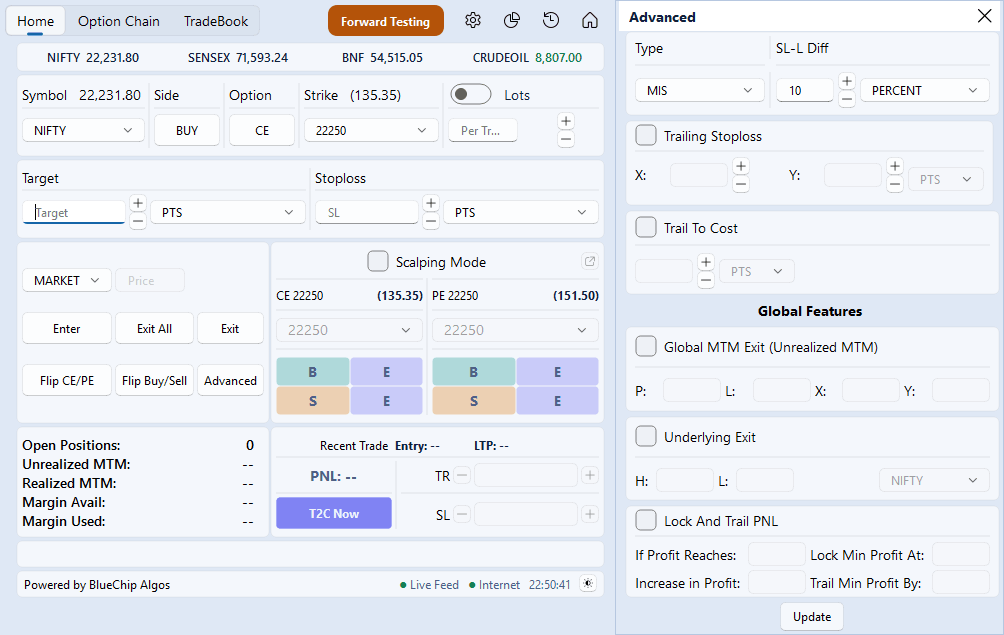
Open Positions, Recent Trade
#Open Positions card ఐదు అంకెలు చూపిస్తుంది: ఎన్ని legs open గా ఉన్నాయి, రోజు unrealized, realized MTM, broker దగ్గర available, used margin. రెండు margin lines broker నుంచి LIVE లో మాత్రమే చదవబడతాయి; Forward Testing లో అవి dash చూపిస్తాయి, ఎందుకంటే paper book margin ఖర్చు చేయదు.
Settings లో ఒకటి కంటే ఎక్కువ broker accounts tick అయి ఉంటే card ఒకసారికి ఒక account ఐదు అంకెలు చూపిస్తుంది, పైన దాని client ID తో, తర్వాతి దానికి మీరు scroll చేస్తారు. Accounts మధ్య ఎప్పుడూ ఏమీ కలపబడదు — total అనేది ఎవరి దగ్గరా లేని number.
Recent Trade మీరు తీసుకున్న చివరి leg: దాని entry, దాని live price, దాని P&L, ఆ leg trail, stop ని మళ్ళీ చెప్పే TR, SL boxes తో, T2C Now తో.