Desktop: Trade Scalper
Trade Scalper: stop loss, target and trailing
The five units for a stop or a target, trailing with X and Y, Trail to Cost, the Advanced panel and Recent Trade.
Stop loss, target and trailing
#Common example: You BUY one option at entry price Rs 100. Quantity is 1. Initial Stop Loss is Rs 90 unless the section says otherwise.
Stop loss and target can be set in points, in percent, in rupees (MTM), as an absolute price, or against the underlying. Trailing uses X and Y: X is how much profit must come first, Y is how far the stop then moves. From a Rs 100 entry, 10 points and 10 percent both mean a stop at Rs 90. On one NIFTY lot, which is 65 quantity, Rs 650 in MTM is that same Rs 90 stop, because 65 × 10 points is Rs 650.
Buy at Rs 100, stop Rs 90, X = 10 and Y = 5. Price reaches Rs 110 → stop moves to Rs 95. Price reaches Rs 120 → stop moves to Rs 100.
Trail to Cost moves the stop to your entry price once you are a set amount in profit, and leaves it there until a trail moves it further. Trail to Cost at 5 points: buy at Rs 100, the price touches Rs 105, and the stop jumps from Rs 90 to Rs 100 — from that moment the worst the trade can do is break even. T2C Now does it immediately, and is refused if the position is not in profit — there is nothing to lock in.
The SL-L difference in Advanced is for a stop order parked at the broker: how far below the trigger the limit price sits, so a fast market cannot leave the order unfilled. It is preset to 10 percent on options and 1 percent on futures and cash, and it is the one value a new day does not clear.
Five ways to write the same stop
#The unit beside Stoploss and Target decides how the number is read. Here is the same Rs 90 stop on a Rs 100 entry, one NIFTY lot of 65, written five ways.
- Points — 10. Ten points below the entry: Rs 90.
- Percent — 10. Ten percent of Rs 100 below the entry: Rs 90.
- MTM — 650. A loss of Rs 650 on 65 quantity is 10 points: Rs 90.
- Absolute — 90. The price itself: Rs 90.
- Underlying — a NIFTY level instead of an option price. You bought a CE with NIFTY at 24,250; a stop at 24,180 sells the CE when the index falls to 24,180, whatever the CE is priced at by then.
- Worth knowing — points and percent are the same distance on any number of lots. MTM is not: the same Rs 650 on 2 lots (130 quantity) is only 5 points, a stop at Rs 95.
The Advanced panel
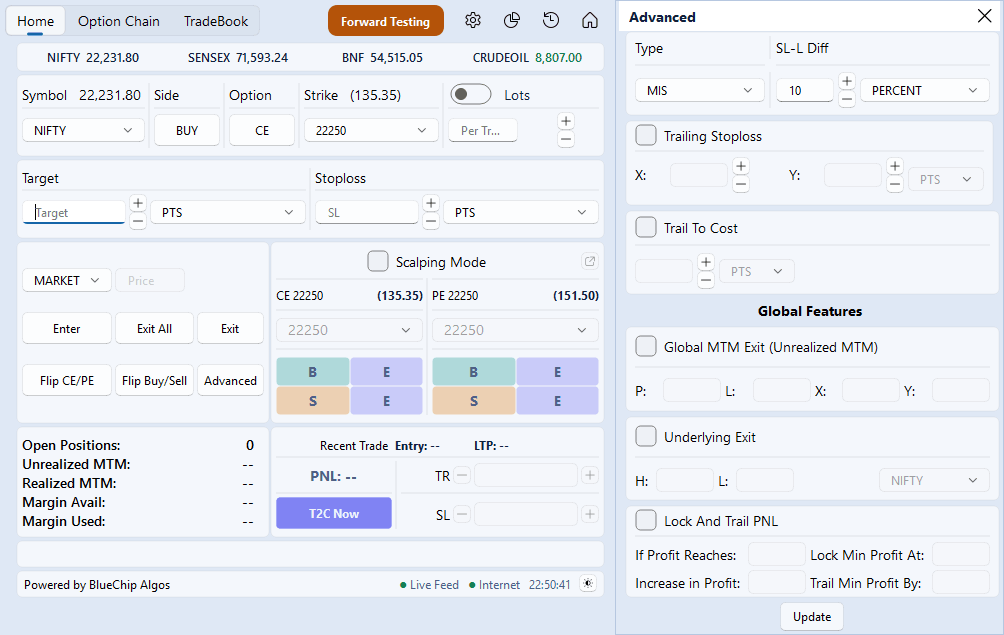
#Press Advanced and a panel opens beside the ticket, the ticket itself never moving. It holds the order Type and the SL-L Diff, the Trailing SL pair X and Y, Trail to Cost, and then, under Global Features, the three day-wide cards: Global MTM profit and loss with their own X and Y, the Underlying Exit high and low, and Lock and Trail.
Every number box in it shows five digits. Type something longer and the rest scrolls inside the box rather than widening it.
The cards are armed by Update, never by typing. Unticking a card and pressing Update turns it off. A cap set on the wrong side of where the day already is will be refused, because it would fire on the very next tick.
Open Positions and Recent Trade
#The Open Positions card shows five figures: how many legs are open, the unrealized and realized MTM for the day, and the margin available and used at the broker. The two margin lines are read from the broker in LIVE only; in Forward Testing they show a dash, because a paper book spends no margin.
With more than one broker account ticked in Settings the card shows one account's five figures at a time, headed by its client ID, and you scroll to the next. Nothing is ever added up across accounts — a total is a number nobody holds.
Recent Trade is the last leg you took: its entry, its live price and its P&L, with TR and SL boxes that re-state the trail and the stop on that leg, and T2C Now.