Desktop: Trade Disc
Trade Disc: Adjustments and strike shifts
Every button on an Adjustments row, shifting a leg to another strike, the quick bar and the keyboard.
One row per leg, and what each button does
#Adjustments has one row for every open leg. Reading the buttons left to right:
- Exit — closes the whole leg at the market. On a leg whose order has not filled yet it reads Cancel and withdraws that order instead.
- «« « Current » »» — the strike shift. « and » move the leg one strike down or up, «« and »» two; Current is the strike it is on now. Custom picks any listed strike.
- Exit Qty and Add Qty ask for a number of lots. Exit 50% and Add 50% take off or add half, rounding down: from 5 lots, Exit 50% takes off 2 and leaves 3.
- − and + beside Qty take one lot off or add one.
- SL / TGT shows the leg's two levels. Edit sets or changes them; Cancel removes both.
- An example — you hold 4 lots of the 24,250 PE, sold at Rs 110. Press Exit 50%: 2 lots are bought back and 2 stay. Press +: 3 lots. Press »: all 3 lots move to the 24,300 PE.
Shifting a leg to another strike
#Press Shift + Up or Shift + Down, or use the strike buttons on the leg. The app exits the leg at market, waits for that exit to FILL, and only then enters the same side and quantity at the next listed strike.
It is one shot. If the exit does not fill, no re-entry is sent and your position is unchanged. If the exit fills and the re-entry is rejected, the leg is left FLAT and the app says so loudly — it never retries on its own.
A stop or target set in points, percent or rupees (MTM) comes across to the new leg and is recomputed from the new entry price. One typed as an absolute price does not — a price that was right for one strike is meaningless on another, so it is dropped rather than applied. Check the new leg's levels after a shift if you had typed an absolute price. A worked example: you are long the 24,250 CE from Rs 100 with a 10-point stop, so the stop sits at Rs 90. Press Shift + Up: the app exits the 24,250 CE at market and buys the 24,300 CE. It fills at Rs 82, so the new stop is Rs 72 — ten points from the new entry, not from the old one.
The other things you can do to a leg
#Add lots or take lots off. Set a stop loss and a target on a leg that has none, or change the ones it has. Exit half. Exit a chosen number of lots.
Editing levels re-states them rather than nudging them. From a Rs 100 entry, typing 10 points puts the stop at Rs 90 — and if it had already trailed up to Rs 95, it goes back to Rs 90. It is not 10 points added to wherever the stop is standing.
The buttons along the foot of Adjustments act on every open leg at once. Each group names its side once: CE << < > >> shifts every call leg, PE << < > >> every put leg, and ALL << < > >> every call AND put leg together. < and > are one strike down or up, << and >> two. Then EXIT CE PE exits every call or every put, and QTY carries Exit Qty, −50%, −, +, +50% and Add Qty for every leg.
ALL is the one-click re-centre. You are short the 24,250 CE and the 24,250 PE and NIFTY climbs to 24,350: press ALL >> and both legs are shifted two strikes up, to the 24,350 CE and the 24,350 PE. Each leg is shifted the way a single shift is — exit filled first, then the re-entry — and the message says how many legs it asked for.
The keyboard
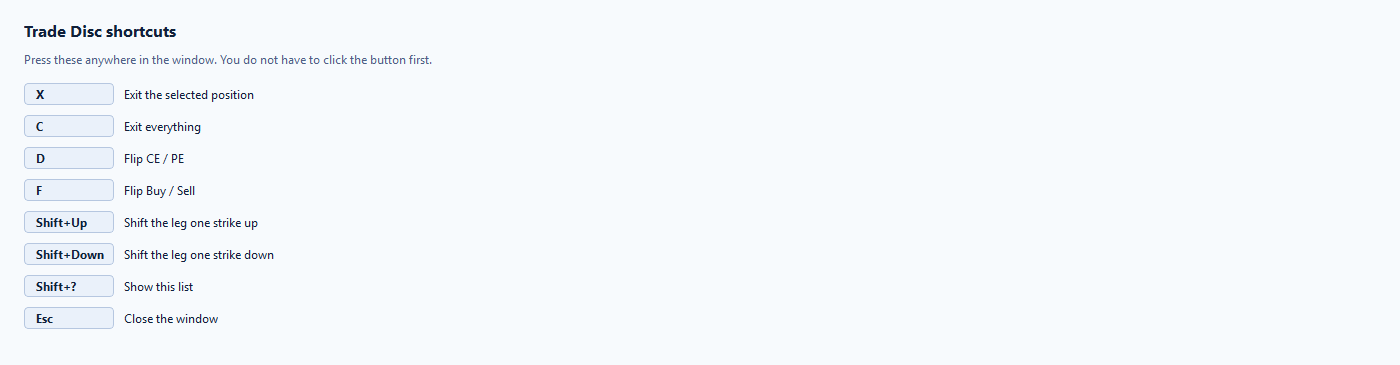
#Trade Disc has its own map. Every key it shares with Trade Scalper means the same thing there, so you do not have to hold two maps in your head.
- Shift + Up shifts the leg one strike up · Shift + Down one strike down. The plain arrows scroll the option chain, as they always have
- X exits the selected position · C exits everything
- D flips CE to PE · F flips Buy to Sell
- Shift + ? shows this list · Esc closes the window
- They act on the leg you have selected. With nothing selected they act on the one opened last, and with nothing open at all they say so rather than guessing.