Desktop: Trade Disc
Trade Disc Desktop
The discretionary terminal on your own machine — the screen, a first trade step by step, and what it cannot do.
What Trade Disc Desktop is?
#The discretionary terminal for option traders who change a position after it is open, rather than only opening and closing one.
Its headline action is the strike shift: one click closes the leg you hold and opens the same leg, same side and same quantity, on another strike — waiting for the first exit to actually fill before sending the second order.
It is the same tool as Trade Disc on the web, on your own machine, and it shares its broker connection and order history with Trade Scalper.
Who it suits, and who it does not?
#It suits an option trader holding several legs who manages them through the day — moving a strike, adding lots, putting levels on a leg that did not have any.
It does not suit someone who wants the fastest possible single-leg ticket, which is Trade Scalper, or trades placed while they are away.
The screen
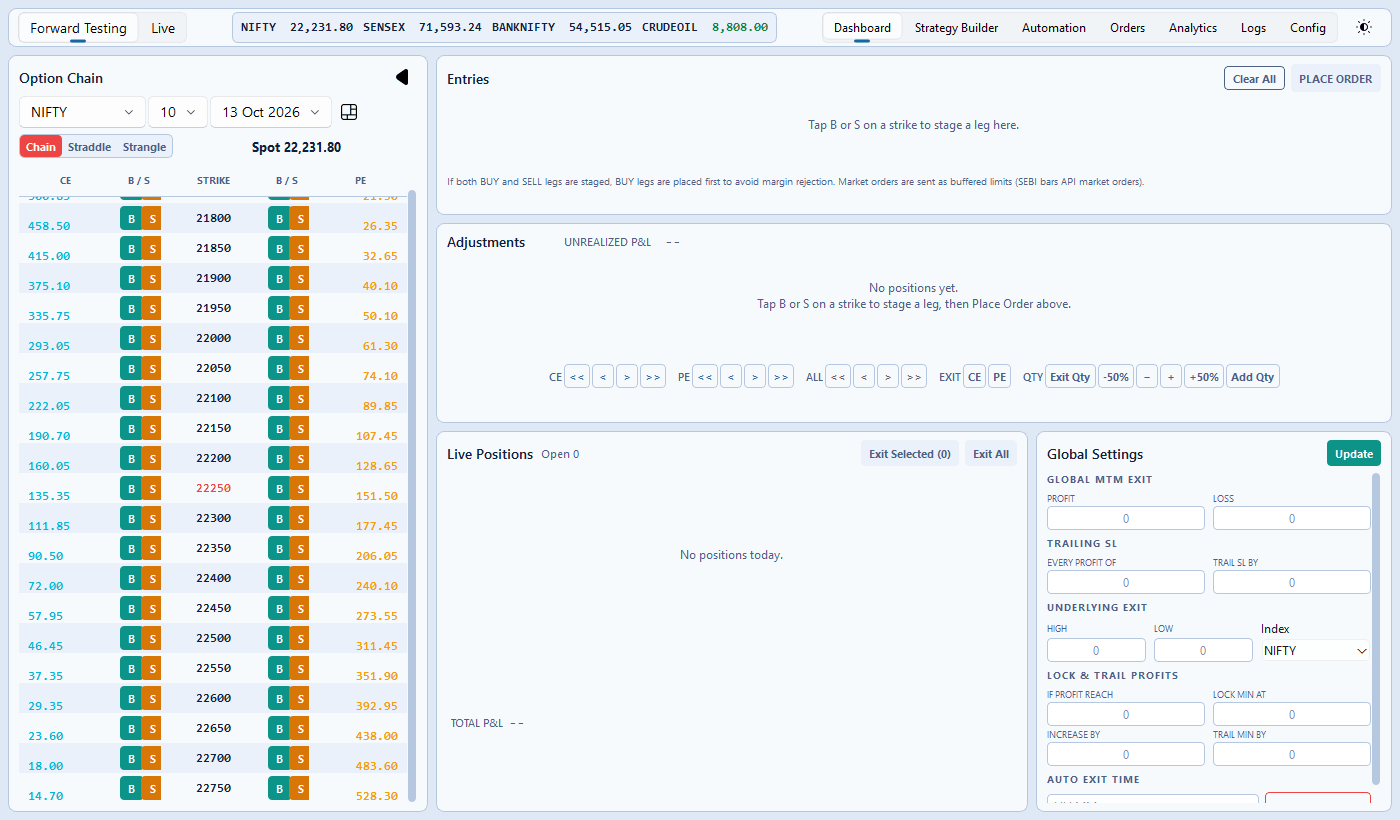
#The option chain is on the left, where a leg starts — B and S beside every strike. The panels on the right are where a leg is changed: Entries, Adjustments, Live Positions and Global Settings.
The line under the chain's pickers starts with three buttons — Chain, Straddle and Strangle — then the spot price. They change how the chain is read, never its width; see Three ways to read the chain.
The mode switch at the top left says Forward Testing or Live. Forward Testing places nothing at the broker; it is how you learn the screen without risking anything.
The Entries panel shows Margin Available — one figure per ticked broker account, each in its broker's colour, and in Live only. In Forward Testing the line is hidden, because a paper book spends no margin.
The tabs across the top are Dashboard, Strategy Builder, Automation, Orders, Analytics for the day's performance, Logs for everything the tool did today, line by line with the time, and Config.
Live Positions carries its Total P&L at the foot of the panel, one figure per broker account: the client ID in plain text, the figure in green or red.
Trade Disc shows only the trades of the accounts on your login. If someone else signs in on the same computer, their positions stay theirs: you do not see them, and they do not count in your Total P&L, Analytics or Exit All.
Your first trade, step by step
#Try this in Forward Testing first — the switch at the top left. Nothing reaches your broker.
Press Straddle above the chain. Each row is one strike with its CE, its PE and the two added together. On the 24,250 row the CE is Rs 120 and the PE Rs 110, so CE + PE reads 230.00.
Press S on that row. Two legs appear in Entries: SELL 24,250 CE and SELL 24,250 PE, one lot each. In each row type 50 in SL with PTS beside it. Then press PLACE ORDER.
Both legs move to Adjustments, one row each, and to Live Positions. The CE's stop sits at Rs 170 and the PE's at Rs 160 — 50 points above each entry, because you sold. Together the two legs collected Rs 14,950 (230 × 65).
From here, everything on the other pages works on these two legs: shift them to another strike, add or take off lots, or set the day-wide controls.
What it cannot do?
#It cannot manage a position while the app is closed or the computer is asleep.
It cannot shift a strike that the exchange does not list, and it will say so rather than picking a different one.
It cannot guarantee that a shift completes. The exit filling and the re-entry being accepted are two separate events at the broker, and the app tells you exactly which one it reached.
If something is not right
#In the order worth checking.
- "This position is not open, so there is nothing to shift." The leg closed while you were looking at it — refresh the positions panel.
- "An exit is already in flight for this position." A previous action is still with the broker. Wait for it to settle rather than pressing again.
- A shift left the leg flat. The exit filled and the re-entry was refused. The reason is on the row; nothing is retried automatically, on purpose.
- Margin Available is missing. You are in Forward Testing; it is shown in Live only.
- Prices are not moving. The broker is not connected — see the Brokers page.