Desktop: Trade Scalper
Trade Scalper: option chain and TradeBook
Trading from the chain, the TradeBook, Partial Exit in lots, and Manually Closed.
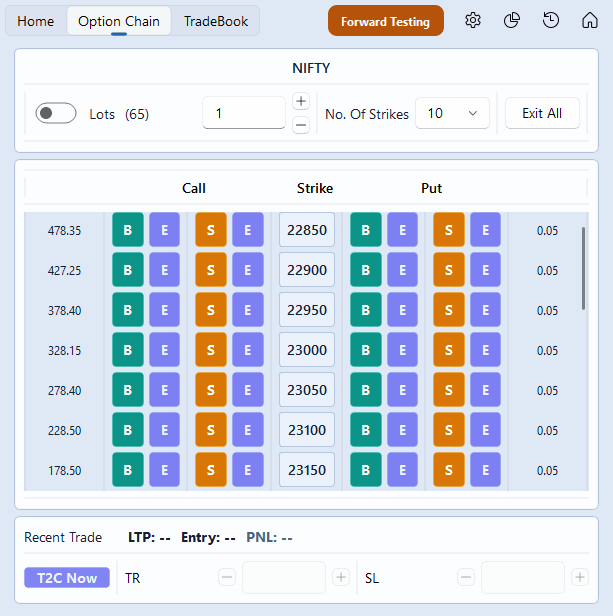
The Option Chain tab
#A row for every strike, with B, S and E on each side — buy, sell, exit. The at-the-money strike is highlighted, and the chain opens with it in the middle.
How many strikes you see either side of the money is your setting, in Settings. With NIFTY at 24,250 and the setting at 10, you see 24,250 in the middle and ten strikes each way — 23,750 up to 24,750, in steps of 50.
The Lots box at the top of the chain is the same box as Home's, and the Recent Trade strip at the foot is the same as Home's too: a click on either page uses the one size and shows the one last trade.
The TradeBook tab
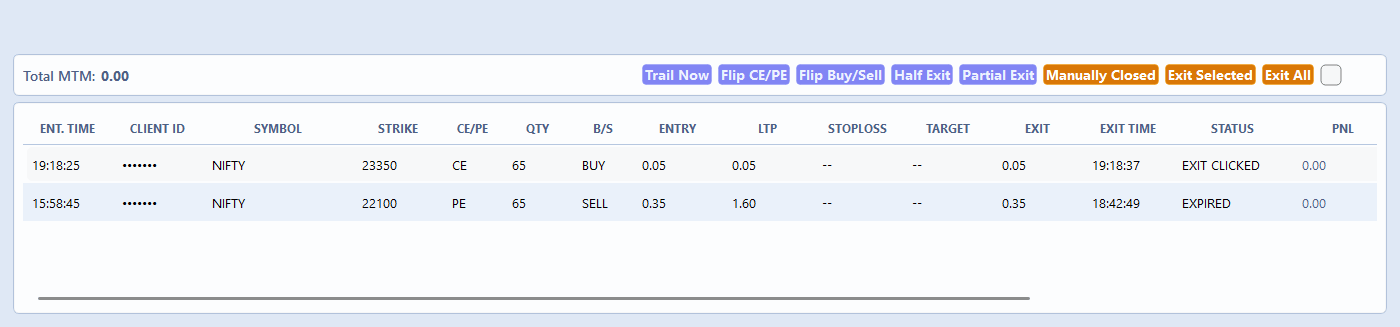
#One row for every leg you have taken today, open ones first, with the day's total at the top. It opens in its own window, so you can keep it beside the ticket or on another screen.
Tick the rows you want and use the buttons: Exit Selected, Exit All, Flip CE/PE, Flip Buy/Sell, Trail Now, Partial Exit.
Partial Exit is in lots on the desktop, where the web asks for a quantity. One lot of NIFTY is 65, so typing 2 here exits 130 — not 2. Asking to exit all of them is refused as a partial; use Exit for that.
Partial Exit, with numbers
#You hold 4 lots of the 24,250 CE — 260 quantity — bought at Rs 100. Tick the row, press Partial Exit, type 2 and press the button. Two lots, 130 quantity, are sold at the market.
The TradeBook now shows the leg twice: a closed row for the 2 lots that were sold, with their own exit price and P&L, and the open row for the 2 lots you still hold, which keeps its buttons. If the price was Rs 110 when you exited, the closed row shows a profit of Rs 1,300 ((110 − 100) × 130).
Typing 4 is refused, because that is not a part: use Exit to close the whole leg.
Manually Closed
#If you closed a leg in your broker's own terminal, this app still shows it open. Manually Closed tells it the price you got. Tick the row in the TradeBook and press Manually Closed.
A small window opens with the Exit Price already filled in at the current price, because you exited moments ago and that is usually close. Change it to what your broker actually filled — + and − step it by one tick — and press Mark Exited.
An example. You bought 1 lot of the 24,250 CE at Rs 100 and sold it in your broker's app at Rs 108. Mark it exited at 108 and the TradeBook closes the row with a profit of Rs 520 ((108 − 100) × 65).
The broker is not contacted — the position is already gone there, and an exit order would open a new one the other way round. Trade Disc has the same thing as Exited Manually in Live Positions.