Discretionary Trading Tools
Trade Scalper Dashboard
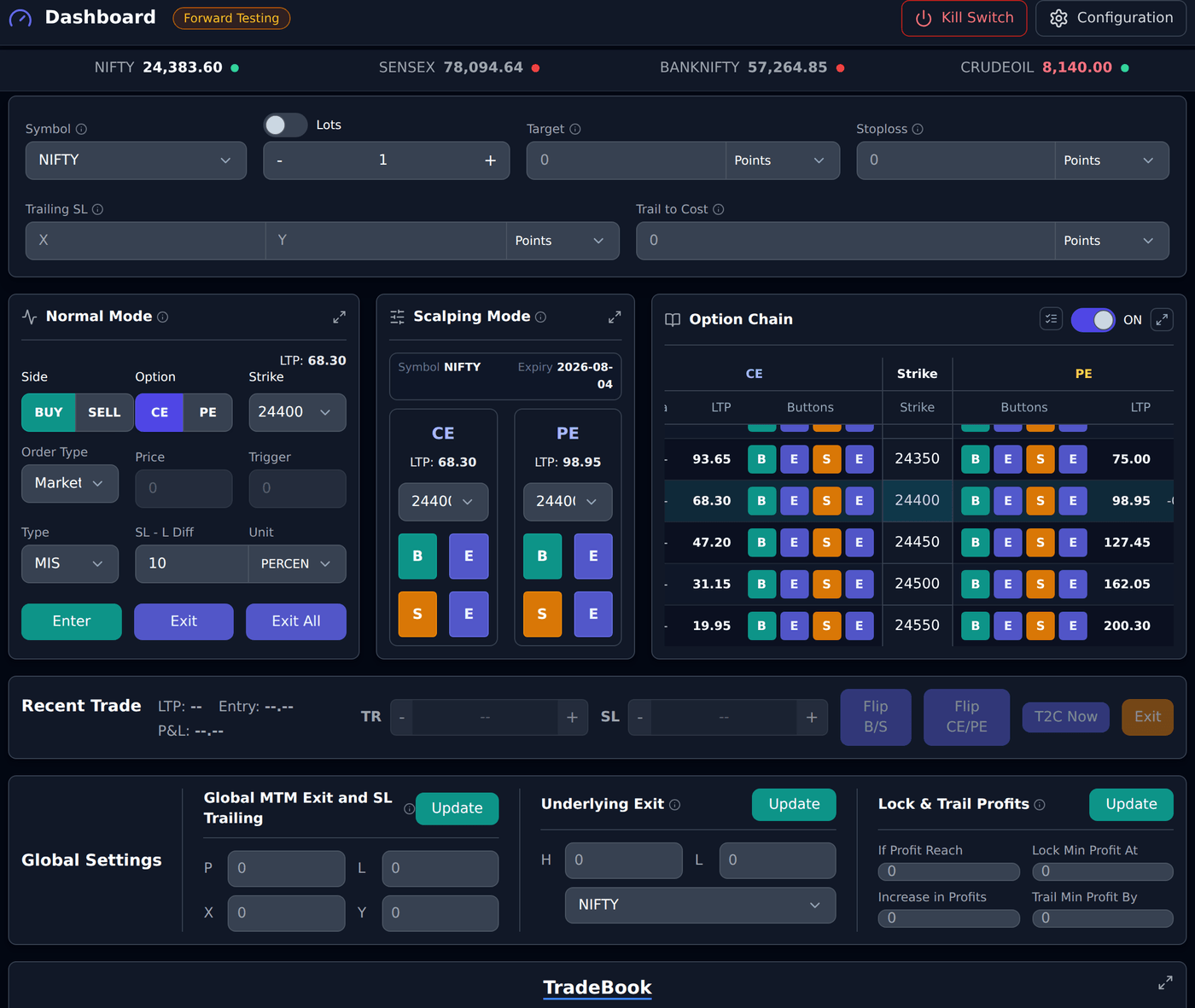
Trade Scalper dashboard భాగాలు, controls.
Overview
#Trade Scalper discretionary traders కోసం, అంటే entry మరియు exit manually decide చేసే users కోసం.
Dashboard లో ముందుగా entry controls అర్థం చేసుకోండి, తర్వాత trade risk fields, option chain, global settings, మరియు trade management actions చూడండి.
Broker Selector
#Broker Selector live actions కోసం assigned broker account choose చేస్తుంది.
Broker మార్చినప్పుడు Trade Scalper దాన్ని default broker లాగా save చేస్తుంది. Broker missing లేదా connected కాకపోతే order placement block అవుతుంది.
Mode Selector
#Mode order Forward Testing లోనా లేదా Live Mode లోనా decide చేస్తుంది. Dashboard లో title పక్కన current mode మాత్రమే కనిపిస్తుంది, అక్కడ మార్చలేరు.
Mode మార్చడానికి Trade Scalper Configuration page తెరిచి Select Mode లో Forward Testing లేదా Live Mode ఎంచుకోండి.
Live order ముందు mode, broker, segment, quantity, symbol, మరియు side తప్పకుండా check చేయండి.
Top trade defaults
#Top row లో exact field names Symbol, Lots/Capital లేదా QTY, Target, Stoploss, Trailing SL, మరియు Trail to Cost.
ఈ values కొత్త Trade Scalper orders మీద runtime controls లాగా apply అవుతాయి. Entry ముందు ఇవి సరిగ్గా ఉంచండి.
Desktop trade ticket fields
#Desktop trade ticket లో exact field names Symbol, Lots/Capital లేదా QTY, Target, Stoploss, Trailing SL, Trail to Cost, Side, Option, Strike/Symbol, Order Type, Price, Trigger, Type, SL - L Diff, Unit, Enter, Exit, మరియు Exit All.
Trailing SL లో X profit step, Y SL ఎంత move అవుతుందో చెబుతుంది. Trail to Cost profit trigger తర్వాత SL ను entry price కు move చేస్తుంది.
BUY example: entry Rs 100, initial Stoploss Rs 90, Trailing SL X 10 మరియు Y 5. Price Rs 110 అయితే SL Rs 95, Rs 120 అయితే SL Rs 100. Trail to Cost 20 అయితే Rs 120 వద్ద SL cost అంటే Rs 100 అవుతుంది.
Mobile trade ticket fields
#Mobile trade ticket లో important controls compact layout లో ఉంటాయి: Symbol, lots/quantity, Scalping switch, Side, Option, Target, మరియు Stoploss.
Live mobile order ముందు broker, mode, symbol, quantity, side, option type, Target, మరియు Stoploss మళ్లీ check చేయండి.
Normal Mode
#Normal Mode regular order form, ఇక్కడ order details నెమ్మదిగా check చేసి place చేయవచ్చు.
Exact field/button names Side, Option లేదా Type, LTP, Strike లేదా Symbol, Order Type, Price, Trigger, Type, SL - L Diff, Unit, Enter, Exit, మరియు Exit All.
Side లో BUY మరియు SELL ఉంటాయి. Option segment లో Option కి CE మరియు PE ఉంటాయి. Order Type లో Market, Limit, Buy Above/Sell Below, లేదా Underlying ఉండవచ్చు.
Example: BUY option కోసం Side BUY, Option CE, Strike choose చేయండి, Order Type Market గా ఉంచండి లేదా valid Price తో Limit choose చేయండి, Type ఉదాహరణకు MIS confirm చేసి Enter click చేయండి.
Scalping Mode
#Scalping Mode fast CE/PE Buy/Sell actions కోసం.
Exact field/button names Symbol, Expiry, CE, PE, LTP, strike dropdown, B, S, మరియు E.
B అంటే Buy, S అంటే Sell, E అంటే ఆ contract/side Exit. Broker, mode, quantity, Symbol, మరియు top risk defaults correct ఉన్నప్పుడు మాత్రమే use చేయండి.
Order Type
#ఈ section detailed documentation కోసం ఉంచబడింది. Future లో app tooltip నేరుగా ఇక్కడికి link చేయడానికి stable anchor ఇప్పుడే available ఉంది.
Limit and trigger examples
#ఈ section detailed documentation కోసం ఉంచబడింది. Future లో app tooltip నేరుగా ఇక్కడికి link చేయడానికి stable anchor ఇప్పుడే available ఉంది.
Buy / Sell
#ఈ section detailed documentation కోసం ఉంచబడింది. Future లో app tooltip నేరుగా ఇక్కడికి link చేయడానికి stable anchor ఇప్పుడే available ఉంది.
Quantity / Lots / Capital
#ఈ section detailed documentation కోసం ఉంచబడింది. Future లో app tooltip నేరుగా ఇక్కడికి link చేయడానికి stable anchor ఇప్పుడే available ఉంది.
Price and Trigger Price
#ఈ section detailed documentation కోసం ఉంచబడింది. Future లో app tooltip నేరుగా ఇక్కడికి link చేయడానికి stable anchor ఇప్పుడే available ఉంది.
Stop Loss
#Stop Loss అనేది loss limit. ఈ level వచ్చినప్పుడు app trade exit చేయడానికి try చేస్తుంది.
Common BUY example: మీరు ఒక option Rs 100 వద్ద BUY చేశారు. Quantity 1. Initial Stop Loss Rs 90 గా తీసుకుందాం.
Points value 10 అయితే SL Rs 90. అంటే price Rs 100 నుండి Rs 90 కి పడితే loss limit చేయడానికి system exit try చేస్తుంది.
Percent value 10 అయినా SL Rs 90, ఎందుకంటే Rs 100 లో 10% అంటే Rs 10.
MTM value 10 మరియు quantity 1 అయితే system Rs 10 total loss watch చేస్తుంది. ఈ simple example లో అది price Rs 90కి సమానం.
Absolute Price value 90 అయితే SL నేరుగా Rs 90. Underlying SL option price కాదు, underlying/index level watch చేస్తుంది.
Target
#Target అనేది profit booking level. ఈ level వచ్చినప్పుడు app profit book చేయడానికి exit try చేస్తుంది.
Common BUY example: మీరు ఒక option Rs 100 వద్ద BUY చేశారు. Quantity 1.
Points Target value 30 అయితే target Rs 130. అంటే price Rs 100 నుండి Rs 130కి పెరిగితే system profit book చేయడానికి try చేస్తుంది.
Percent value 30 అయినా target Rs 130, ఎందుకంటే Rs 100 లో 30% అంటే Rs 30.
MTM value 30 మరియు quantity 1 అయితే system Rs 30 total profit watch చేస్తుంది. ఈ simple example లో అది price Rs 130కి సమానం.
Absolute Price value 130 అయితే target నేరుగా Rs 130. Underlying Target option price కాదు, underlying/index level watch చేస్తుంది.
Trailing Stop Loss
#Trailing Stop Loss profit పెరిగినప్పుడు SL ను step by step better level కి move చేస్తుంది. BUY trade లో price తగ్గినా SL తిరిగి క్రిందికి రావదు.
Example: మీరు option Rs 100 వద్ద BUY చేశారు. Initial SL Rs 90. Trail Every X 10 points, Trail By Y 5 points.
Price Rs 110 చేరితే trade 10 points profit లో ఉంటుంది. అప్పుడు SL 5 points trail అయి Rs 90 నుండి Rs 95 అవుతుంది.
Price Rs 120 చేరితే మరో 10 points favorable move వచ్చింది. SL Rs 95 నుండి Rs 100 అవుతుంది.
Price Rs 130 చేరితే SL Rs 105 అవుతుంది. తరువాత price Rs 125కి వచ్చినా SL క్రిందికి రావదు; better protected level దగ్గరే ఉంటుంది.
Trail To Cost
#Trail To Cost లేదా T2C profit trigger hit అయిన తర్వాత SL ను entry price కి move చేస్తుంది.
Example: మీరు option Rs 100 వద్ద BUY చేశారు. Initial SL Rs 90. T2C trigger 20 points.
Price Rs 110 వరకు మాత్రమే వెళ్తే T2C activate కాదు, ఎందుకంటే profit 10 points మాత్రమే.
Price Rs 120 చేరితే profit 20 points. T2C activate అయి SL Rs 90 నుండి entry price Rs 100కి రావచ్చు.
తర్వాత price Rs 100కి తిరిగి వచ్చినా original Rs 10 loss బదులు trade cost దగ్గర protected గా ఉంటుంది.
SL-L Diff
#ఈ section detailed documentation కోసం ఉంచబడింది. Future లో app tooltip నేరుగా ఇక్కడికి link చేయడానికి stable anchor ఇప్పుడే available ఉంది.
Option Chain
#ఈ section detailed documentation కోసం ఉంచబడింది. Future లో app tooltip నేరుగా ఇక్కడికి link చేయడానికి stable anchor ఇప్పుడే available ఉంది.
Option Chain toggle
#ఈ section detailed documentation కోసం ఉంచబడింది. Future లో app tooltip నేరుగా ఇక్కడికి link చేయడానికి stable anchor ఇప్పుడే available ఉంది.
Strike selection
#ఈ section detailed documentation కోసం ఉంచబడింది. Future లో app tooltip నేరుగా ఇక్కడికి link చేయడానికి stable anchor ఇప్పుడే available ఉంది.
Global Settings
#Global Settings active Trade Scalper trades మీద broader controls apply చేస్తుంది.
Dashboard లో exact section names Global MTM Exit and SL Trailing, Underlying Exit, మరియు Lock & Trail Profits. ప్రతి section లో తన Update button ఉంటుంది.
Dashboard header లో Reset నొక్కితే dashboard inputs ఖాళీ అవుతాయి, అన్ని Global Settings ఆపేసి వాటి values తీసేస్తుంది. కొత్త orders కోసం quantity 1, Market సహా default ticket values వస్తాయి. Configuration, ఎంచుకున్న broker, mode, orders, positions, trade history, ఇప్పటికే తెరిచిన trade సొంత protections అలాగే ఉంటాయి. Global Settings Live, Forward Testing రెండింటికీ వర్తిస్తాయి కాబట్టి Reset రెండు modes లో ఈ shared limits తీసేస్తుంది.
Global MTM Exit and SL Trailing
#ఈ section లో exact field names P, L, X, మరియు Y.
P profit exit amount. L loss exit amount. X global trailing profit step. Y ప్రతి X step తర్వాత global loss level ఎంత move అవుతుందో చెబుతుంది.
ఇవి రోజు మొత్తం మీద చూస్తాయి, తెరిచి ఉన్న trades మీద మాత్రమే కాదు: అప్పటికే మూసిన trades లో book అయిన profit లేదా loss కి, తెరిచి ఉన్న trades నడుస్తున్న MTM కలిపి.
అలాగే Live, Forward Testing విడివిడిగా లెక్కిస్తాయి. Forward Testing డబ్బు ఎప్పుడూ Live limit లో కలవదు, తిరగా కూడా కలవదు.
Example: Trade A Rs 700 profit మరియు Trade B Rs 300 profit, ఇంకా ఏదీ మూయలేదు. రోజు Rs 1000. P 1000 అయితే global profit exit trigger కావచ్చు.
Trailing example: L 1000, X 1000, Y 500 అయితే open profit Rs 1000 చేరినప్పుడు loss level సుమారు Rs -1000 నుండి Rs -500 అవుతుంది. Rs 2000 profit వద్ద సుమారు Rs 0 అవుతుంది.
Underlying Exit
#ఈ section లో exact field names H, L, మరియు Symbol.
H high underlying level. L low underlying level. Symbol ఏ underlying/index watch చేయాలో చెబుతుంది.
Example: Symbol NIFTY, H 24000, L 23800. NIFTY 24000 చేరినా లేదా 23800 పడినా global underlying exit trigger కావచ్చు.
Lock & Trail Profits
#Lock & Trail Profits ను Profit Protection లాగా అర్థం చేసుకోండి. Profit ఒక level cross అయిన తర్వాత open profit లో కొంత protect చేస్తుంది.
Exact field names If Profit Reach, Lock Min Profit At, Increase in Profits, మరియు Trail Min Profit By.
If Profit Reach first profit level. Lock Min Profit At ఆ level తర్వాత minimum protected profit. Increase in Profits next profit step. Trail Min Profit By ప్రతి step కి protected profit ఎంత పెరుగుతుందో చెబుతుంది.
Example: If Profit Reach Rs 1000 మరియు Lock Min Profit At Rs 500. Profit Rs 1000 చేరిన తర్వాత system Rs 500 protect చేస్తుంది. Increase in Profits Rs 500 మరియు Trail Min Profit By Rs 250 అయితే Rs 1500 profit వద్ద protection Rs 750, Rs 2000 profit వద్ద Rs 1000 అవుతుంది.
MTM Graph — రోజంతా ఒకే గీతలో
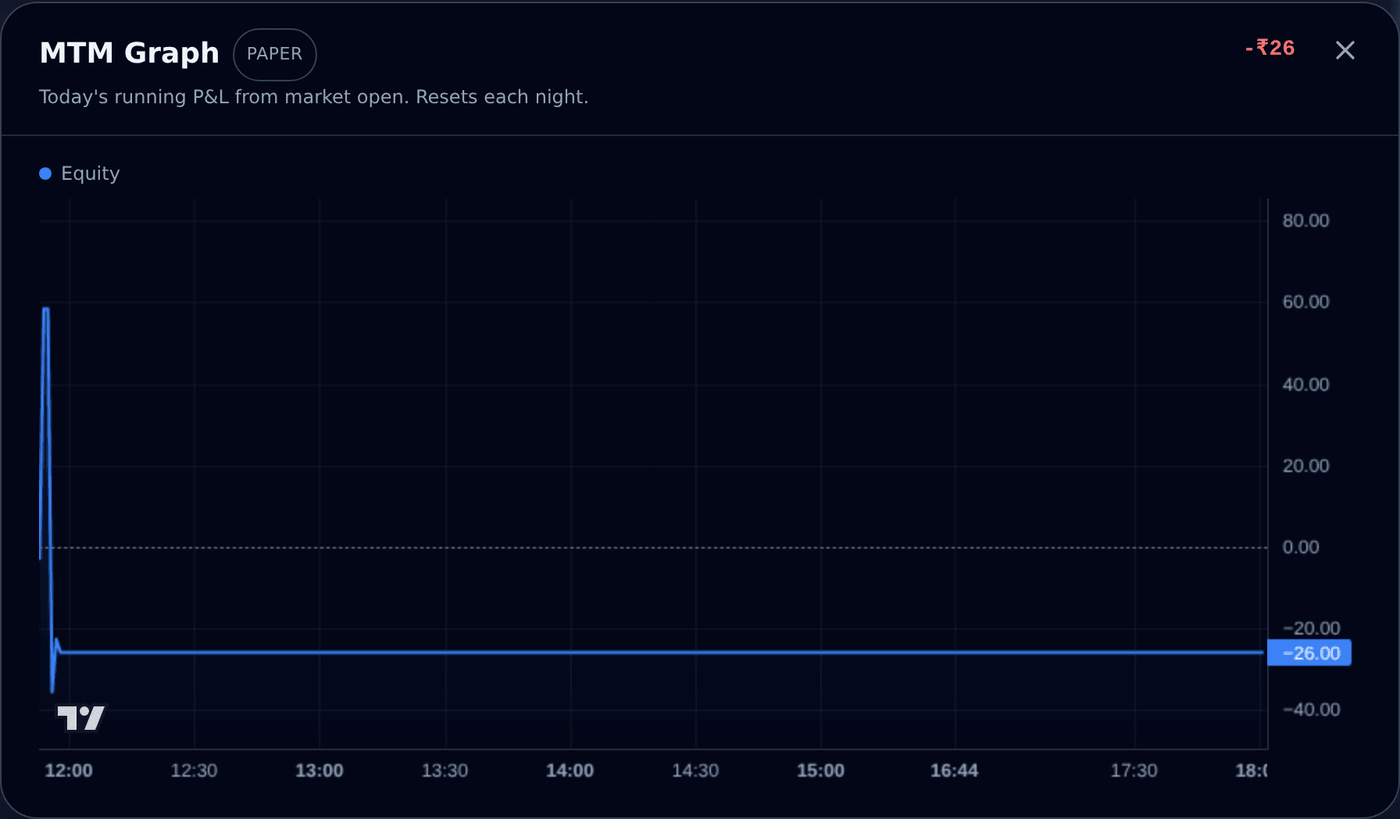
#MTM అంటే mark-to-market: మీ trades కి ఇప్పుడున్న విలువ. MTM Graph ఈ రోజు నడుస్తున్న profit-loss ని market తెరిచినప్పటి నుంచి ఒక గీతలా గీస్తుంది. గీత చుక్కల zero గీత పైన ఉంటే ఈ రోజు మీరు profit లో ఉన్నారు; కింద ఉంటే loss లో.
TradeScalper లో graph dashboard జాగా తీసుకోదు. TradeBook లో Realized MTM పక్కనే ఉన్న నీలం chart icon నొక్కండి — page పైన ఒక window లా తెరుచుకుంటుంది. మూసేయడానికి X నొక్కండి, Escape నొక్కండి, లేదా window బయట ఎక్కడైనా click చేయండి.
Graph మీ mode selector ని అనుసరిస్తుంది: Live mode లో live trades, Forward Testing mode లో forward-testing trades కనిపిస్తాయి. Window పైన ఉన్న badge మీరు ఏది చూస్తున్నారో చెబుతుంది.
గీతలు రెండు ఉండొచ్చు. నీలం గీత మీ equity భాగం — NIFTY, BANKNIFTY, SENSEX options, stocks. Amber (నారింజ) గీత మీరు commodities (MCX) trade చేసిన రోజే కనిపిస్తుంది: equity market 3:30 pm కి మూసేయగానే నీలం గీత ఆగిపోతుంది, amber గీత మాత్రం సాయంత్రం దాకా నడుస్తుంది.
ఉదాహరణ చూద్దాం. మీరు 10:15 am కి Rs 100 కి ఒక option కొన్నారనుకోండి, quantity 65. Price Rs 110 అయ్యింది — గీత +650 కి ఎక్కింది. Price జారి Rs 95 వచ్చింది — గీత -325 కి. మీరు Rs 110 దగ్గర exit అయ్యారు — 650 profit book అయిపోయింది, ఇక వేరే trade కదిలిస్తే తప్ప గీత +650 దగ్గరే ఉంటుంది.
- ప్రతి నిమిషానికి ఒక కొత్త point చేరుతుంది; చివరి point price తో దాదాపు live గా కదులుతుంది.
- Graph ఈ రోజుది మాత్రమే. ప్రతి రాత్రి clear అయిపోయి మర్నాడు కొత్తగా మొదలవుతుంది — పాత రోజులు Analytics page లో ఉంటాయి.
- గీత మీద ఎక్కడైనా mouse పెట్టండి (phone లో తాకి పట్టుకోండి) — ఆ క్షణం time, విలువ కనిపిస్తాయి.
- ఎంచుకున్న mode లో ఈ రోజు trade లేకపోతే window లో "No trading activity yet today" అని కనిపిస్తుంది — అది మామూలే, తప్పు కాదు.
Avl. Margin — broker funds ఒక్క చూపులో
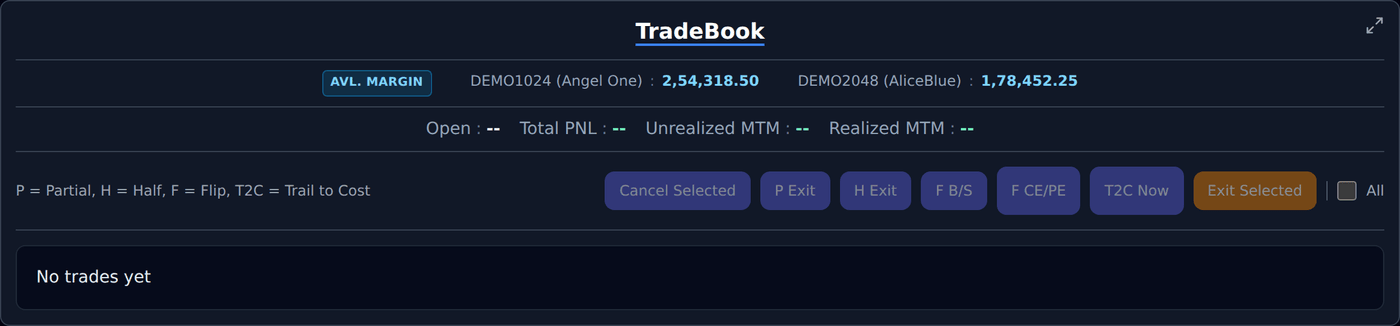
#Avl. Margin వరుస TradeBook లో అన్నిటికంటే పైన, Open, Total PNL కి పైనే ఉంటుంది. ఇందులో ప్రతి broker account లో available margin — అంటే కొత్త trades కి ఖాళీగా ఉన్న డబ్బు — కనిపిస్తుంది. Funds చూడడానికే broker terminal తెరవాల్సిన పని ఉండదు.
ఇప్పుడు login అయి ఉన్న broker లే ఇక్కడ కనిపిస్తారు. ఒక broker Settings లో ఉండి ఈ వరుసలో లేకపోతే, దాని session కలవలేదు — Settings నుంచి connect చేయండి, వరుస దాన్ని చూపిస్తుంది. ఏ broker login లో లేకపోతే వరుస దాక్కుంటుంది.
ఇవి ఎప్పుడూ మీ అసలు broker లెక్కలే, Forward Testing mode లో కూడా. Forward-testing డబ్బు ఉత్తుత్తిది, దాన్ని ఇక్కడ చూపిస్తే ఉపయోగం లేదు — ఈ వరుస మీరు నిజంగా ఎంత trade చేయగలరో చెబుతుంది.
ఈ సంఖ్య దాదాపు ప్రతి నిమిషానికి refresh అవుతుంది. సరిగ్గా ఈ second విలువ కావాలంటే — పెద్ద order కి ముందు లాంటిది — ఇప్పటికీ మీ broker terminal లోనే చూసి నిర్ధారించుకోండి.
- ఇదే వరుస TradeBridge, TradeBots, TradeBuilder dashboard లలో కూడా ఉంటుంది, Global Controls కింద.
- ఒక broker login లో ఉండి క్షణం సేపు జవాబు ఇవ్వకపోతే దాని దగ్గర "--" కనిపిస్తుంది — మిగతా broker లు తమ లెక్కలు చూపిస్తూనే ఉంటాయి.
Trade Book
#Trade Book active management కోసం current Trade Scalper trades చూపిస్తుంది.
ఇందులో selection controls మరియు Exit, Cancel, Edit, Partial Exit, Half Exit, T2C Now, Flip B/S, Flip CE/PE actions ఉండవచ్చు.
Recent Trade
#ఈ section detailed documentation కోసం ఉంచబడింది. Future లో app tooltip నేరుగా ఇక్కడికి link చేయడానికి stable anchor ఇప్పుడే available ఉంది.
Edit runtime controls
#Edit already open Trade Scalper trade runtime controls open చేస్తుంది.
Exact field names SL, Target, TSL X, TSL Y, T2C, Exit Delay Sec, If Profit Reach, Lock Min Profit At, Increase in Profits, మరియు Trail Min Profit By.
Recent trade runtime controls
#Edit already open Trade Scalper trade runtime controls open చేస్తుంది.
Exact field names SL, Target, TSL X, TSL Y, T2C, Exit Delay Sec, If Profit Reach, Lock Min Profit At, Increase in Profits, మరియు Trail Min Profit By.
Lock & Trail Profits ను Profit Protection లాగా అర్థం చేసుకోండి. Profit ఒక level cross అయిన తర్వాత open profit లో కొంత protect చేస్తుంది.
Exact field names If Profit Reach, Lock Min Profit At, Increase in Profits, మరియు Trail Min Profit By.
If Profit Reach first profit level. Lock Min Profit At ఆ level తర్వాత minimum protected profit. Increase in Profits next profit step. Trail Min Profit By ప్రతి step కి protected profit ఎంత పెరుగుతుందో చెబుతుంది.
Example: If Profit Reach Rs 1000 మరియు Lock Min Profit At Rs 500. Profit Rs 1000 చేరిన తర్వాత system Rs 500 protect చేస్తుంది. Increase in Profits Rs 500 మరియు Trail Min Profit By Rs 250 అయితే Rs 1500 profit వద్ద protection Rs 750, Rs 2000 profit వద్ద Rs 1000 అవుతుంది.
Partial Exit
#ఈ section detailed documentation కోసం ఉంచబడింది. Future లో app tooltip నేరుగా ఇక్కడికి link చేయడానికి stable anchor ఇప్పుడే available ఉంది.
Half Exit
#ఈ section detailed documentation కోసం ఉంచబడింది. Future లో app tooltip నేరుగా ఇక్కడికి link చేయడానికి stable anchor ఇప్పుడే available ఉంది.
Flip Actions
#ఈ section detailed documentation కోసం ఉంచబడింది. Future లో app tooltip నేరుగా ఇక్కడికి link చేయడానికి stable anchor ఇప్పుడే available ఉంది.
Cancel action
#ఈ section detailed documentation కోసం ఉంచబడింది. Future లో app tooltip నేరుగా ఇక్కడికి link చేయడానికి stable anchor ఇప్పుడే available ఉంది.
Exit All
#ఈ section detailed documentation కోసం ఉంచబడింది. Future లో app tooltip నేరుగా ఇక్కడికి link చేయడానికి stable anchor ఇప్పుడే available ఉంది.
Common BUY example used in docs
#Docs లో common example ఇదే: BUY one option at Rs 100, quantity 1, initial SL Rs 90.
Stop Loss 10 points అంటే price Rs 90 వద్ద exit try.
Target 30 points అంటే price Rs 130 వద్ద profit book try.
Trailing Stop Loss లో X 10 మరియు Y 5 అయితే price Rs 110 వద్ద SL Rs 95, Rs 120 వద్ద SL Rs 100, Rs 130 వద్ద SL Rs 105 అవుతుంది.
Trail To Cost 20 points అంటే price Rs 120 చేరిన తర్వాత SL entry price Rs 100కి move అవుతుంది.