AI Strategy Finder
AI strategy page
ఒక AI strategy పూర్తి report, tab వారీగా.
పైన AI rules
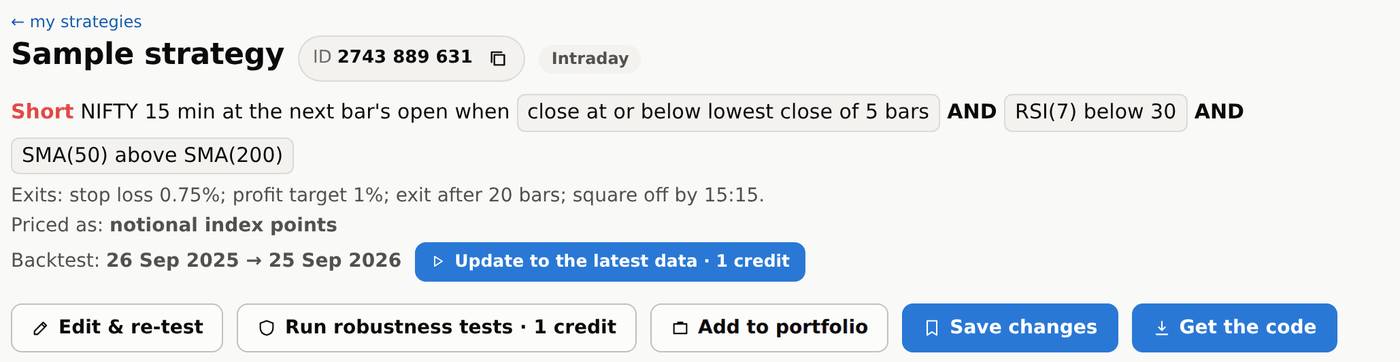
#Page పైన strategy పేరు, దాని 10 అంకెల ID (support తో మాట్లాడేటప్పుడు ఇదే చెప్పండి), అది intraday ఆ positional ఆ, దాని rules కనిపిస్తాయి: ఎప్పుడు long లేదా short వెళ్ళాలి, ప్రతి exit. Page లోని ప్రతి number అది దొరికిన search dates మీదే.
Rules కింద Backtest line numbers ఏ dates వో చెబుతుంది. అవి strategy దొరికిన search dates, వాటంతట అవే ముందుకు వెళ్ళవు. కొత్త data వస్తే దాని పక్కన Update to the latest data button వస్తుంది: అది strategy ని ఈరోజు వరకు re-test చేస్తుంది (1 credit), ఆ తర్వాత page ఆ dates నే ఉంచుకుంటుంది. ఇలాంటి paid runs button నొక్కగానే మొదలవుతాయి; strategy కొనే ముందు, మళ్ళీ search చేసే ముందు మాత్రమే అడుగుతుంది.
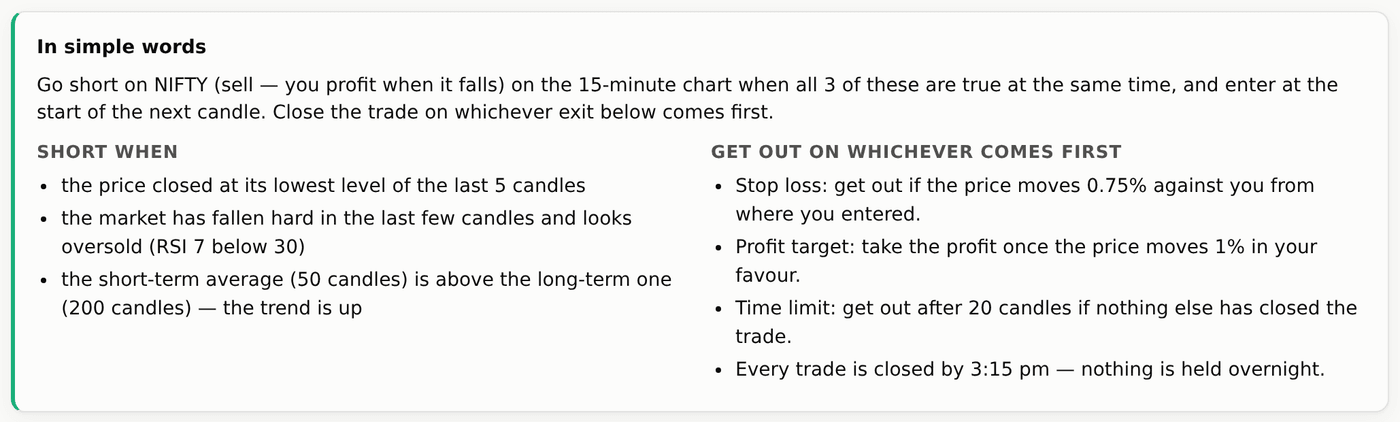
AI rules సులువైన మాటల్లో
#Strategy కొన్న తర్వాత, అవే rules ఒక స్నేహితుడికి చెప్పినట్టు: entry ఎప్పుడు తీసుకోవాలి, బయటికి రావడానికి మార్గాల list — ఏది ముందు జరిగితే అది. Long + Short strategy లో రెండు lists ఉంటాయి: Long when, Short when. Signal కి మనం long, short అంటాం; buy, sell నిజంగా పెట్టిన order కి మాత్రమే — trades లో Order column అదే చూపిస్తుంది (index మీద Buy లేదా Sell, options లో Buy CE లేదా Sell PE లాగా).
AI exits ఎలా పనిచేస్తాయి, numbers తో?
#మీరు buy చేసినప్పుడు NIFTY 24,000 దగ్గర ఉందనుకోండి. 0.5% stop loss అంటే 120 points: trade 23,880 దగ్గర మూసుకుంటుంది. 1% profit target అంటే 240 points: trade 24,240 దగ్గర మూసుకుంటుంది.
0.5% trailing stop అయితే trade ఇంకో 120 points పెరిగిన ప్రతిసారి stop ని 120 points పైకి జరుపుతుంది: 24,120 దగ్గర stop 24,000 కి, 24,240 దగ్గర 24,120 కి. దానికి బదులు Trail to cost ఉంటే, trade ఎంచుకున్నంత పైకి వెళ్లగానే stop మీ entry price (24,000) కి వస్తుంది — ఇక loss రాదు.
Exits ని 1-minute prices మీద check చేస్తారు, అందుకే ఒక 15-minute candle target, stop రెండూ తాకితే, ఏది ముందు తాకిందో అదే లెక్కలోకి వస్తుంది.
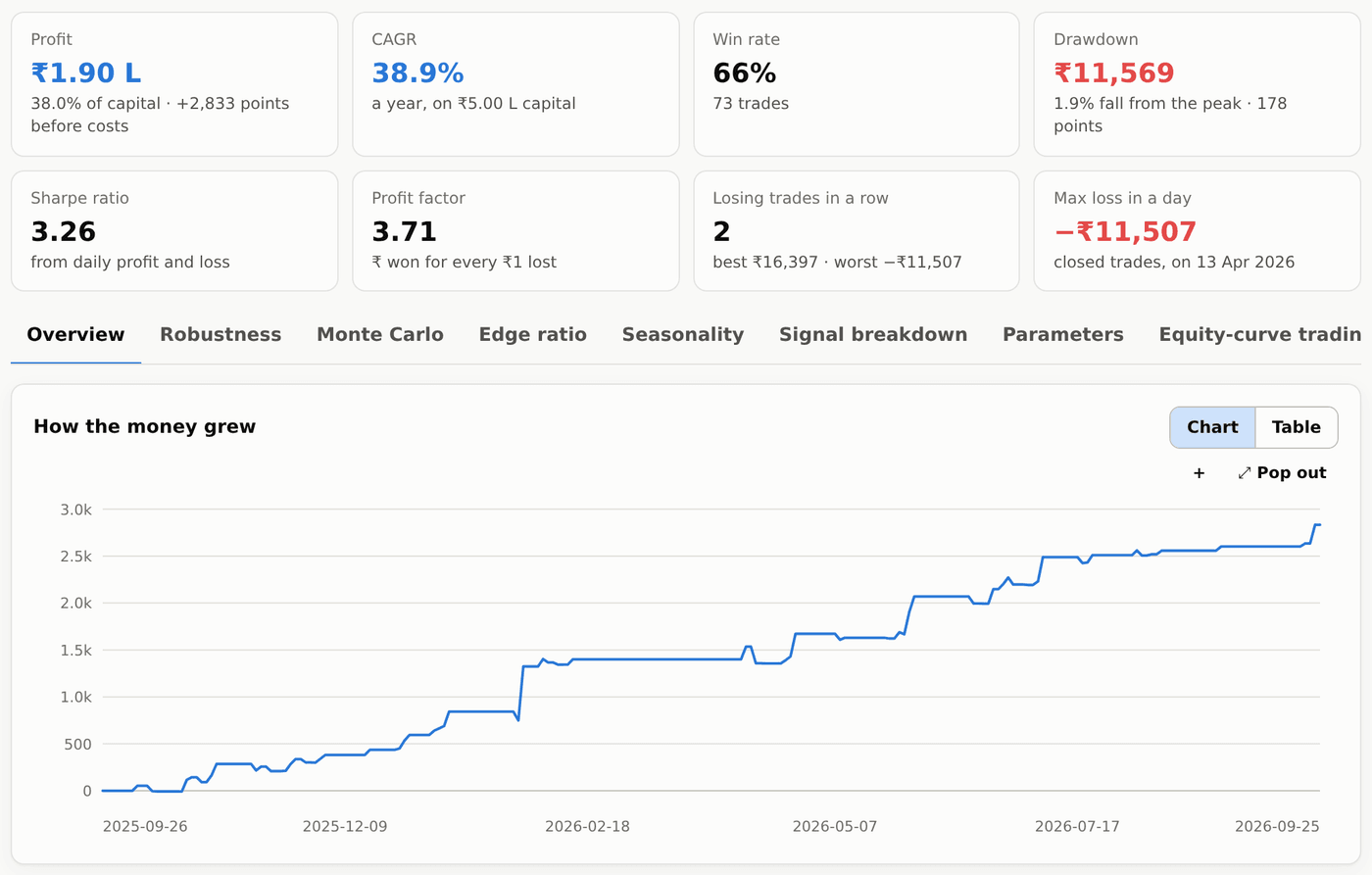
AI strategy summary tiles, Overview
#ఎనిమిది cards, ప్రతి strategy కి, ప్రతి portfolio కి ఒకేలా: Profit (₹ లో, starting capital లో %), CAGR (ఆ capital మీద ఏడాదికి పెరుగుదల), Win rate, Drawdown (ఒక high నుంచి అతి పెద్ద పతనం, ₹ లో, ఆ high దగ్గర account లో %), Sharpe ratio, Profit factor, Losing trades in a row, Max loss in a day (మూసిన trades మాత్రమే). ₹ profit = points × ఆ టైం lot size.
Overview లో equity curve (profit ఎలా పెరిగిందో), robustness తీర్పు, నెల వారీ table ఉన్న పూర్తి performance report, trades ఏ కారణాలతో మూసుకున్నాయో (stop, target, trailing stop, time, day end…) ఉంటాయి.
Cost ticks ఇక్కడ కూడా results page లాగే పని చేస్తాయి. Returns ని % లో చూపించడానికి report మీ starting capital కూడా అడుగుతుంది. Index strategies కి ఇది ₹2,00,000 తో (ఇవి index future ఒక lot trade చేస్తాయి, దాని margin దాదాపు అంతే) మొదలవుతుంది, options కొనడానికి ₹50,000, options అమ్మడానికి ₹2,00,000; మీరు మార్చింది ఆ రకం strategy కి గుర్తుంటుంది.
AI strategy మిగతా tabs
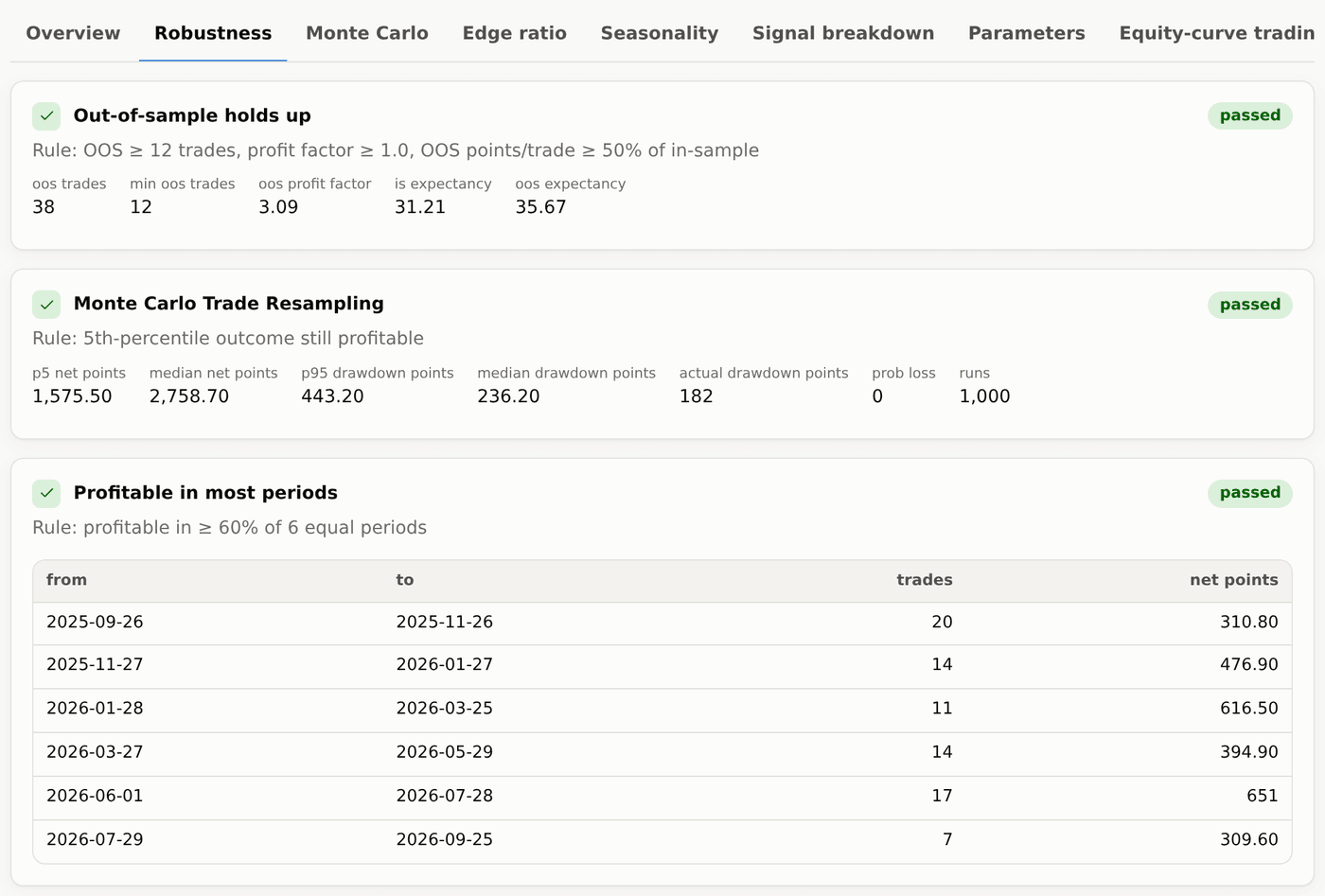
#- Robustness — 8 tests లో ప్రతి దాని result, దాని వెనక numbers.
- Monte Carlo — అవే trades చాలా రకాల వరుసల్లో, మంచి-చెడు అదృష్టం range, తక్కువ win rate తో ఒక variance test.
- Edge ratio — trade కి అనుకూలంగా price ఎంత కదిలింది, వ్యతిరేకంగా ఎంత, random entries తో పోల్చి.
- Seasonality — expiry కి ఎన్ని రోజుల ముందు (expiry day, expiry − 1, − 2, …), నెల, entry గంట, సంవత్సరం వారీగా profit.
- Signal breakdown — ప్రతి entry rule ఒంటరిగా ఎంత contribute చేస్తుందో.
- Parameters — దగ్గర్లోని settings heat-maps: పెద్ద ఆకుపచ్చ ప్రాంతం మంచిది, ఒకే ఒక మెరిసే చుక్క హెచ్చరిక.
- Equity-curve trading — strategy సొంత equity దాని average కంటే కిందికి వెళ్లినప్పుడల్లా ఆపేస్తే ఏమయ్యేదో.
- Options (NIFTY కి మాత్రమే) — అవే trades నిజమైన NIFTY options prices తో (weekly/monthly, ATM/ITM/OTM), premium stop, target, trailing stop లేదా trail to cost 10%, 20%, 30% లేదా 40% తో.
- Trades — ప్రతి trade, entry, exit టైం, signal (Long లేదా Short), పెట్టిన order (Buy లేదా Sell, options లో Sell PE లాగా), prices, points, ₹, exit కారణం.
- Code — strategy code నాలుగు formats లో, free (Credits, code చూడండి).
AI strategy తో పని: edit, re-test, save, portfolio
#- Edit & re-test — direction, timeframe, style, fill, entry టైం, square-off, rules (ఏదైనా షరతు కలపండి లేదా తీసేయండి) లేదా ఏ exit value అయినా మార్చి, Apply and re-test నొక్కితే కొత్త numbers వెంటనే కనిపిస్తాయి (ప్రతి re-test కి 1 credit; cost ticks లేదా capital మార్చడం free). Test on dates తో అదే strategy వేరే From / To dates మీద నడుస్తుంది; page మీద ఒక note ఇది చెబుతుంది, search dates కి తిరిగి వెళ్ళే link తో. ఇక్కడే index లో trade చేయడం, దాని options లో trade చేయడం మధ్య మార్చొచ్చు, options కొనాలా అమ్మాలా, strike, expiry ఎంచుకోవచ్చు. Free. తర్వాత మీరు edited version చూస్తున్నారని ఒక సూచన వస్తుంది: Save as new strategy దాన్ని సొంత ID తో My strategies లో ఉంచుతుంది (search లో original అలాగే ఉంటుంది), Undo edits వెనక్కి తీసుకెళ్తుంది.
- Run robustness tests — ఈ version మీద 8 tests అన్నీ నడుపుతుంది: 1 credit.
- Add to portfolio, Save — మీ portfolios లో లేదా My strategies లో ఉంచుకోండి.
- Get the code — Code tab తెరుస్తుంది. Strategy కొనే ముందు page లో Save, Run robustness tests, Buy కనిపిస్తాయి; edit, portfolio కొన్న తర్వాతే తెరుచుకుంటాయి.
TradeBuilder, TradeBots లేదా Investing Terminalకి deploy చేయడం
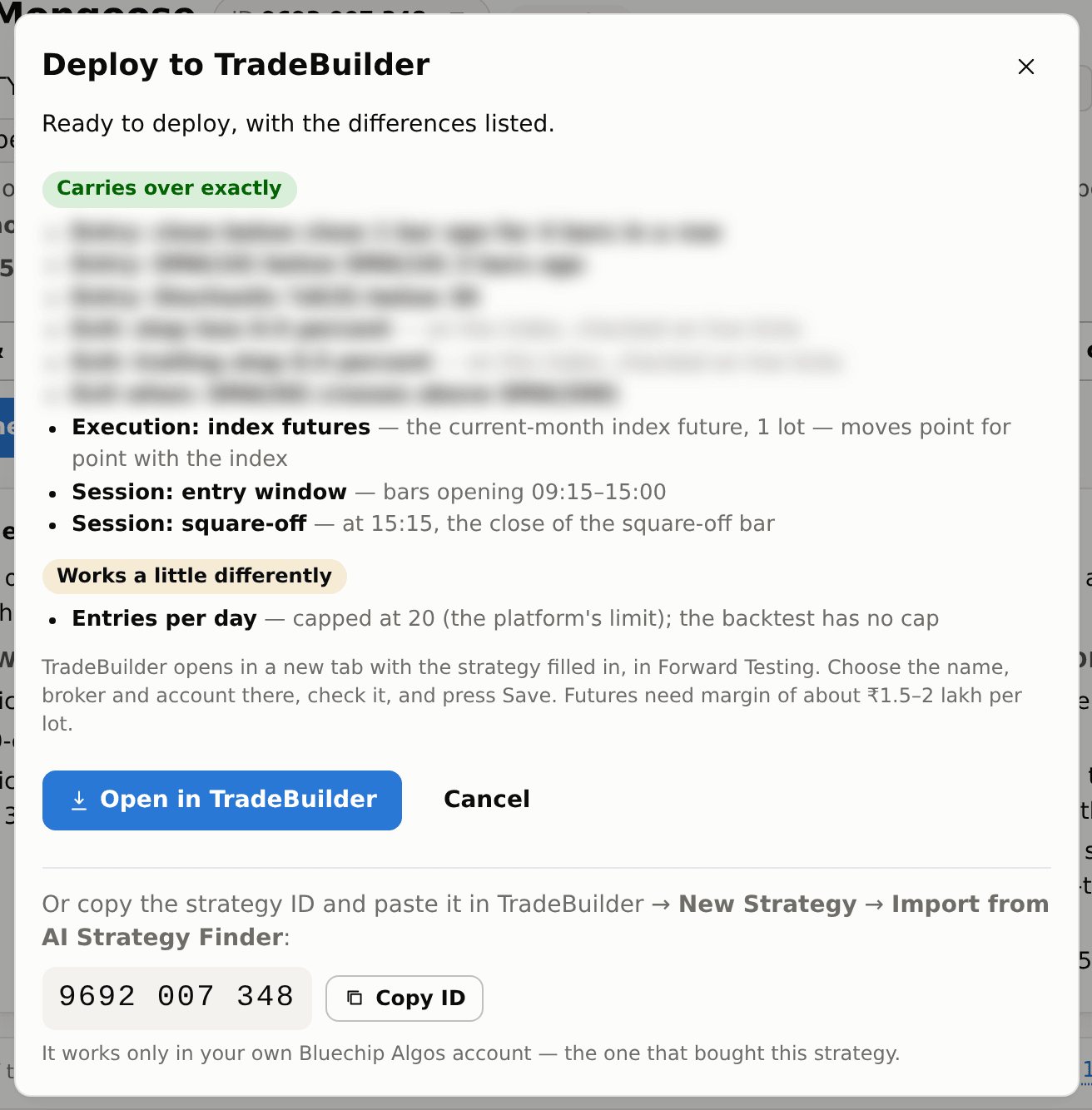
#Strategy కొన్న తర్వాత Deploy చాలా trading strategiesని TradeBuilderకి, fixed-time straddles, stranglesని TradeBotsకి, investing strategiesని Investing Terminalకి పంపుతుంది. Dialogలో destination పేరు ఉంటుంది. ఆ toolకి active paid subscription లేదా Platinum access కావాలి. Trials trading లేదా investing strategies deploy చేయలేరు. Strategy కొనడం, execution tool access వేర్వేరు.
Deploy నొక్కితే Deploy to TradeBuilder (లేదా Deploy to TradeBots) తెరుచుకుంటుంది, strategy లోని ప్రతి భాగాన్ని మూడు lists లో చూపిస్తుంది: Carries over exactly, Works a little differently (ఏం తేడానో కూడా — ఉదాహరణకి entries per day limit 20, signal candle close కే fill అయ్యే strategy దాని తర్వాత కొన్ని సెకన్లకి entry తీసుకుంటుంది) లేదా Not deployable yet. Index strategy ఈ నెల index future 1 lot trade చేస్తుంది.
Open in TradeBuilder లేదా destination tool పేరు ఉన్న button నొక్కండి. కొత్త tabలో strategy నింపి Forward Testingలో తెరుస్తుంది. Eligible access ఉంటే sign-in link 60 secondsలో ఒక్కసారి పని చేస్తుంది. Name, broker account, Forward Testing లేదా Live ఎంచుకుని, rules చూసి save చేయండి. Trading importsలో strategy తన exitsని చూసుకుంటుంది; greyed-out leg exit boxes అలాగే ఉంచండి. Investing importsలో capital, మొదట ఎంచుకున్న stocks కూడా చూడండి.
Code 30 రోజులు పనిచేస్తుంది, దాన్ని మొదట వాడిన TradeBuilder లేదా TradeBots account కి మాత్రమే; tool new-strategy page లో Import from AI Strategy Finder లో paste కూడా చేయొచ్చు. ఇంకా సులభం: Deploy window లో strategy ID Copy ID button తో కనిపిస్తుంది — అదే అక్కడ paste చేయండి. Strategy కొన్న మీ సొంత Bluechip Algos account లోనే ఇది పనిచేస్తుంది. ఒక గంటలో 20 వేర్వేరు strategies import చేయొచ్చు; అదే strategy ని మళ్ళీ import చేస్తే లెక్కలోకి రాదు.
Live results backtest తో అచ్చం సరిపోవు: నిజమైన orders కి ఖర్చులు ఉంటాయి, fill కూడా backtest prices కి కొంచెం దూరంలో పడుతుంది. మొదట కొన్ని రోజులు Forward Testing లో నడపండి.