AI Strategy Finder
AI strategy का page
एक AI strategy की पूरी report, tab by tab.
ऊपर AI के rules
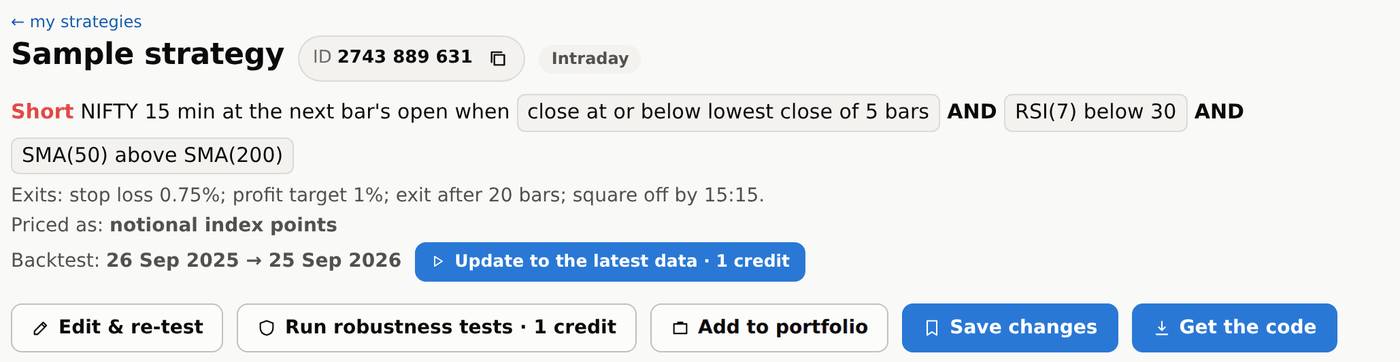
#Page के ऊपर strategy का नाम, उसका 10 अंकों का ID (support से बात करते समय यही बताइए), वो intraday है या positional, और उसके rules दिखते हैं: कब long या short जाना है, और हर exit. Page का हर number उसी search की dates पर है जिसमें ये मिली.
Rules के नीचे Backtest वाली line बताती है कि numbers किन dates के हैं. ये उस search की dates हैं जिसमें strategy मिली, और अपने आप आगे नहीं बढ़तीं. नया data आने पर उसके पास Update to the latest data बटन आता है: वो strategy को आज तक re-test करता है (1 credit), और उसके बाद page वही dates रखता है. ऐसे paid runs बटन दबाते ही शुरू हो जाते हैं; सिर्फ़ strategy ख़रीदने और दोबारा search करने से पहले पूछा जाता है.
AI के rules आसान शब्दों में
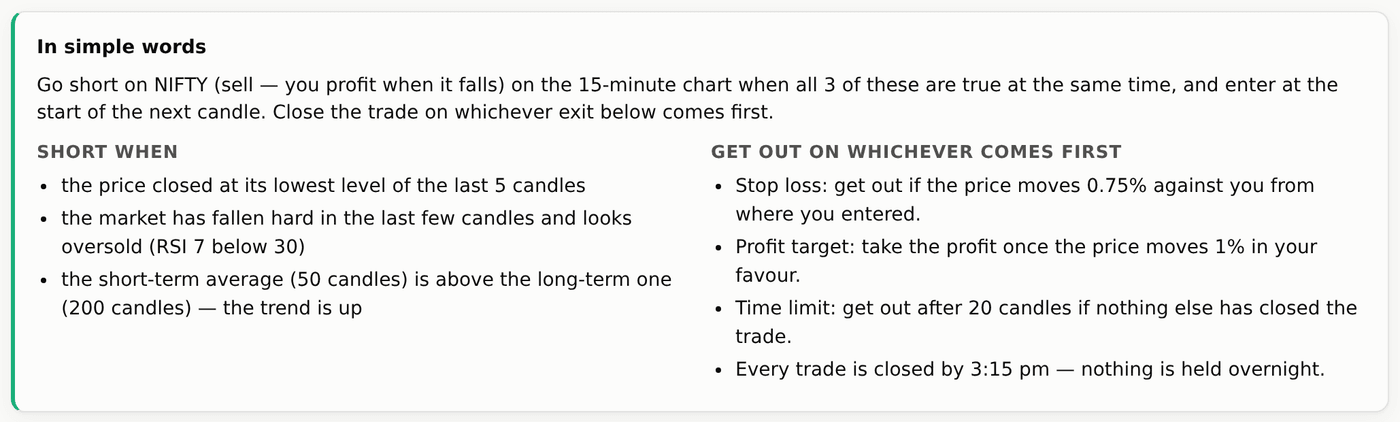
#Strategy ख़रीदने के बाद, वही rules ऐसे समझाए गए जैसे किसी दोस्त को बताते हैं: entry कब लेनी है, और बाहर निकलने के तरीकों की list — जो पहले हो. Long + Short strategy में दो lists होती हैं: Long when और Short when. Signal के लिए हम long और short कहते हैं, और buy / sell सिर्फ़ असल में लगे order के लिए — trades में Order column यही दिखाता है (index पर Buy या Sell, options में जैसे Buy CE या Sell PE).
AI के exits कैसे काम करते हैं, numbers के साथ?
#मान लीजिए buy करते समय NIFTY 24,000 पर है. 0.5% का stop loss यानी 120 points: trade 23,880 पर बंद होगा. 1% का profit target यानी 240 points: trade 24,240 पर बंद होगा.
0.5% का trailing stop हर बार trade के 120 points और बढ़ने पर stop को 120 points ऊपर ले जाता है: 24,120 पर stop 24,000 पर आता है, 24,240 पर 24,120 पर. Trail to cost की जगह चुना गया हो तो trade तय रकम ऊपर जाते ही stop आपके entry price (24,000) पर आ जाता है, फिर loss नहीं हो सकता.
Exits 1-minute prices पर जाँचे जाते हैं, इसलिए अगर एक 15-minute candle ने target और stop दोनों छुए, तो जो पहले छुआ वही गिना जाता है.
AI strategy के summary tiles और Overview
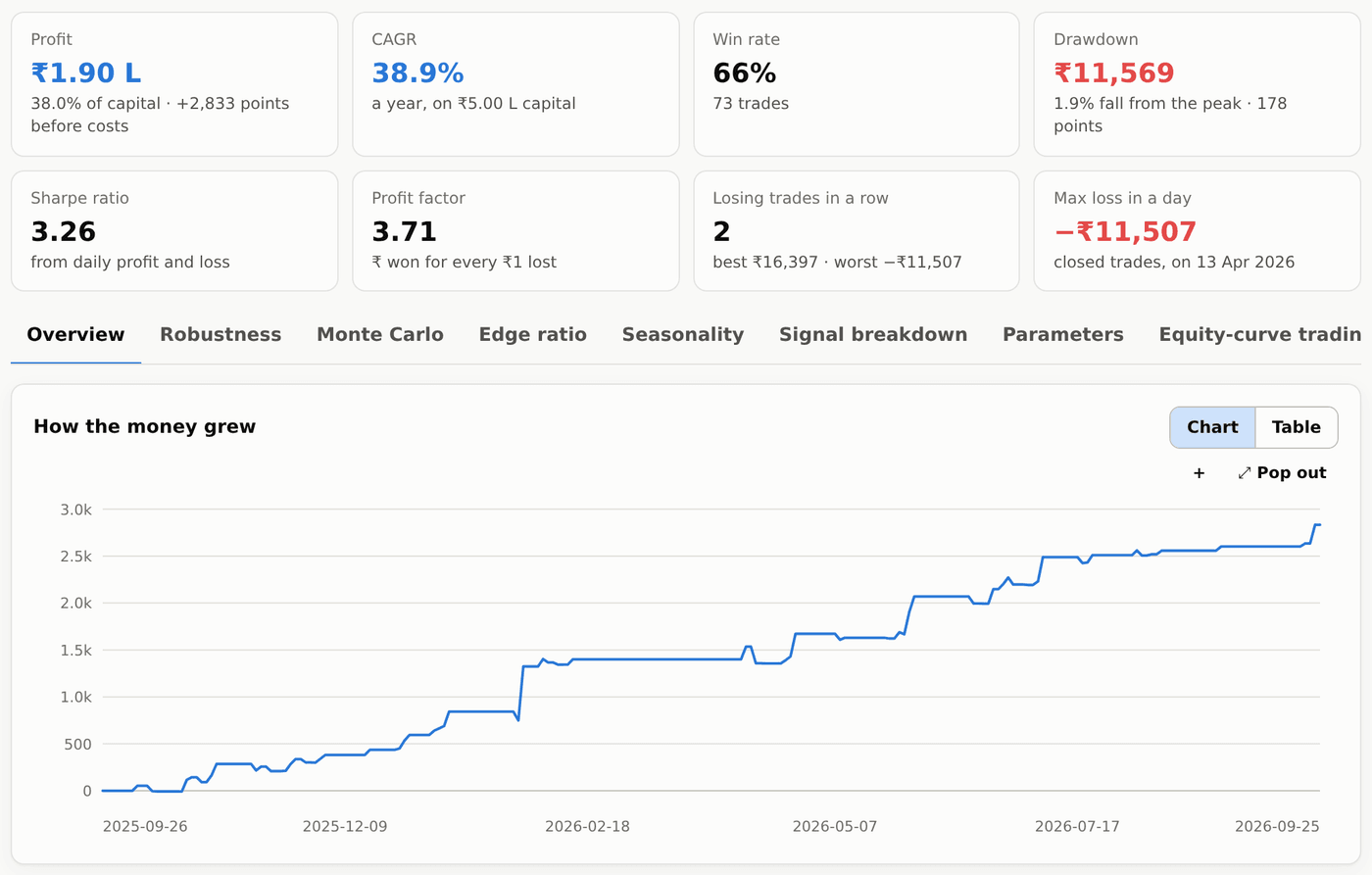
#आठ cards, हर strategy और हर portfolio पर एक जैसे: Profit (₹ में, और starting capital का %), CAGR (उस capital पर हर साल की बढ़त), Win rate, Drawdown (किसी high से सबसे बड़ी गिरावट, ₹ में और उस high पर account के % में), Sharpe ratio, Profit factor, Losing trades in a row और Max loss in a day (सिर्फ़ बंद हुए trades). ₹ का profit = points × उस समय का lot size.
Overview में equity curve है (profit कैसे बढ़ा), robustness का नतीजा, महीने-दर-महीने table वाली पूरी performance report, और trades किन वजहों से बंद हुए (stop, target, trailing stop, time, day end…).
Cost ticks यहाँ भी बिल्कुल results page की तरह काम करते हैं. Report % में returns दिखाने के लिए आपकी starting capital भी पूछती है. Index strategies के लिए यह ₹2,00,000 से (ये index future का एक lot trade करती हैं, जिसका margin लगभग इतना ही है) शुरू होती है, options ख़रीदने के लिए ₹50,000 और options बेचने के लिए ₹2,00,000; बदलाव उसी तरह की strategy के लिए याद रखा जाता है.
AI strategy के बाकी tabs
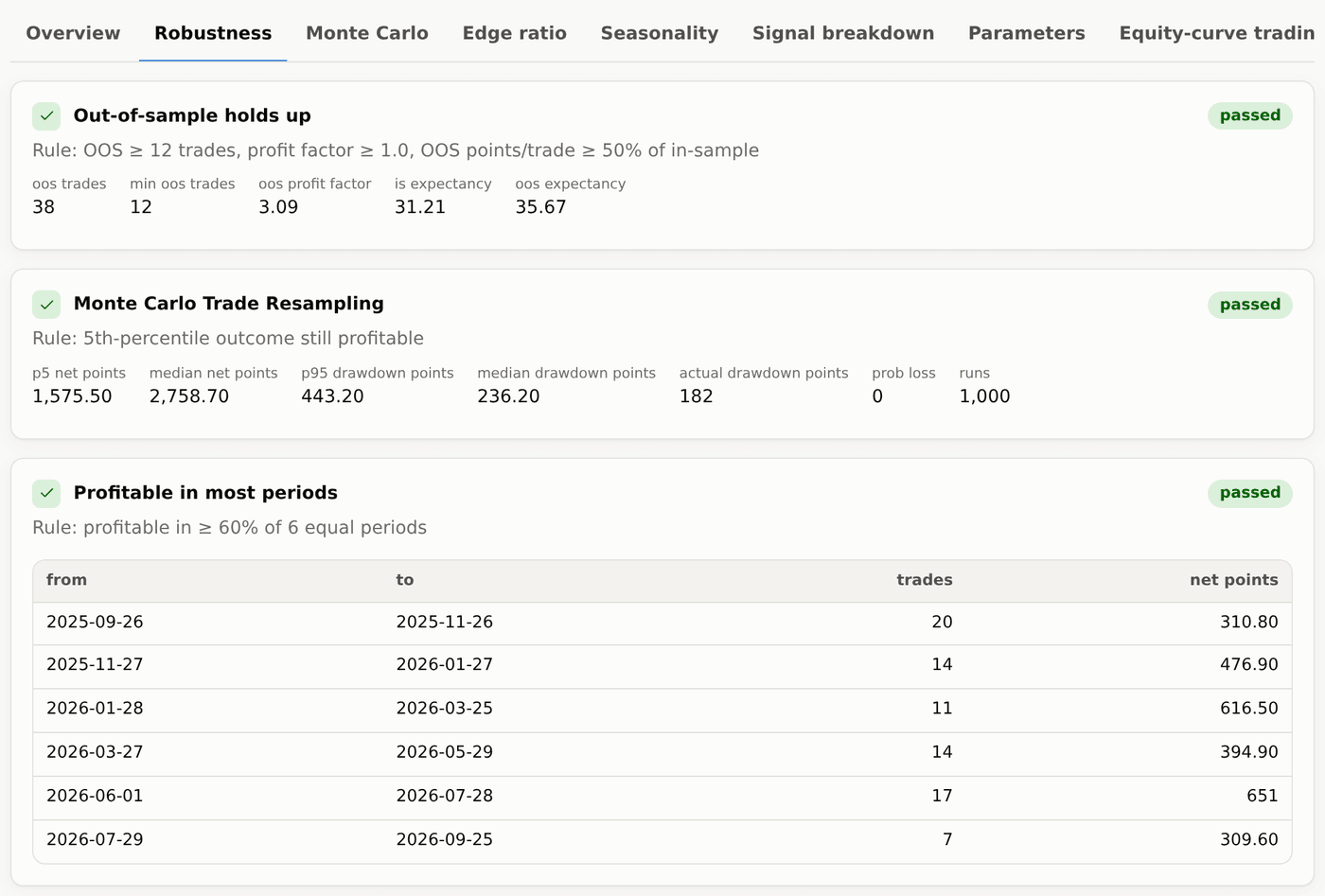
#- Robustness — 8 में से हर test, उसका नतीजा और उसके पीछे के numbers.
- Monte Carlo — उन्हीं trades के कई उलट-पलट क्रम, अच्छी और बुरी किस्मत की range, और कम win rate के साथ एक variance test.
- Edge ratio — trade के पक्ष में price कितना चला बनाम ख़िलाफ़, random entries से तुलना करके.
- Seasonality — expiry से कितने दिन पहले (expiry day, expiry − 1, − 2, …), महीने, entry के घंटे और साल के हिसाब से profit.
- Signal breakdown — हर entry rule अकेले कितना योगदान देता है.
- Parameters — आसपास की settings के heat-maps: बड़ा हरा इलाका अच्छा है, एक अकेला चमकीला बिंदु चेतावनी है.
- Equity-curve trading — अगर strategy की अपनी equity उसके average से नीचे जाते ही आप strategy रोक दें तो क्या होता.
- Options (सिर्फ़ NIFTY) — वही trades असली NIFTY options के prices पर (weekly/monthly, ATM/ITM/OTM), premium stop, target, trailing stop या trail to cost 10%, 20%, 30% या 40% के साथ.
- Trades — हर trade, entry और exit का समय, signal (Long या Short), लगा हुआ order (Buy या Sell, options में जैसे Sell PE), prices, points, ₹ और exit की वजह.
- Code — strategy का code चार formats में, free (Credits और code देखिए).
AI strategy के साथ काम: edit, re-test, save, portfolio
#- Edit & re-test — direction, timeframe, style, fill, entry का समय, square-off, rules (कोई शर्त जोड़िए या हटाइए) या कोई भी exit value बदलिए, फिर Apply and re-test दबाकर तुरंत नए numbers देखिए (हर re-test में 1 credit लगता है; cost ticks या capital बदलना free है). Test on dates से वही strategy दूसरी From / To dates पर चलती है; page पर एक note यह बताता है, और search की dates पर वापस जाने का link भी. यहीं index और उसके options में trade करने के बीच बदल सकते हैं, options ख़रीदना या बेचना चुन सकते हैं, और strike व expiry चुन सकते हैं. Free है. फिर एक सूचना बताती है कि आप edited version देख रहे हैं: Save as new strategy उसे अपने ID के साथ My strategies में रख देता है (search में original बनी रहती है), Undo edits वापस ले जाता है.
- Run robustness tests — इस version पर सारे 8 tests चलाता है: 1 credit.
- Add to portfolio और Save — इसे अपने portfolios में या My strategies में रखिए.
- Get the code — Code tab खोलता है. Strategy ख़रीदने से पहले page पर Save, Run robustness tests और Buy दिखते हैं; edit और portfolio ख़रीदने के बाद खुलते हैं.
TradeBuilder, TradeBots या Investing Terminal में deploy करना
#Strategy खरीदने के बाद Deploy ज्यादातर trading strategies को TradeBuilder, fixed-time straddles और strangles को TradeBots, और investing strategies को Investing Terminal भेजता है। Dialog में destination का नाम दिखता है। उस tool का active paid subscription या Platinum access चाहिए। Trials trading या investing strategy deploy नहीं कर सकते। Strategy खरीदना और execution tool का access अलग हैं।
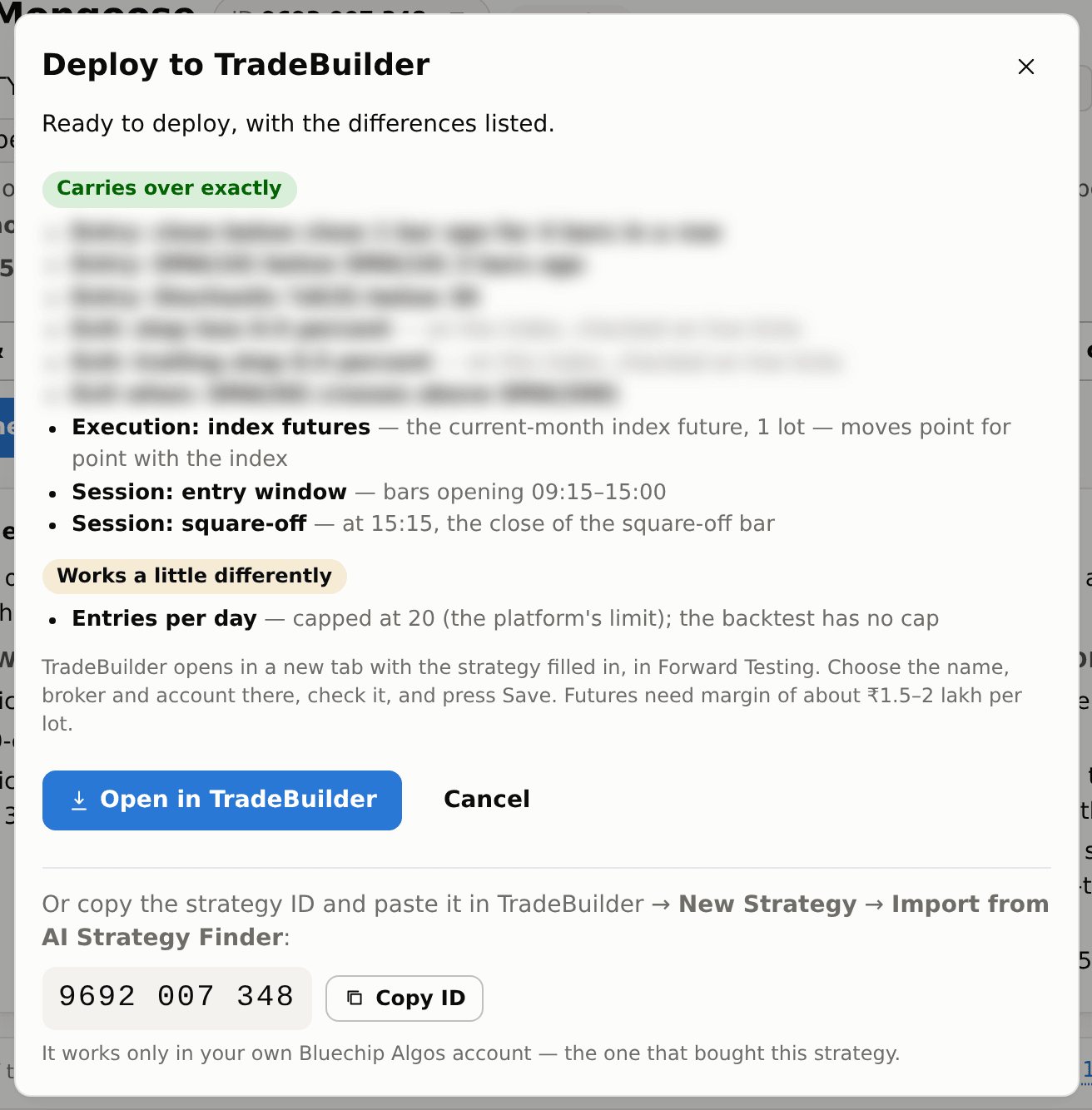
Deploy से Deploy to TradeBuilder (या Deploy to TradeBots) खुलता है, जो strategy का हर हिस्सा तीन lists में दिखाता है: Carries over exactly, Works a little differently (क्या अलग है, वह भी — जैसे entries per day की limit 20 है, और जो strategy signal candle के close पर भरती है वह उसके कुछ seconds बाद entry लेती है) या Not deployable yet. Index strategy इस महीने के index future का 1 lot trade करती है.
Open in TradeBuilder या destination tool के नाम वाला button दबाएँ। नए tab में भरी हुई strategy Forward Testing में खुलती है। Eligible access हो तो sign-in link 60 seconds के अंदर एक बार काम करता है। Name, broker account और Forward Testing या Live चुनें, rules जाँचें, फिर save करें। Trading imports में strategy अपने exits सँभालती है; greyed-out leg exit boxes वैसे ही रहने दें। Investing imports में capital और शुरुआती चुने हुए stocks भी जाँचें।
Code 30 दिन चलता है और सिर्फ़ उस पहले TradeBuilder या TradeBots account के लिए जो उसे इस्तेमाल करे; tool के new-strategy page पर Import from AI Strategy Finder में paste भी कर सकते हैं. और आसान: Deploy window में strategy की ID Copy ID button के साथ दिखती है — वही वहाँ paste कीजिए. यह सिर्फ़ आपके अपने Bluechip Algos account में चलती है, जिसने strategy खरीदी है. एक घंटे में 20 अलग-अलग strategies import हो सकती हैं; वही strategy दोबारा import करना गिना नहीं जाता.
Live results backtest से बिल्कुल नहीं मिलेंगे: असली orders पर खर्च लगता है और fill backtest के prices से थोड़ा हटकर होता है. पहले कुछ दिन Forward Testing में चलाइए.