AI Strategy Finder
AI Strategy Finder के साथ शुरुआत
AI Strategy Finder का AI क्या करता है, इसकी कीमत क्या है और आपकी पहली AI search कैसे चलती है.
हमारा AI क्या करता है?
#ज़्यादातर trading tools मान कर चलते हैं कि आपके पास पहले से एक strategy है. AI Strategy Finder का AI उससे पहले वाला कदम करता है: आपके लिए strategy ढूँढता है. आप एक index और chart timeframe चुनिए, Find strategies दबाइए, और हमारा AI पुराने NIFTY, BANK NIFTY या SENSEX के prices पर हज़ारों rule combinations आज़माकर सीखता है कि कौन से काम करते हैं.
AI सबसे अच्छी strategies रख लेता है, फिर हर एक को 8 robustness tests से गुज़ारा जाता है — ये जाँच उस strategy को पकड़ने के लिए हैं जो सिर्फ़ किस्मत से अच्छी दिखती है. जो strategies सारे 8 tests पास करती हैं, वो आपके results में सबसे ऊपर हरे रंग में दिखती हैं.
हर AI strategy सीधी-सादी होती है: 1 से 3 entry rules जो एक साथ सच होने चाहिए, और उसके exits (stop loss, target, trailing stop वगैरह). हर strategy को आप आसान शब्दों में पढ़ सकते हैं — कोई black box नहीं.
AI किसके लिए है, और किसके लिए नहीं?
#यह उन traders के लिए है जो अंदाज़े की जगह test की हुई, rule-based entries चाहते हैं, और trade करने से पहले strategy को समझने के लिए तैयार हैं.
यह उनके लिए नहीं है जो पक्का profit ढूँढ रहे हैं. जो strategy पहले अच्छा चली, वो आगे loss भी दे सकती है. Tests इसकी संभावना कम करते हैं; इसे नामुमकिन नहीं बना सकते.
AI शुरू करने से पहले क्या चाहिए?
#बहुत कम:
- एक free Bluechip Algos account (नाम, email, mobile). यही email और password Trade Apps में भी चलते हैं; अगर आपका Trade Apps account पहले से है तो उसी से login कीजिए. नए account को email confirm करने पर 1,000 free credits (₹1,000 के बराबर) मिलते हैं; जो पहले से Bluechip Algos के client हैं, उन्हें यहाँ पहली बार login करते ही वही 1,000 credits मिल जाते हैं, कुछ confirm नहीं करना पड़ता.
- Credits: ₹1 में 1 credit मिलता है. हर search बनी हुई हर strategy पर एक credit लेती है, और strategy के rules और code उसे 499 credits में ख़रीदने पर खुलते हैं (Credits and code देखिए).
- और कुछ नहीं — ना broker account, ना data subscription. Price history अंदर ही मौजूद है.
पहली AI search चार कदमों में
#1. Find strategies पर index, chart timeframe और strategy type चुनिए. Dates पहले से पिछले एक साल की भरी होती हैं.
2. Find strategies दबाइए. एक bar में AI is generating strategies… 1 of 200 गिनती बढ़ती दिखेगी, फिर AI is testing strategies for robustness…. आमतौर पर एक minute से कम लगता है; कुछ seconds बाद bar के नीचे एक Did you know? card धीरे से आता है, जिसमें trading की सलाह और features एक-एक करके दिखते हैं.
3. Results अपने आप खुल जाते हैं. ऊपर वाला हरा हिस्सा उन strategies का है जिन्होंने सारे 8 tests पास किए. एक line के नीचे बाकी strategies हैं.
4. किसी भी strategy पर click करके उसकी पूरी report खोलिए. जो पसंद आए उन्हें My strategies में save कीजिए, या किसी portfolio में जोड़िए.
हर search एक snapshot है: उसकी strategies और tests उसकी dates के हिसाब से हैं, जो ऊपर search की details में दिखती हैं. नया data आने पर वहाँ एक highlighted bar आता है, और Search again with the latest data उन्हीं settings से नई search शुरू करता है (किसी भी search की तरह charge: हर बनी strategy पर 1 credit, 200 तक).
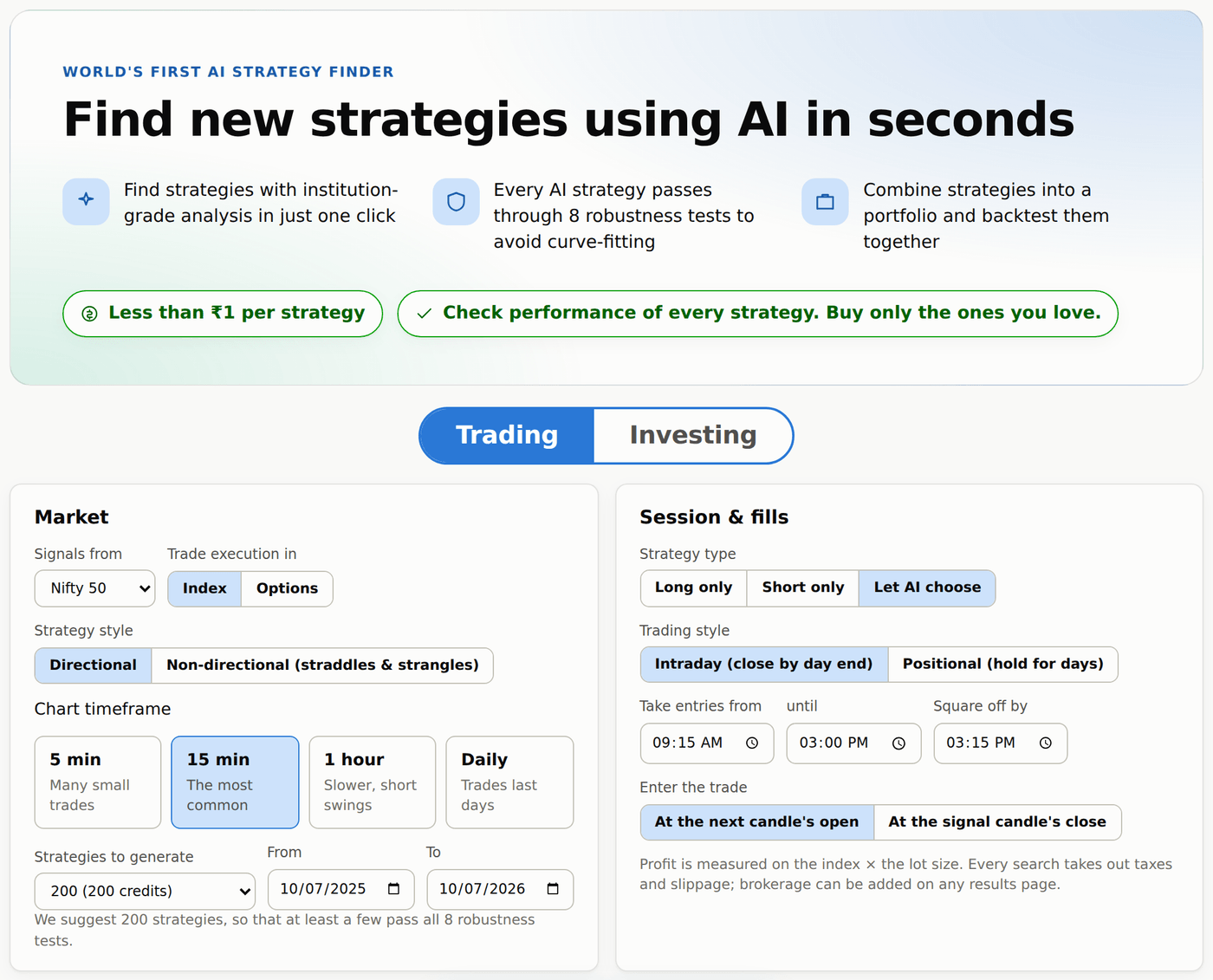
बिना account के AI आज़माना
#Visitors भी Find strategies दबा कर एक search देख सकते हैं — 24 घंटे में 3 searches free; उसके बाद इंतज़ार कीजिए (page बताता है कितना) या free account बनाइए और 1,000 credits free पाइए (₹1,000 के बराबर). सब कुछ दिखता है — profit, drawdown, हर test — सिर्फ़ entry और exit rules धुंधले दिखते हैं. Free account बनाइए (email confirm करने पर 1,000 free credits) और अपनी searches चलाइए. Visitors index, timeframe और strategy type चुन सकते हैं; dates, trading hours और options में trade करने के लिए free account चाहिए.
AI क्या नहीं कर सकता?
#- यह trades नहीं लगाता. यह strategies ढूँढता और test करता है; trade करना आपका फ़ैसला है.
- यह वादा नहीं कर सकता कि strategy आगे भी चलती रहेगी. Market बदलता रहता है.
- Trade execution in: Index में profit index points × lot size पर नापा जाता है. Index को सीधे ख़रीदा नहीं जा सकता, इसलिए असली results अलग होंगे; असली option prices पर trades परखने के लिए Trade execution in: Options चुनिए.