AI Strategy Finder
AI strategies के credits और code
AI की कितनी कीमत है, AI strategy का code कैसे मिलता है, आपका account, और हमसे कैसे बात करें.
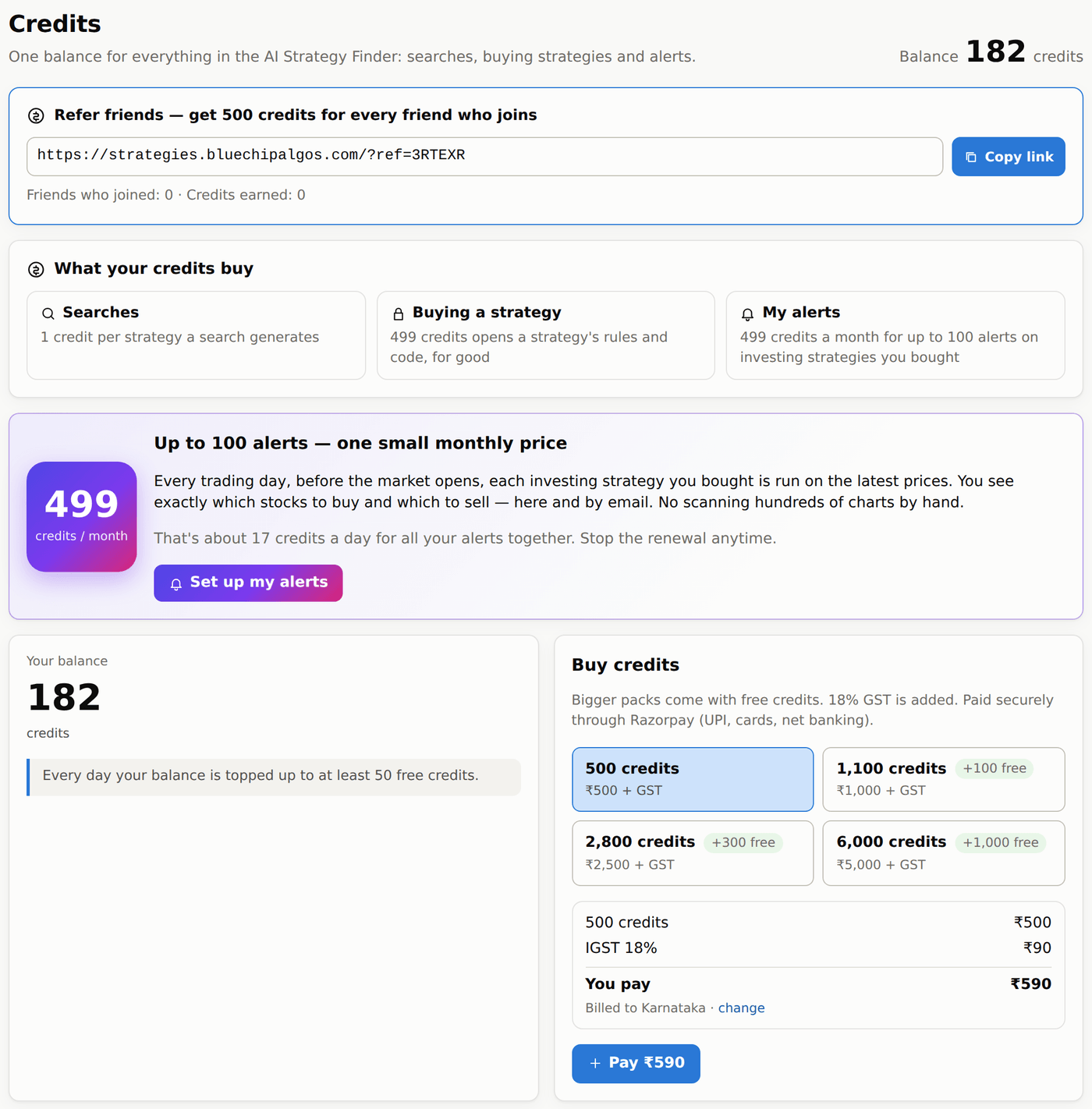
AI के लिए credits
#- एक credit से एक strategy बनती है. जो search 200 strategies बनाती है उसमें 200 credits लगते हैं — चाहे वो tests पास करें या न करें.
- Search शुरू होते ही credits रोक लिए जाते हैं और ख़त्म होने पर हिसाब होता है: कम strategies बनीं तो बाकी credits अपने आप वापस. Restart से रुकी search के सारे credits वापस मिलते हैं.
- Strategy को दोबारा चलाने के भी credits लगते हैं: Apply and re-test या Update to the latest data 1 credit, Run robustness tests 1 credit, portfolio का Run हर tick की हुई strategy का 1 credit, Run all on the latest data हर strategy का 1 credit. Cost ticks, capital या lots बदलना free है. My alerts के हर महीने 499 credits लगते हैं, 100 alerts तक. Searches, strategies और alerts — सब उन्हीं credits से.
- नए accounts को email confirm करने पर 1,000 free credits (₹1,000 के बराबर) मिलते हैं (link welcome email में आता है). Free credits हर व्यक्ति को एक ही बार मिलते हैं: जिस device पर पहले कोई और account बन चुका हो, वहाँ बने नए account को नहीं मिलते (page के ऊपर एक note यह बताता है; ग़लत लगे तो support से संपर्क कीजिए).
- Refer friends (Credits page में सबसे ऊपर): अपना link copy करके share कीजिए. उस link से खुले हर नए account पर, दोस्त के email confirm करते ही आपको 500 credits मिलते हैं; आपके दोस्त को भी अपने 1,000 free credits मिलते हैं.
- हर दिन आपका balance कम से कम 50 free credits तक भर दिया जाता है — चाहे आपने credits ख़रीदे हों या नहीं. Free credits दिन-ब-दिन जुड़ते नहीं: 50 से कम balance फिर से 50 कर दिया जाता है (20 बचे → 30 जुड़ते हैं), और 50 या उससे ज़्यादा balance पर कुछ नहीं जुड़ता. Credits page पर हर top-up Free daily top-up नाम से दिखता है.
- Packs के साथ free credits मिलते हैं: ₹500 = 500 credits, ₹1,000 = 1,100, ₹2,500 = 2,800, ₹5,000 = 6,000. ऊपर से 18% GST लगता है (₹1,000 + ₹180). Telangana के लिए GST CGST 9% + SGST 9% है, बाकी states के लिए IGST 18%. पहली बार page आपका billing address और state पूछता है — ये invoice पर छपते हैं. Razorpay से payment कीजिए (UPI, cards, net banking). Payments में आपके payments हैं, हर एक के साथ GST tax invoice (PDF) का Invoice button; Credit history में आपके balance का हर बदलाव दिखता है.
AI strategy ख़रीदना
#हर search में हर strategy का हर number, chart और robustness test दिखता है — लेकिन entry और exit rules strategy ख़रीदने तक छिपे (धुँधले) रहते हैं. पहले देखिए कि वो कैसी चली; सिर्फ़ वही ख़रीदिए जो पसंद आए.
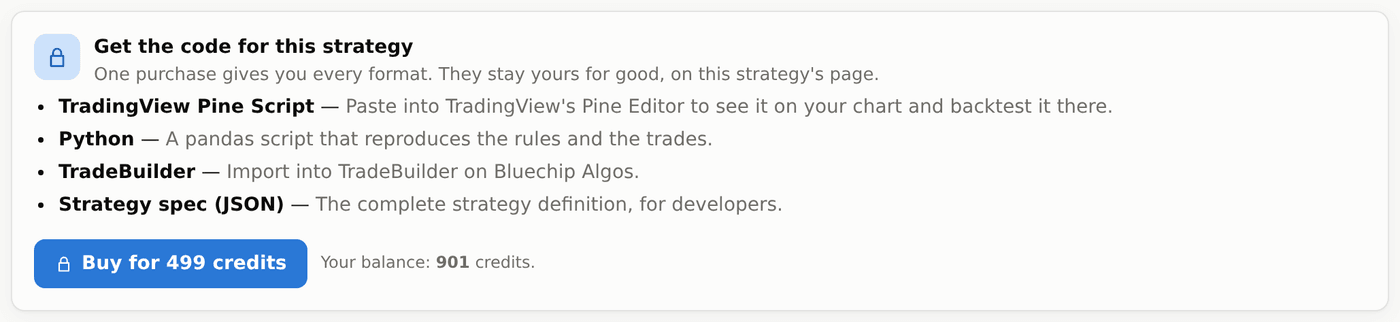
- Buy की कीमत 499 credits है, और इससे rules और चारों formats का code हमेशा के लिए खुल जाता है.
- ख़रीदने से पहले आप strategy को Save कर सकते हैं, नए data तक update कर सकते हैं और उसके robustness tests चला सकते हैं (इनके credits ऊपर लिखे हिसाब से लगते हैं).
- Edit करना, Signal breakdown, Parameters और Options tabs, portfolios और Daily position report ख़रीदने के बाद खुलते हैं, क्योंकि इनमें rules दिखते या इस्तेमाल होते हैं.
AI strategy का code
#Strategy खोलिए और उसके Code tab पर जाइए (या उसकी row पर Code दबाइए). Strategy ख़रीदने के बाद उसका code चारों formats में मिलता है: TradingView Pine (Pine Editor में paste कीजिए), Python, TradeBuilder (Bluechip Algos पर import कीजिए) और JSON (पूरी definition, developers के लिए). Copy कीजिए या download कीजिए.
Code rules के साथ strategy ख़रीदने पर खुलता है (499 credits). अलग-अलग platforms पर results तभी मिलते हैं जब data, session के समय और costs एक जैसे हों.
My account
#नाम, mobile number, billing address और state (ये आपके GST invoice पर छपते हैं), या password बदलने के लिए बाएँ menu में अपने नाम पर click कीजिए. नाम, mobile और password आपके Bluechip Algos account के हैं — ये Trade Apps में भी बदल जाते हैं. Password बदलने पर आपके बाकी devices logout हो जाते हैं. Password भूल गए? Forgot password से Bluechip Algos का email आता है, उसके link से नया password चुनिए.
Contact us
#बाएँ menu में Contact us पर हमारा WhatsApp, +91 93988 40360, और email, [email protected], दोनों हैं — दोनों पर Bluechip Algos की team जवाब देती है. Click करते ही WhatsApp chat या आपका email app खुल जाता है. सवाल किसी एक strategy के बारे में हो तो उसकी 10 अंकों वाली ID ज़रूर लिखिए.