Strategy Automation Tools
Trade Bridge Dashboard
Trade Bridge में dashboard के हिस्से, चलते हुए signals और झटपट नज़र रखने का तरीक़ा.
Overview
#यह section detailed documentation के लिए रखा गया है. इसका stable anchor अभी से available है, ताकि future में app tooltip सीधे यहां link कर सके.
Market Watch
#यह section detailed documentation के लिए रखा गया है. इसका stable anchor अभी से available है, ताकि future में app tooltip सीधे यहां link कर सके.
Global Controls
#यह section detailed documentation के लिए रखा गया है. इसका stable anchor अभी से available है, ताकि future में app tooltip सीधे यहां link कर सके.
MTM Target
#यह section detailed documentation के लिए रखा गया है. इसका stable anchor अभी से available है, ताकि future में app tooltip सीधे यहां link कर सके.
MTM Stop Loss
#यह section detailed documentation के लिए रखा गया है. इसका stable anchor अभी से available है, ताकि future में app tooltip सीधे यहां link कर सके.
Kill Switch
#यह section detailed documentation के लिए रखा गया है. इसका stable anchor अभी से available है, ताकि future में app tooltip सीधे यहां link कर सके.
Dashboard Stats
#यह section detailed documentation के लिए रखा गया है. इसका stable anchor अभी से available है, ताकि future में app tooltip सीधे यहां link कर सके.
Realized, Unrealized, and Net
#यह section detailed documentation के लिए रखा गया है. इसका stable anchor अभी से available है, ताकि future में app tooltip सीधे यहां link कर सके.
MTM Graph — पूरा दिन एक रेखा में
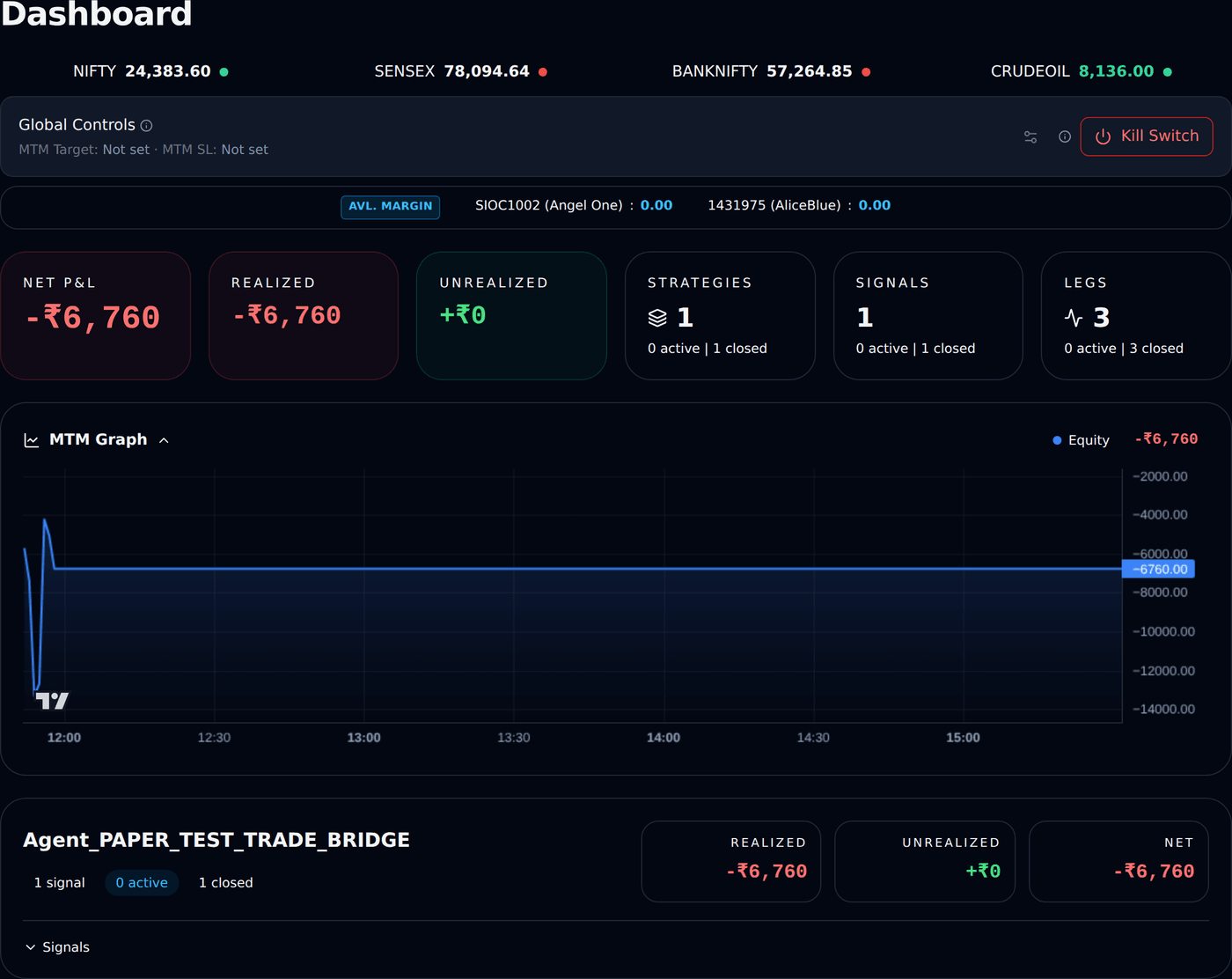
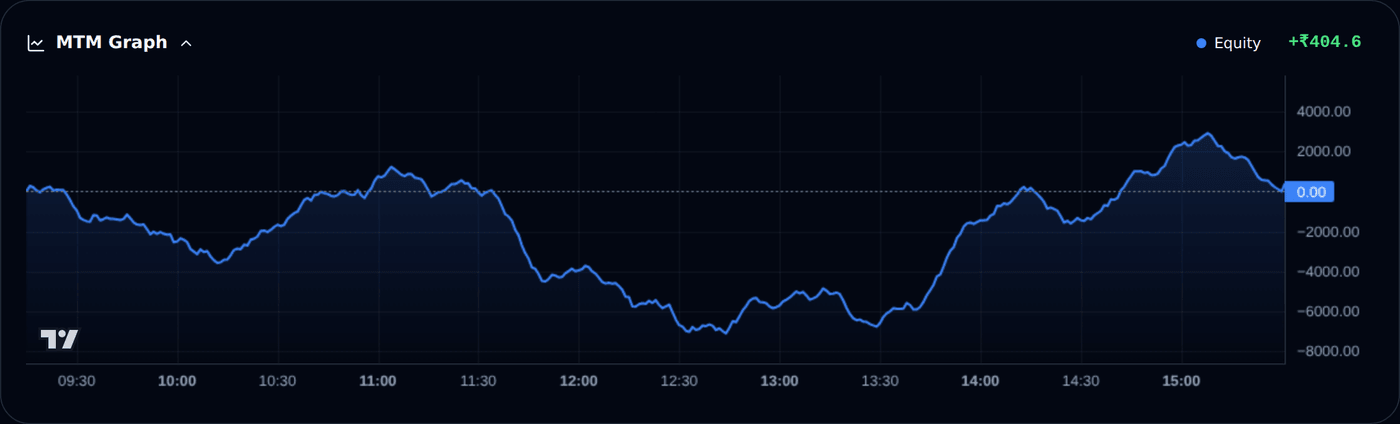
#MTM का मतलब है mark-to-market: आपके trades की इस वक़्त की क़ीमत. MTM Graph आज का चलता हुआ profit-loss एक रेखा की तरह खींचता है, market खुलने से लेकर अभी तक. रेखा बिंदुओं वाली zero रेखा के ऊपर है तो आप आज profit में हैं; नीचे है तो loss में.
यह dashboard पर P&L वाले बॉक्स के ठीक नीचे मिलेगा. जिस दिन आपका कोई trade होता है, card अपने आप खुल जाता है, और छोटे तीर से आप इसे बंद या चालू कर सकते हैं — आपकी पसंद इसी browser पर याद रहती है.
रेखाएँ दो हो सकती हैं. नीली रेखा आपका equity हिस्सा है — NIFTY, BANKNIFTY, SENSEX के options और stocks. Amber (नारंगी) रेखा सिर्फ़ उस दिन दिखती है जिस दिन आप commodities (MCX) में trade करते हैं, क्योंकि उस market की घड़ी अलग है: equity market 3:30 pm पर बंद होते ही नीली रेखा रुक जाती है, जबकि amber रेखा शाम तक चलती रहती है.
एक example देखिए. मान लीजिए आपने 10:15 am पर Rs 100 में एक option ख़रीदा, quantity 65. Price Rs 110 हुआ — रेखा +650 पर चढ़ गई. Price फिसल कर Rs 95 आया — रेखा -325 पर. आपने Rs 110 पर exit किया — 650 का profit book हो गया, तो अब रेखा +650 पर टिकी रहेगी, जब तक कोई और trade उसे न हिलाए.
Graph बग़ल वाले Net P&L बॉक्स से मेल खाता है: इस dashboard पर उसमें इसी app के live और Forward Testing के trades जुड़े होते हैं. रेखा पर कहीं भी mouse ले जाइए (phone पर छूकर रोके रखिए) — उस पल का समय और आँकड़ा दिख जाएगा.
- हर minute एक नया point जुड़ता है; आख़िरी point price के साथ लगभग live चलता है.
- Graph सिर्फ़ आज का है. यह हर रात साफ़ हो जाता है और अगली सुबह नए सिरे से शुरू होता है — पिछले दिन Analytics page पर मिलते हैं.
- हर app का अपना graph है. TradeBots का trade TradeBridge के graph पर नहीं दिखेगा.
- आज कोई trade नहीं हुआ तो card पर "No trading activity yet today" लिखा दिखेगा — यह सामान्य है, कोई गड़बड़ नहीं.
Strategy Card
#यह section detailed documentation के लिए रखा गया है. इसका stable anchor अभी से available है, ताकि future में app tooltip सीधे यहां link कर सके.
Exit Strategy
#यह section detailed documentation के लिए रखा गया है. इसका stable anchor अभी से available है, ताकि future में app tooltip सीधे यहां link कर सके.
Long/Short Signal Section
#यह section detailed documentation के लिए रखा गया है. इसका stable anchor अभी से available है, ताकि future में app tooltip सीधे यहां link कर सके.
Signal Controls (MTM)
#Signal Controls running signal के runtime controls बदलता है, saved strategy template नहीं.
Exact field names हैं Overall Stop Loss (MTM Rs), Overall Target (MTM Rs), Enable Overall Trailing Stop (MTM), Trail Every X (MTM Rs), Trail By Y (MTM Rs), और Trade Type For Running Signal.
Example: दो open legs में Rs 700 profit और Rs 300 profit है. Combined signal MTM Rs 1000 है. अगर Overall Target (MTM Rs) 1000 है तो signal all open legs exit कर सकता है.
Trailing example: Trail Every X (MTM Rs) 1000 और Trail By Y (MTM Rs) 500 है तो signal MTM Rs 1000 profit पर stop Rs 500 improve हो सकता है.
Exit Signal (All Legs)
#यह section detailed documentation के लिए रखा गया है. इसका stable anchor अभी से available है, ताकि future में app tooltip सीधे यहां link कर सके.
Place SL/Tgt
#यह section detailed documentation के लिए रखा गया है. इसका stable anchor अभी से available है, ताकि future में app tooltip सीधे यहां link कर सके.
Unfilled entries are re-placed once at the current price
#यह section detailed documentation के लिए रखा गया है. इसका stable anchor अभी से available है, ताकि future में app tooltip सीधे यहां link कर सके.
When one leg fills and another does not
#यह section detailed documentation के लिए रखा गया है. इसका stable anchor अभी से available है, ताकि future में app tooltip सीधे यहां link कर सके.
Legs Table
#यह section detailed documentation के लिए रखा गया है. इसका stable anchor अभी से available है, ताकि future में app tooltip सीधे यहां link कर सके.
Leg Controls
#Leg Controls leg row के Action column में sliders/settings icon से खुलता है.
Exact field names हैं Stop Loss, Target, Enable Trailing Stop, Trail Every X, Trail By Y, Unit, Enable Trail to Cost, Trigger Value, Auto Exit Time, और Exit Delay (seconds).
BUY example: entry Rs 100, initial SL Rs 90. Stop Loss Points 10 मतलब exit Rs 90. Target Points 30 मतलब target Rs 130.
Enable Trailing Stop ON, Trail Every X 10, Trail By Y 5, Unit Points: price Rs 110 पर SL Rs 95, price Rs 120 पर SL Rs 100. Enable Trail to Cost ON और Trigger Value 20 हो तो price Rs 120 पर SL entry Rs 100 हो जाता है.
Leg Control units
#यह section detailed documentation के लिए रखा गया है. इसका stable anchor अभी से available है, ताकि future में app tooltip सीधे यहां link कर सके.
Exit Leg
#यह section detailed documentation के लिए रखा गया है. इसका stable anchor अभी से available है, ताकि future में app tooltip सीधे यहां link कर सके.
Exited Manually
#यह section detailed documentation के लिए रखा गया है. इसका stable anchor अभी से available है, ताकि future में app tooltip सीधे यहां link कर सके.
Status Values
#यह section detailed documentation के लिए रखा गया है. इसका stable anchor अभी से available है, ताकि future में app tooltip सीधे यहां link कर सके.
Common Dashboard Example
#यह section detailed documentation के लिए रखा गया है. इसका stable anchor अभी से available है, ताकि future में app tooltip सीधे यहां link कर सके.