AI Strategy Backtester
AI Strategy Backtester
AI Strategy Backtester खोलें ↗
हमारा AI आपकी अपनी strategy पढ़ता है — code, शब्द या screenshots — और असली 1-minute prices पर, index या options में, उसका backtest करता है.
AI Strategy Backtester क्या करता है?
#Finder menu से AI Strategy Backtester का अलग portal खोलिए. अपने Bluechip Algos email और password से login कीजिए; नया portal एक बार login माँग सकता है. Credits और saved results उसी account के हैं. अपनी strategy paste कीजिए — TradingView Pine Script, Python या कोई भी code — या शब्दों और screenshots में समझाइए. हमारा AI उसे हमारे backtest engine के लिए दोबारा लिखता है, और कुछ भी charge होने से पहले आप उसकी समझ check करते हैं.
नई strategy के 99 credits backtest करने पर लगते हैं. दूसरी values या dates पर retest के 49 credits हैं. Strategy पढ़वाना और बदलवाना free है. शुरू करने के लिए balance में कम से कम 100 credits चाहिए; ये minimum कटता नहीं है.
TradingView strategy जो कुछ कर सकती है, ये सब test करता है: stop और limit entries, orders cancel करके फिर लगाना, partial exits, trailing stops, एक ही direction में कई entries, दिन में ज़्यादा से ज़्यादा 2 trades जैसे counters, और बड़े timeframe की values. हर order असली 1-minute prices पर fill होता है. उदाहरण देखिए: NIFTY का 09:30 candle 24,180 के high पर बंद हुआ और आपका buy stop high + 10 = 24,190 है; जिस minute में price 24,190 छूता है, उसी minute में fill होता है. अगर एक ही minute में stop loss और target दोनों छू जाएँ, तो stop loss लिया जाता है. इसलिए results TradingView से थोड़े अलग हो सकते हैं, क्योंकि वो candle के अंदर prices का क्रम अंदाज़े से मानता है.
हम NIFTY, BANKNIFTY और SENSEX के January 2023 से prices पर test करते हैं. Profit index points × lot size होता है, या Step 1 में चुना गया option. जिन strategies को stock prices, volume, fixed option strikes या एक साथ कई option legs चाहिए, वो test नहीं हो सकतीं; AI ये साफ़ शब्दों में बताता है और कुछ charge नहीं होता.
Step 1 — AI के लिए scope तय कीजिए
#Index, dates चुनिए, और ये कि हर trade index पर होगा या option में. Options के लिए buy या sell, strike (ATM, या कितने strikes in या out of the money) और weekly या monthly expiry चुनिए. उदाहरण देखिए: NIFTY 24,250 पर है और आप ATM weekly options buy करते हैं — long signal पर 24250 CE और short signal पर 24250 PE खरीदा जाता है. आपकी entries और exits फिर भी index से चलती हैं; profit option की अपनी price से आता है.
Timeframe, trading hours और square-off का समय आपकी strategy से ही आते हैं. अगर code में timeframe नहीं लिखा, तो यहाँ चुना हुआ timeframe लिया जाता है.
Step 2 — AI को strategy समझाइए
#Paste your code पहले से चुना रहता है, साथ में Pine Script, Python, JSON और Other. Source paste कीजिए या file upload कीजिए. हमारा AI आपका code सिर्फ़ पढ़ता है; उसे कभी चलाया नहीं जाता.
Describe your strategy चुनिए, फिर Strategy language में भाषा चुनकर हर line में एक rule लिखिए और चार screenshots तक जोड़िए. English शामिल है और पहले से चुनी रहती है. भारत की 22 official भाषाएँ भी हैं — कुल 23 भाषाएँ. अपनी लिपि, English अक्षरों या English trading terms के साथ लिख सकते हैं. AI उसी भाषा में आपके rules समझाएगा और सवाल पूछेगा. Numbers ज़रूर दीजिए: indicator lengths, levels, stop loss, target और समय.
Understand my strategy दबाइए. अगर आप indicator paste करते हैं — जो signals दिखाता है पर orders नहीं लगाता — तो AI ये बताता है और पूछता है कि उसके कौन से signals पर buy, sell और exit करना है.
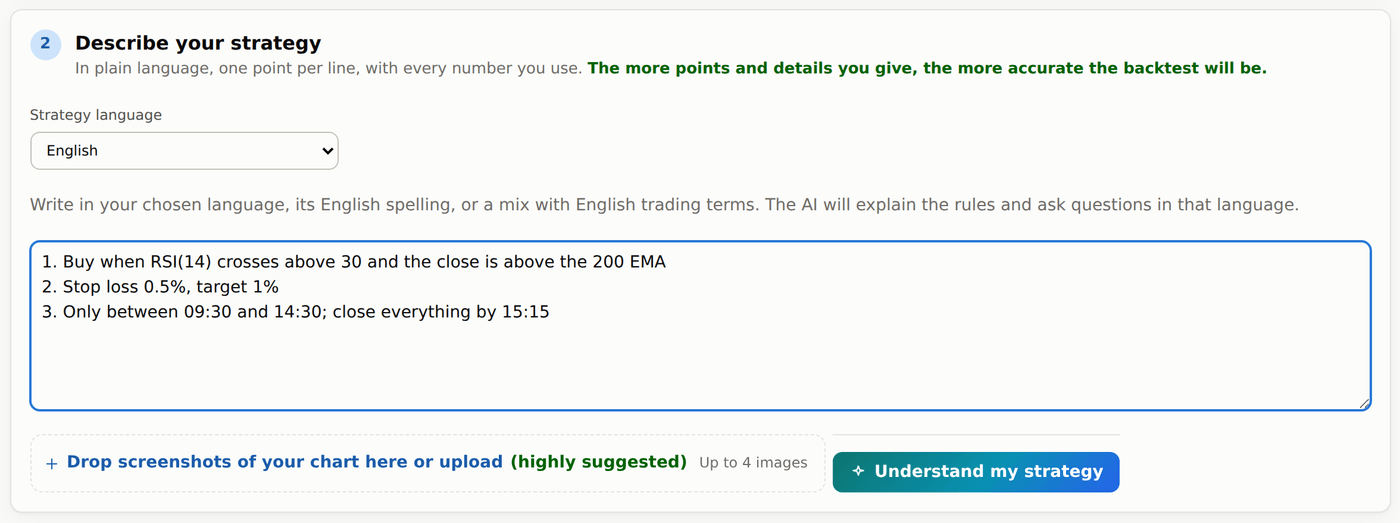
Step 3 — AI की समझ confirm कीजिए और results पाइए
#आपकी strategy आसान शब्दों में दिखती है, और Checked in the code में वो जो हमारे system ने AI की script से खुद पढ़ा: timeframe, order types, indicators और हर input value. We assumed में AI की चुनी हर default लिखी होती है. Pay करने से पहले इन्हें अपनी strategy से मिलाइए.
कुछ साफ़ न हो तो AI numbered questions पूछता है, हर एक के साथ अपना answer box या Yes / No buttons, और आख़िर में Anything else? box. अगर strategy पहले से चल सकती है, तो जवाब देना optional है.
सब सही लगे तो Looks right — backtest it दबाइए और price confirm कीजिए. Run background में चलता है और results अपने आप खुलते हैं: trades, charts, हर महीने के figures और robustness tests. जो test आपकी strategy पर लागू नहीं होता, उसमें कारण दिखता है, pass कभी नहीं.
Results page पर Edit & re-test से strategy की input values और dates 49 credits में बदलती हैं. Rules ही बदलने हों तो Backtester में फिर खोलकर बदलाव लिखिए. इस्तेमाल हुए indicators बदलने के लिए नई strategy चाहिए.
जो run fail हो, उसके credits वापस आते हैं. बिना trades वाले result का मतलब है कि उन dates पर आपके सारे rules कभी एक साथ सही नहीं हुए; page पर ये लिखा आता है.
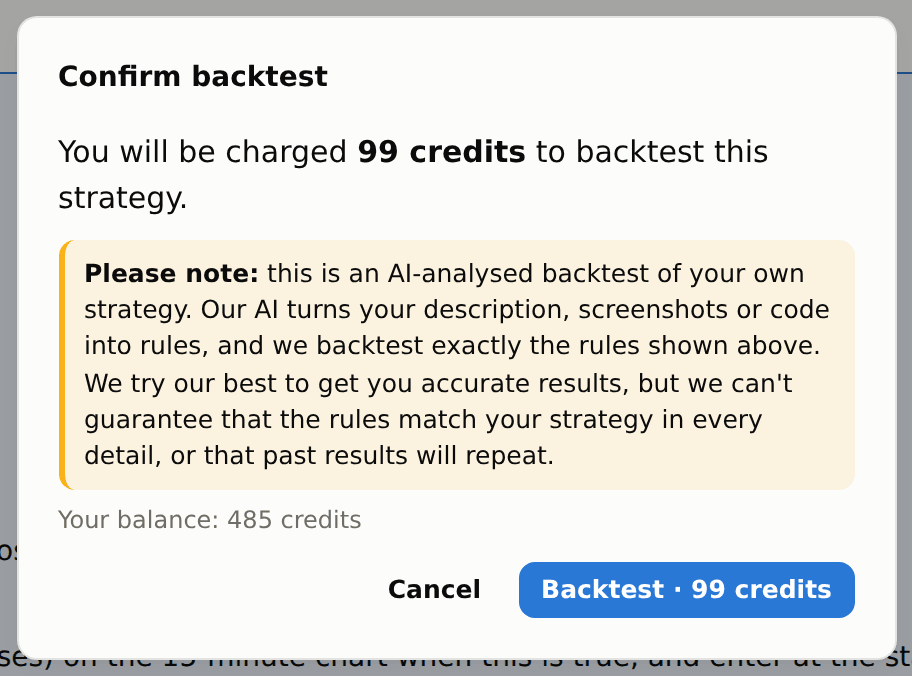
ChatGPT या Claude में Backtester इस्तेमाल करें
#Backtester का MCP connection, ChatGPT या Claude को आपकी अपनी strategy हमारे backtesting engine तक भेजने और results पढ़ने देता है. MCP, chat app और हमारी service के बीच का connection है. यह feature backtesting के लिए है; यह नई strategies नहीं ढूँढता और live trades नहीं करता.
Website की Strategy language list में दिए English और 22 Indian languages में से किसी में भी लिख सकते हैं. Chat में dropdown नहीं है: अपनी भाषा में लिखिए या बताइए कि जवाब किस भाषा में चाहिए, जैसे Explain this in Telugu. अपनी लिपि, Roman typing और English trading terms मिलाकर लिख सकते हैं. भाषा साफ़ न हो तो chat assistant को पूछना चाहिए. आपके अपने शब्द सीधे उसी Backtester model तक पहुँचते हैं, और चुनी भाषा questions व revisions में draft के साथ रहती है. Drafts, quotes और reports chat assistant को बताते हैं कि कौन सी भाषा इस्तेमाल करनी है. English में आए checked facts या errors को वह उसी भाषा में समझाए, लेकिन numbers, indicator names, code और computed results न बदले. अलग translation service या translation charge नहीं है.
Backtester में Connect MCP खोलिए. Connected AI services पर दिखने वाला server URL अपने chat app की custom MCP connection settings में डालिए और OAuth sign-in चुनिए. पूछा जाए तो automatic client registration चुनिए और client ID व secret खाली रखिए. आपके chat app में custom remote MCP connections का support चाहिए; account और workspace की पाबंदियाँ लागू हो सकती हैं. हमारी website पर अपने मौजूदा Bluechip Algos account से sign in कीजिए. अपना password कभी chat में paste मत कीजिए.
Read-only access चुनिए, या strategy पढ़ने और backtests चलाने की permission दीजिए. Run की permission के लिए daily credit ceiling रखिए. उदाहरण के लिए, 200 credits की ceiling होने पर connected services उस दिन 200 credits तक खर्च कर सकती हैं; सभी MCP connections का खर्च साथ गिना जाता है और दिन India time से तय होता है. Zero होने पर सिर्फ free काम चलेगा. Connected AI services पर कभी भी disconnect कर सकते हैं; ceiling बदलने के लिए disconnect करके फिर connect कीजिए.
आम बोलचाल में पूछिए, जैसे: “2025-01-01 से 2025-12-31 तक Nifty की strategy test करें: 20 EMA जब 50 EMA के ऊपर cross करे तो buy, 1% stop और 2% target.” Backtester उसे पढ़कर अपनी checked understanding दिखाता है और जरूरी बात छूटी हो तो पूछता है. Chat में run approve करने से पहले rules, assumptions, market, dates और सही price देखिए. Quote 10 minutes में expire होता है; बदलाव के लिए नया quote चाहिए.
Website और chat का wallet, Backtester prices, minimum balance, refunds और free-mode settings एक ही हैं. अलग MCP subscription या connection fee नहीं है. पूरे हो चुके reports पढ़ना free है; नए या बदले हुए backtests पर दिखाया गया price लगता है. Settings में रखा हो तो strategy पढ़ने का अपना price भी हो सकता है. आपका ChatGPT या Claude plan और उसकी usage limits अलग हैं. Credits हमारी website पर खरीदिए; connection उन्हें नहीं बेचता.
Drawdowns, costs या losing trades के बारे में आगे पूछिए, या पूरे हो चुके runs की तुलना कीजिए. Reports website पर भी खुलते हैं. Failed run के credits wallet में लौटते हैं; सुरक्षा के लिए उसका पहले वाला charge उस दिन की MCP ceiling में फिर भी गिना जाता है. आपकी strategy और माँगे गए results connected AI service को भेजे जाते हैं. पहले version में code text और strategy descriptions हैं; screenshots, raw data downloads, alerts और live orders शामिल नहीं हैं. लंबे run का status फिर check करना पड़ सकता है; chat reply का मतलब background notification की guarantee नहीं है.
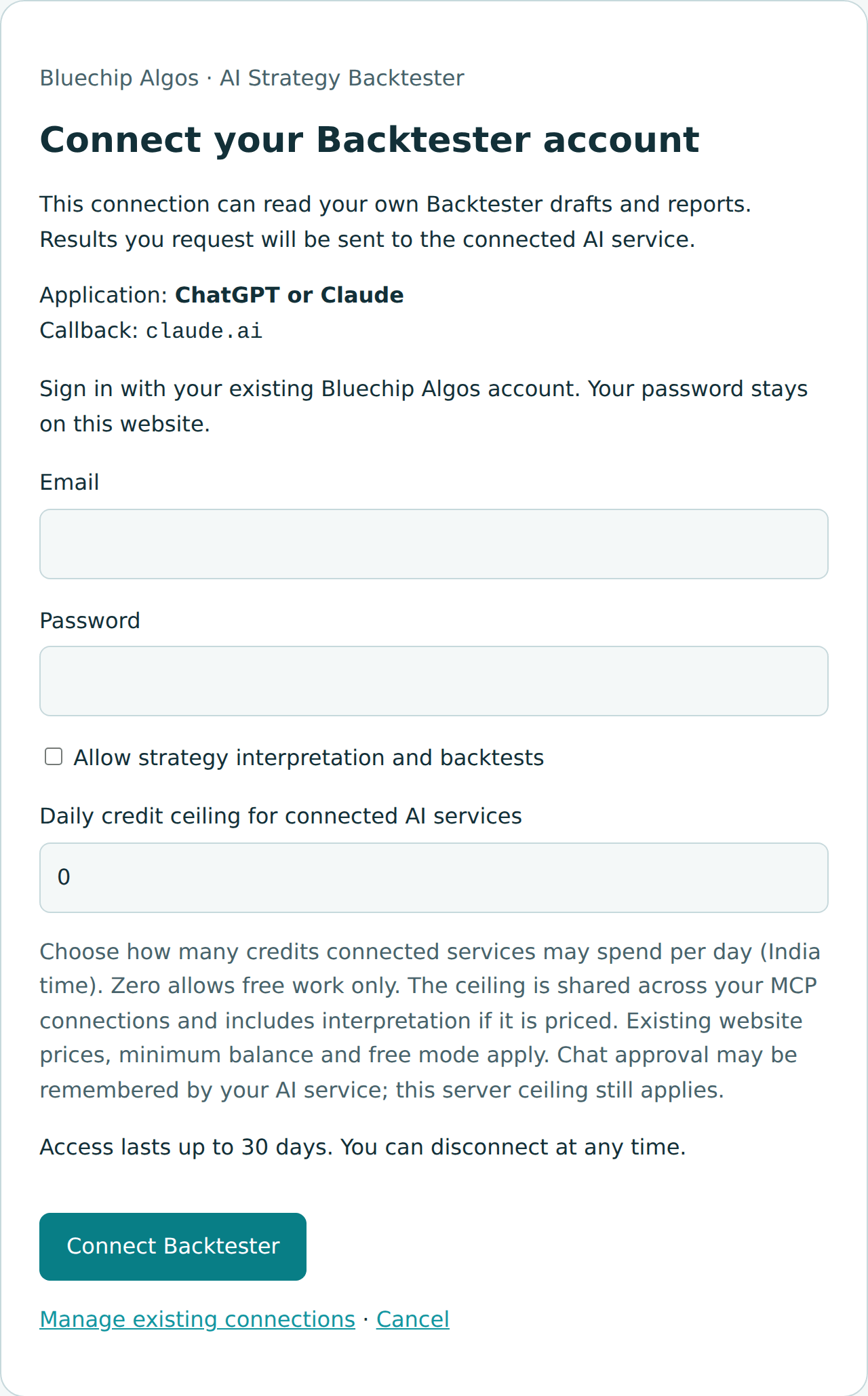
एक-एक कदम करके connect करें
#Backtester में Connect MCP खोलिए. MCP introduction page खुलेगा, जहाँ copy करने के लिए server URL, ChatGPT और Claude के अलग instructions, example prompts और इस guide के links हैं. Manage connections से account sign-in और connected services खुलती हैं. Introduction page बिना sign-in पढ़ सकते हैं; अपने drafts इस्तेमाल करने या backtest चलाने के लिए sign-in चाहिए.
ChatGPT में Plugins खोलिए, plus button दबाइए और Add custom MCP server चुनिए. कुछ accounts में यह Settings → Apps और Developer mode में दिखता है. Backtester server URL डालिए, OAuth और पूछा जाए तो automatic client registration चुनिए, फिर website पर sign in कीजिए. Connection create या install करके tools देखिए और नए chat में उसे चुनिए. मौजूद हो तो @ लिखकर चुन सकते हैं. Menu और access आपके account व workspace पर निर्भर हैं. Official OpenAI setup guide.
Claude में Customize → Connectors, फिर + Add → Add custom connector खोलिए. कुछ versions में Connectors, Settings में मिलता है. Server URL डालिए, Sign in now चुनिए और OAuth client में Register automatically रखिए. Manual credentials और custom request headers खाली छोड़िए. यह release Claude का published identity option support नहीं करता. Website पर sign-in करके connector जोड़िए और chat में + → Connectors से चालू कीजिए. Team workspace में owner को पहले जोड़ना पड़ सकता है. Official Claude setup guide.
Sign in सिर्फ खुलने वाली Bluechip Algos website पर कीजिए. नए backtests के लिए Allow strategy interpretation and backtests tick करके daily credit ceiling चुनिए. उदाहरण के लिए 200 होने पर सभी connections मिलाकर India-time day में 200 credits तक gross spending कर सकते हैं. Ceiling 0 हो तो सिर्फ free काम चलेगा. Read-only से पुराने reports पढ़ सकते हैं, strategy बना या बदल नहीं सकते.
MCP के लिए अलग monthly Backtester subscription ज़रूरी नहीं है. Backtester free mode चालू हो तो signed-in user zero credits से run कर सकता है. Charging चालू हो तो सामान्य minimum balance और quoted charges लगते हैं; free mode administrator की setting है, chat assistant इसे bypass नहीं कर सकता. Chat app का अपना plan, custom-connection access और usage limits अलग हैं.
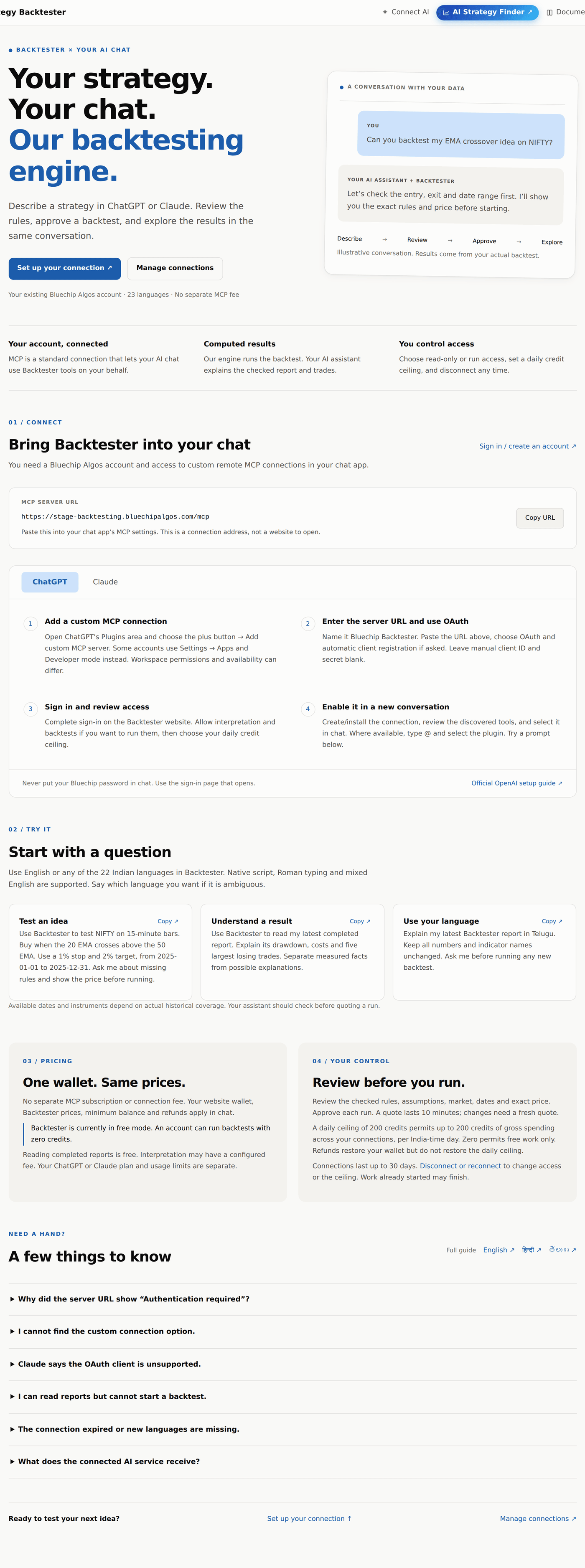
MCP errors और पहला chat
#Server URL खोलने पर Authentication required या invalid_token दिखे तो आपने connection endpoint सीधे खोला है. उस address को chat app की MCP settings में डालकर OAuth sign-in पूरा कीजिए. Normal browser में /mcp अब introduction page खोलता है. Valid token के बिना protocol request पर authentication error आएगा; यह आपके account की सुरक्षा है.
Custom connection option न मिले तो chat app की मौजूदा official guide और workspace permissions देखिए. Claude में unsupported OAuth client आए तो Register automatically चुनकर connector फिर जोड़िए. Reports पढ़ सकते हैं लेकिन run नहीं कर सकते तो Manage connections पर run permission, wallet balance और daily ceiling देखिए. Access या ceiling बदलने के लिए disconnect करके फिर connect कीजिए.
Chat में यह लिखकर देखिए: Use Backtester to test NIFTY on 15-minute bars. Buy when the 20 EMA crosses above the 50 EMA, use a 1% stop and 2% target, from 2025-01-01 to 2025-12-31. Ask me about missing rules and show the exact price before running. Assistant को पहले available history और अधूरे rules check करने चाहिए. Example की dates होने का मतलब coverage की guarantee नहीं है.
Run पूरा हो जाए तो पूछिए: Explain the drawdown, costs and five largest losing trades in my latest Backtester report. Separate measured facts from possible explanations. भाषा बदलने के लिए कहिए Explain this in Telugu. नए या बदले run के लिए fresh quote और आपकी approval चाहिए; पुराने report के बारे में पूछने से नया computation शुरू नहीं होता.
Connection expire हो तो tools refresh कीजिए या reconnect करके नया chat खोलिए. Access 30 days तक रहता है; account changes या revoke होने पर पहले भी बंद हो सकता है. Run queued या running हो तो दोबारा submit करने के बजाय status पूछिए. लंबे run का status बाद में फिर पूछना पड़ सकता है; automatic background notifications का वादा नहीं है.