AI Strategy Finder
My alerts
499 credits महीने में 100 तक alerts: हर trading day, market खुलने से पहले, देखिए कि आपकी ख़रीदी हर investing strategy क्या ख़रीदती और बेचती है.
Alerts क्या करते हैं?
#Investing strategy अपने rules बता देती है, लेकिन उसे हाथ से follow करने का मतलब है हर दिन सैकड़ों stocks देखना. Alerts ये checking आपके लिए करते हैं. हर trading day, market खुलने से पहले, आपका हर alert latest prices पर चलता है और आपको साफ़ दिखता है कि कौन से stocks ख़रीदने हैं और कौन से बेचने हैं — left menu के My alerts page पर और एक email में.
Alert आपकी ख़रीदी हुई investing strategy के लिए होता है. ये strategy के अपने portfolio को follow करता है, ठीक वैसे जैसे उसका page चलाता है, उन dates की शुरुआत से जिन पर वो मिली थी. जैसे, एक बार में 10 stocks रखने वाली strategy उस दिन बताती है Buy TITAN at the next open, 10% of the portfolio जिस दिन वो TITAN ख़रीदती, और ये भी बताती है कि कब वो कोई stock next open पर बेचती है या दिन में stop loss या target पर.
Plan: 499 credits महीने में 100 तक alerts
#एक छोटी सी कीमत में सब कुछ: 30 दिन के 499 credits, चाहे जितने alerts हों, 100 alerts तक. यानी सारे alerts मिलाकर लगभग 17 credits रोज़. इसे My alerts पर शुरू कीजिए.
हर 30 दिन में ये आपके credit balance से अपने आप renew होता है. Renewal के दिन balance कम हो तो आपके alerts रुक जाते हैं और हम आपको email करते हैं; credits डालिए और Resume दबाइए. Stop renewal से renewal बंद होता है — आपके alerts paid दिन ख़त्म होने तक चलते रहते हैं.
Plan उन्हीं credits से चलता है जिनसे आप search करते हैं और strategies ख़रीदते हैं. Credits Credits page पर ख़रीदिए.
Alert जोड़िए
#हर investing strategy पर एक bell (घंटी) button है — results list की row में और strategy के page पर (Create alert). जब तक आप strategy नहीं ख़रीदते, bell दबाने पर पहले उसे ख़रीदने (या login करने) को कहती है, क्योंकि alert ठीक वही दिखाता है जो उसके rules ख़रीदते और बेचते हैं.
ख़रीदी हुई strategy पर bell दबाइए: My alerts खुलता है और पूछता है Create an alert for strategy …? Create alert दबाइए. आप strategy की 10 अंकों की ID My alerts पर Add an alert में paste भी कर सकते हैं.
Alerts कब और कहाँ आते हैं: email और Telegram
#Checks सुबह 07:30 बजे, Tuesday से Saturday चलते हैं, पिछले trading day के close पर — दिन की final prices शाम के बाद आती हैं, इसलिए सुबह पहली बार वो पूरी मिलती हैं. Alerts 09:15 के open से पहले आपके पास पहुँच जाते हैं, और सिर्फ़ उन दिनों जब कुछ बदला हो.
Email सबसे ऊपर एक line से शुरू होता है जो बताती है कि आपकी कौन सी strategies ने market scan किया, फिर हर strategy की एक छोटी table — Stock, Action, Reason. Action के नीचे bracket में लिखा होता है कि कब: Buy (at the next open), Exit (at the next open), time limit के लिए Exit (at the next close), या trailing stop ऊपर खिसके तो Move stop-loss (before the next open). Buy के reason में stop-loss और target भी आपकी buy price के percentage में लिखे होते हैं, ताकि ख़रीदते ही आप उन्हें लगा सकें. दिन के बीच hit हुआ stop loss या target Exited (on 8 Oct, during the day) दिखता है.
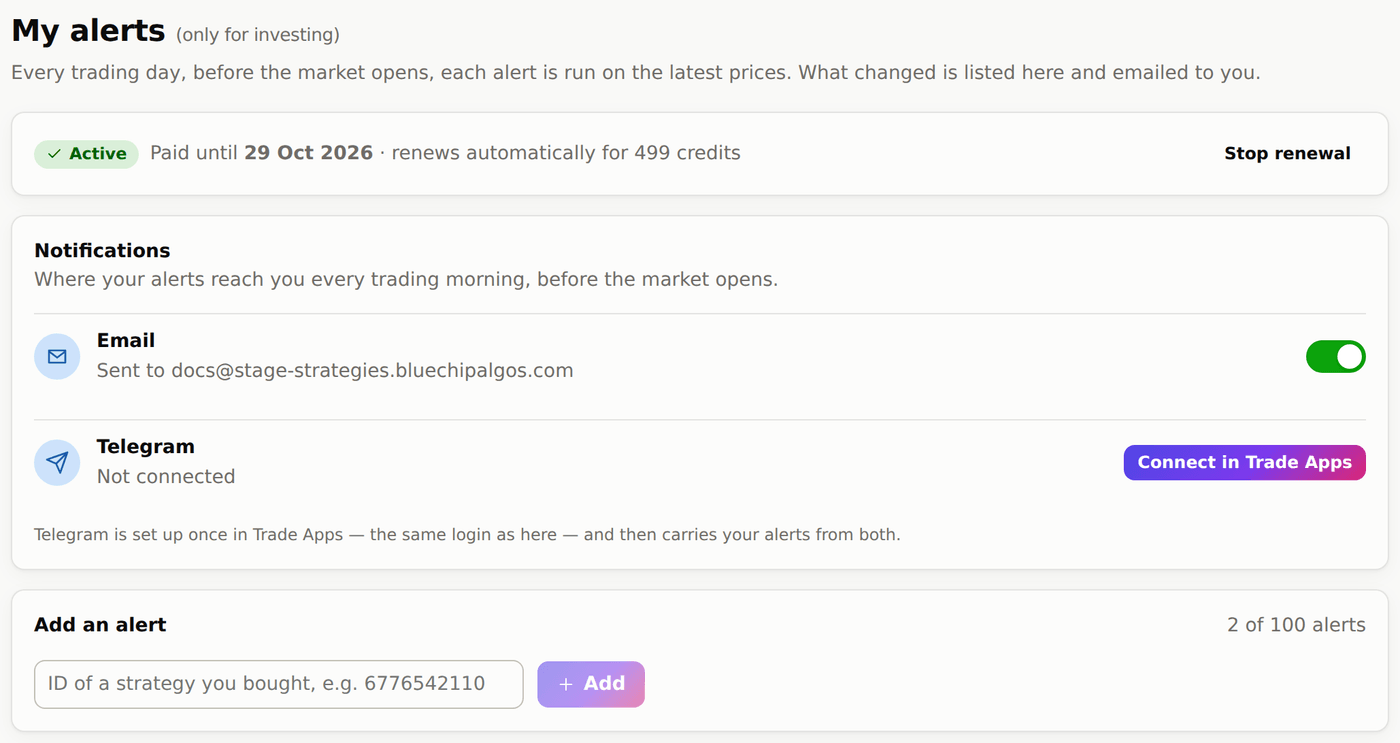
My alerts पर Notifications card तय करता है कि alerts आप तक कहाँ पहुँचें. Email default में on है और आपके login email पर जाता है; इसे बंद कीजिए, या किसी भी alert email के नीचे Unsubscribe दबाइए, तो emails रुक जाते हैं — आपके alerts चलते रहते हैं और My alerts पर दिखते रहते हैं. Telegram यही alerts आपके phone पर भेजता है: Connect in Trade Apps दबाइए, Trade Apps पहले से logged in होकर अपनी Telegram settings पर खुलता है. वहाँ एक बार connect कीजिए — वही Bluechip Algos login है — फिर Telegram दोनों के alerts लाता है.
My alerts page
#सबसे ऊपर plan: कब renew होगा, या उसे शुरू करने का button. Plan active हो तो Notifications card (email और Telegram). फिर Add an alert, फिर आपके alerts की list — हर एक में अभी कितने stocks हैं, आख़िरी बार कब check हुआ, और नाम बदलने, रोकने या हटाने के buttons. कोई alert रोकने या हटाने से महीने की कीमत नहीं बदलती.
Scanned stocks में latest check का नतीजा है: next open के buys और sells, और दिन में लगे stops या targets. Alert history में हर पुराना alert रहता है. आपके पास जो stocks असल में हैं वो strategy से अलग हो सकते हैं — जो stock आपके पास नहीं है उसका sell alert छोड़ दीजिए.