AI Strategy Finder
An AI strategy's page
The full report of one AI strategy, tab by tab.
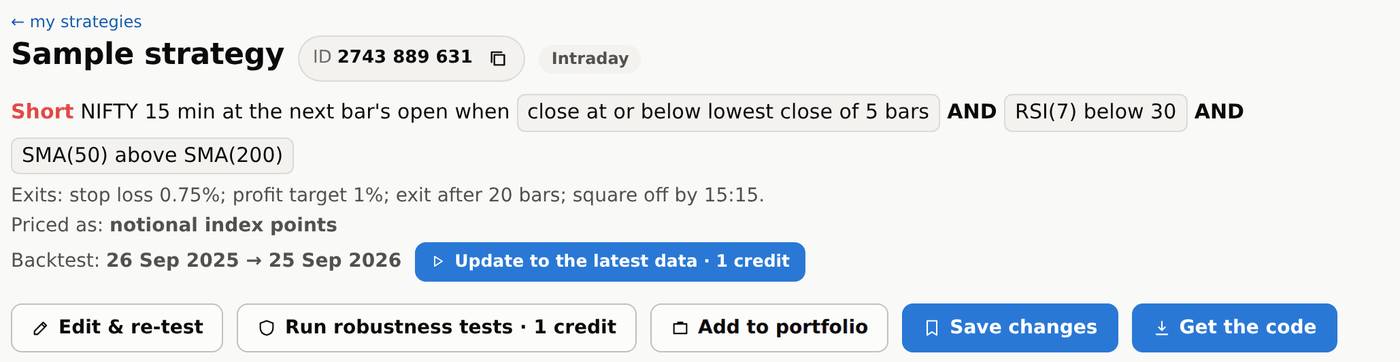
The AI's rules at the top
#The top of the page shows the strategy's name, its 10-digit ID (use it when you talk to support), whether it is intraday or positional, and its rules: when to go long or short, and every exit. Every number on the page uses the dates of the search that found it.
Under the rules, the Backtest line shows the dates the numbers cover. They are the dates of the search that found it and never move forward by themselves. When newer data exists, an Update to the latest data button appears beside it: it re-tests the strategy up to today (1 credit) and the page keeps those dates from then on. Paid runs like this start as soon as you press them; only buying a strategy and searching again ask first.
The AI's rules in simple words
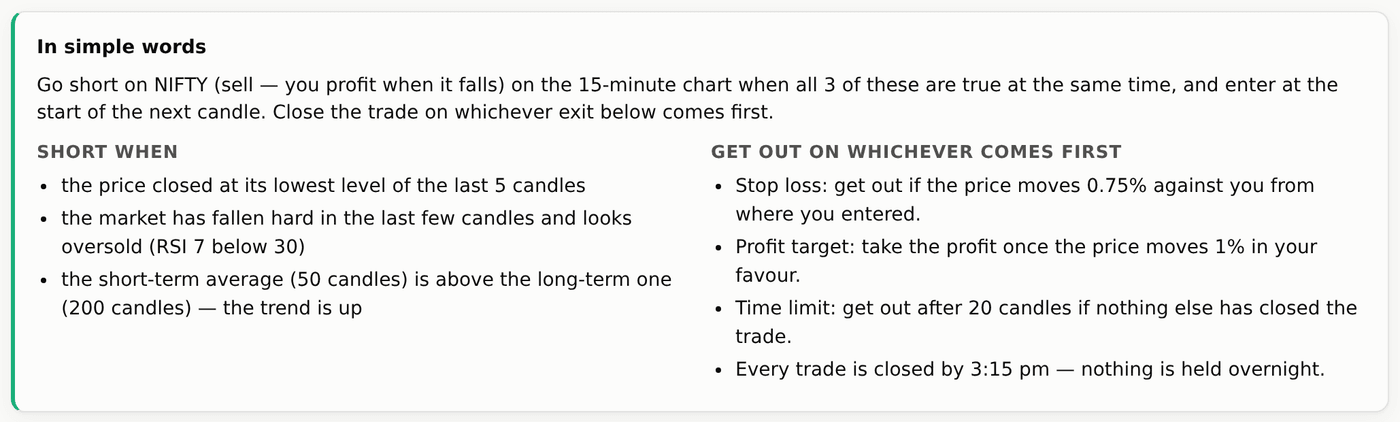
#Once you have bought a strategy, the same rules explained like you would to a friend: when to enter, and a list of the ways to get out — whichever comes first. For a Long + Short strategy there are two lists: Long when and Short when. We say long and short for the signal, and buy and sell only for the order actually placed — the Order column of the trades shows it (Buy or Sell on the index, for example Buy CE or Sell PE in options).
How the AI's exits work, with numbers?
#Say NIFTY is at 24,000 when you buy. A stop loss of 0.5% is 120 points: the trade closes at 23,880. A profit target of 1% is 240 points: it closes at 24,240.
A trailing stop of 0.5% moves the stop up by 120 points every time the trade gains another 120 points: at 24,120 the stop goes to 24,000, at 24,240 to 24,120. Trail to cost instead moves the stop to your entry price (24,000) once the trade is up by the chosen amount, so it can no longer lose.
Exits are checked on 1-minute prices, so if one 15-minute candle touches both the target and the stop, the one reached first is the one that counts.
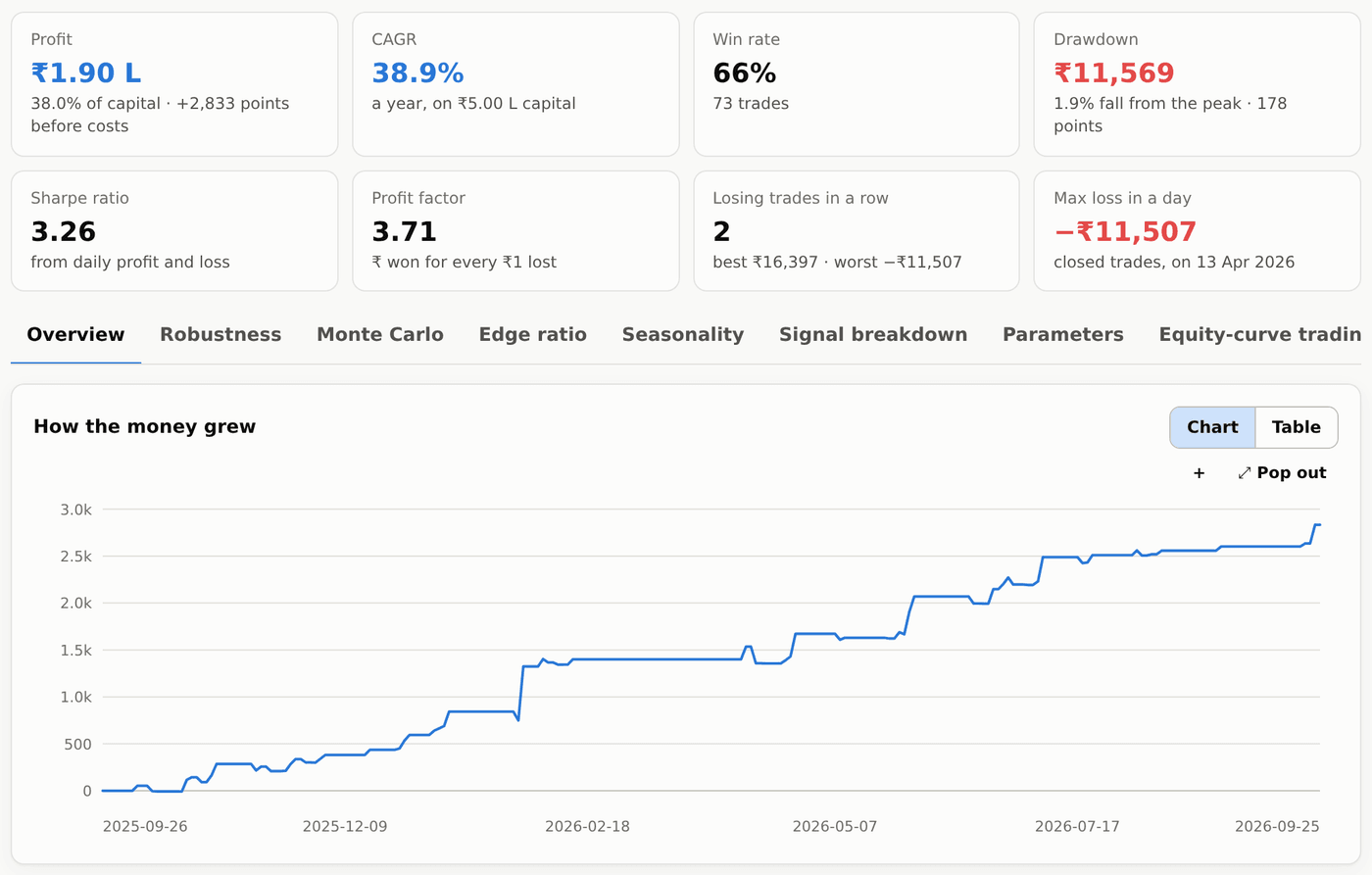
An AI strategy's summary tiles and Overview
#Eight cards, the same on every strategy and every portfolio: Profit (₹, and % of the starting capital), CAGR (the yearly growth rate on that capital), Win rate, Drawdown (the biggest fall from a high, in ₹ and as % of the account at that high), Sharpe ratio, Profit factor, Losing trades in a row and Max loss in a day (closed trades only). Profit in ₹ is points × the lot size of the time.
Overview holds the equity curve (how the profit grew), the robustness verdict, a full performance report with a month-by-month table, and the reasons trades closed (stop, target, trailing stop, time, day end…).
The cost ticks work here exactly like on the results page. The report also asks for your starting capital to show returns in %. It starts at ₹2,00,000 for index strategies (they trade one lot of the index future, whose margin is about that), ₹50,000 for buying options and ₹2,00,000 for selling options; a change is remembered for that kind of strategy.
The other tabs on an AI strategy
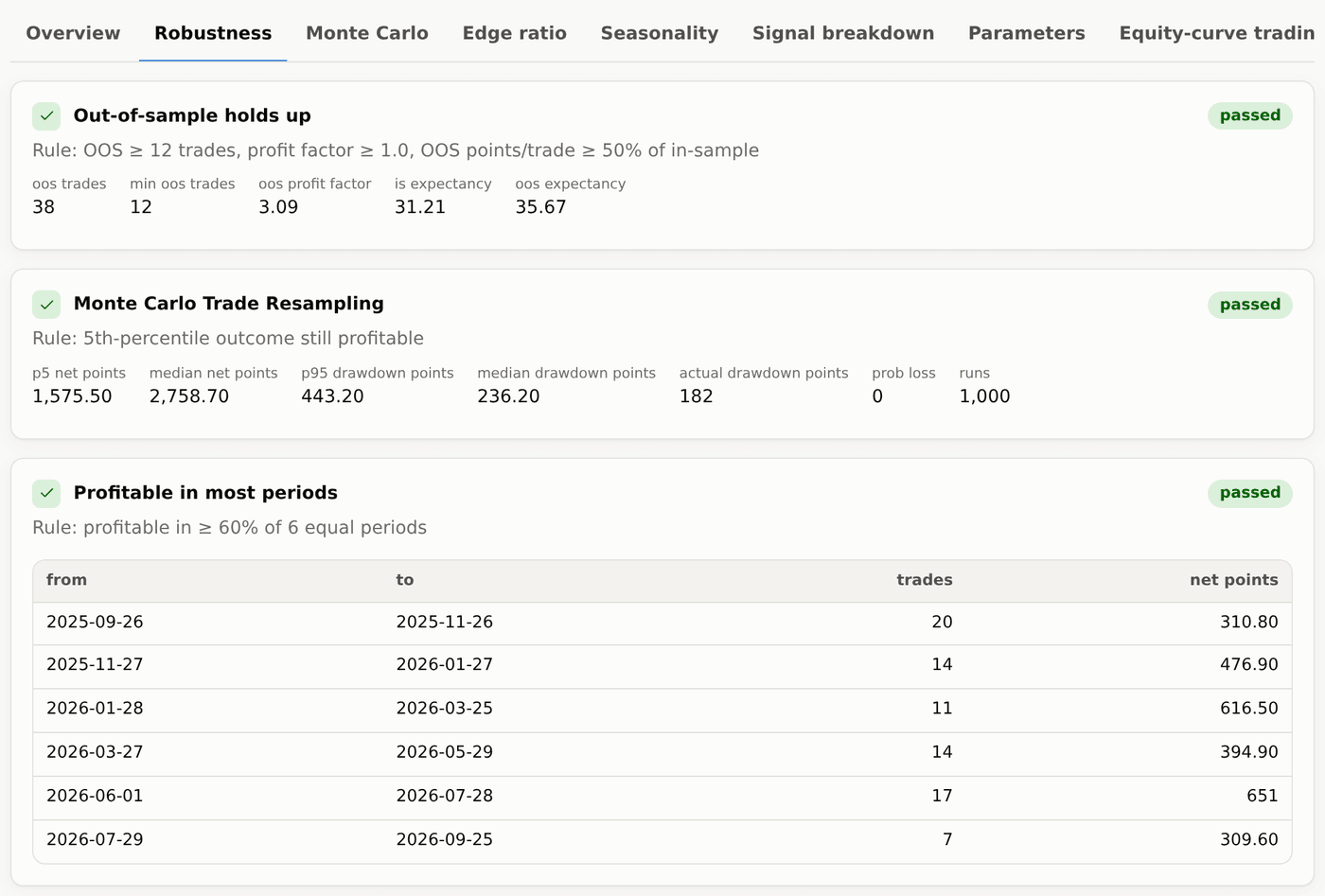
#- Robustness — each of the 8 tests with its result and the numbers behind it.
- Monte Carlo — the same trades in many reshuffled orders, showing the range of good and bad luck, and a variance test with a lower win rate.
- Edge ratio — how far price moved in the trade's favour versus against it, compared with random entries.
- Seasonality — profit by days to expiry (expiry day, expiry − 1, − 2, …), month, entry hour and year.
- Signal breakdown — how each entry rule on its own contributes.
- Parameters — heat-maps of nearby settings: a broad green area is good, a single bright spot is a warning.
- Equity-curve trading — what would happen if you paused the strategy whenever its own equity fell below its average.
- Options (NIFTY only) — the same trades priced as real NIFTY options (weekly/monthly, ATM/ITM/OTM), with a premium stop, target, trailing stop or trail to cost of 10%, 20%, 30% or 40%.
- Trades — every trade with entry and exit time, the signal (Long or Short), the order placed (Buy or Sell, or for example Sell PE in options), prices, points, ₹ and the exit reason.
- Code — the strategy's code in four formats, free (see Credits and code).
Working with an AI strategy: edit, re-test, save, portfolio
#- Edit & re-test — change the direction, timeframe, style, fill, entry window, square-off, the rules (add or remove a condition) or any exit value, then Apply and re-test to see the new numbers instantly (each re-test uses 1 credit; changing the cost ticks or the capital is free). Test on dates runs the same strategy on other From / To dates; a note on the page says so, with a link back to the search's dates. You can also switch between trading the index and trading its options, buy or sell the options, and pick the strike and expiry. Free. A notice then says you are looking at an edited version: Save as new strategy keeps it in My strategies with its own ID (the search keeps the original), Undo edits goes back.
- Run robustness tests — runs all 8 tests on this version: 1 credit.
- Add to portfolio and Save — keep it in your portfolios or in My strategies.
- Get the code — opens the Code tab. Before you buy a strategy the page shows Save, Run robustness tests and Buy; editing and portfolios open once you buy it.
Deploying to TradeBuilder, TradeBots or Investing Terminal
#After buying a strategy, Deploy sends most trading strategies to TradeBuilder, fixed-time straddles and strangles to TradeBots, and investing strategies to Investing Terminal. The dialog names the destination. You need an active paid subscription for that tool or Platinum access. Trials cannot deploy trading or investing strategies. Buying the strategy and access to the execution tool are separate.
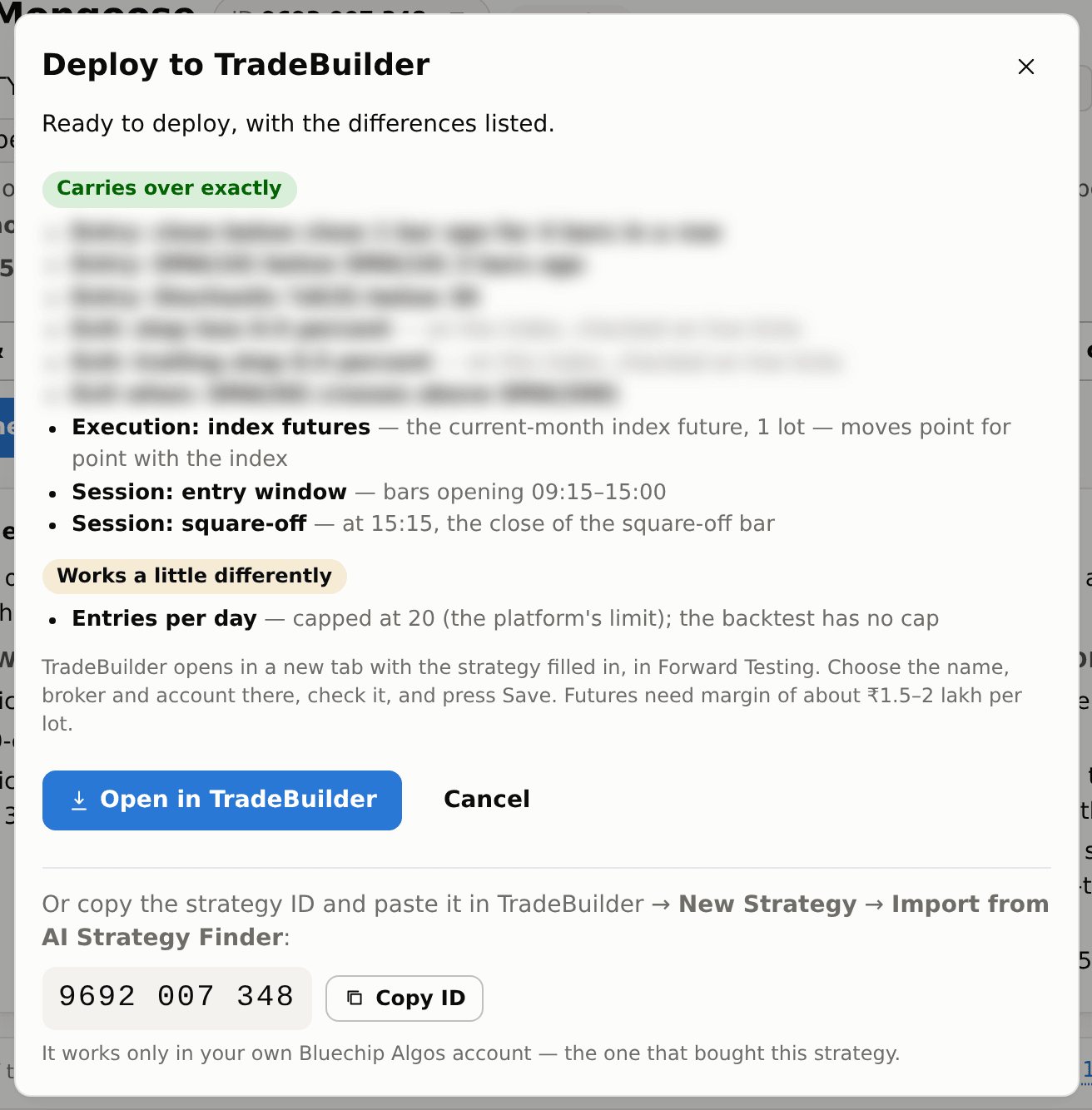
Deploy opens Deploy to TradeBuilder (or Deploy to TradeBots), which lists every part of the strategy under Carries over exactly, Works a little differently (with what differs — for example entries per day are capped at 20, and a strategy that fills at the signal candle's close enters a few seconds after it) or Not deployable yet. An index strategy trades 1 lot of the current-month index future.
Press Open in TradeBuilder or the button naming the destination tool. It opens a new tab with the strategy filled in, in Forward Testing. With eligible access, the sign-in link works once within 60 seconds. Choose the name, broker account and Forward Testing or Live, check the rules, then save. For trading imports, the strategy manages its own exits; leave the greyed-out leg exit boxes alone. For investing imports, also review capital and selected starting stocks.
The code works for 30 days and only for the first TradeBuilder or TradeBots account that uses it; you can also paste it into Import from AI Strategy Finder on the tool's new-strategy page. Simpler: the Deploy window shows the strategy's ID with a Copy ID button — paste that there instead. It works only in your own Bluechip Algos account, the one that bought the strategy. Up to 20 different strategies can be imported in an hour; importing the same one again does not count.
Live results will not match the backtest exactly: real orders pay costs and fill a little away from the backtest's prices. Run it in Forward Testing for a few days first.