Strategy Automation Tools
Opening Range Breakout
Trade the break of the first hour’s high or low — explained in plain words, with real numbers and a picture of the actual screen.
What is an opening range breakout?
#In the first hour of the day the market often moves inside a band. It goes up a bit, down a bit, and stays between two prices. That band is called the opening range.
Many traders wait for the price to break out of that band. The idea is simple: while the price stays inside the band nobody is in charge, and when it finally closes above the top of the band the buyers have won.
Trade Builder can watch this for you and place the trade the moment it happens. You do not have to sit and stare at the chart.
A real example with real numbers
#Say it is Monday and you are watching NIFTY. Between 09:15 and 10:15 the highest price NIFTY touches is 24,180 and the lowest is 24,060.
So your opening range is 24,060 at the bottom and 24,180 at the top. The band is 120 points wide.
Now you tell Trade Builder: buy when a 5-minute candle closes above 24,180. You do not type 24,180 anywhere — you choose Opening range (breakout) and Range high, and the platform works out the number itself, every day, on its own.
At 11:20 a 5-minute candle closes at 24,196. That is above 24,180, so the rule is true and your buy is placed.
If instead the candle had closed at 24,175, nothing would happen. 24,175 is below 24,180. The rule waits.
How to build it, click by click?
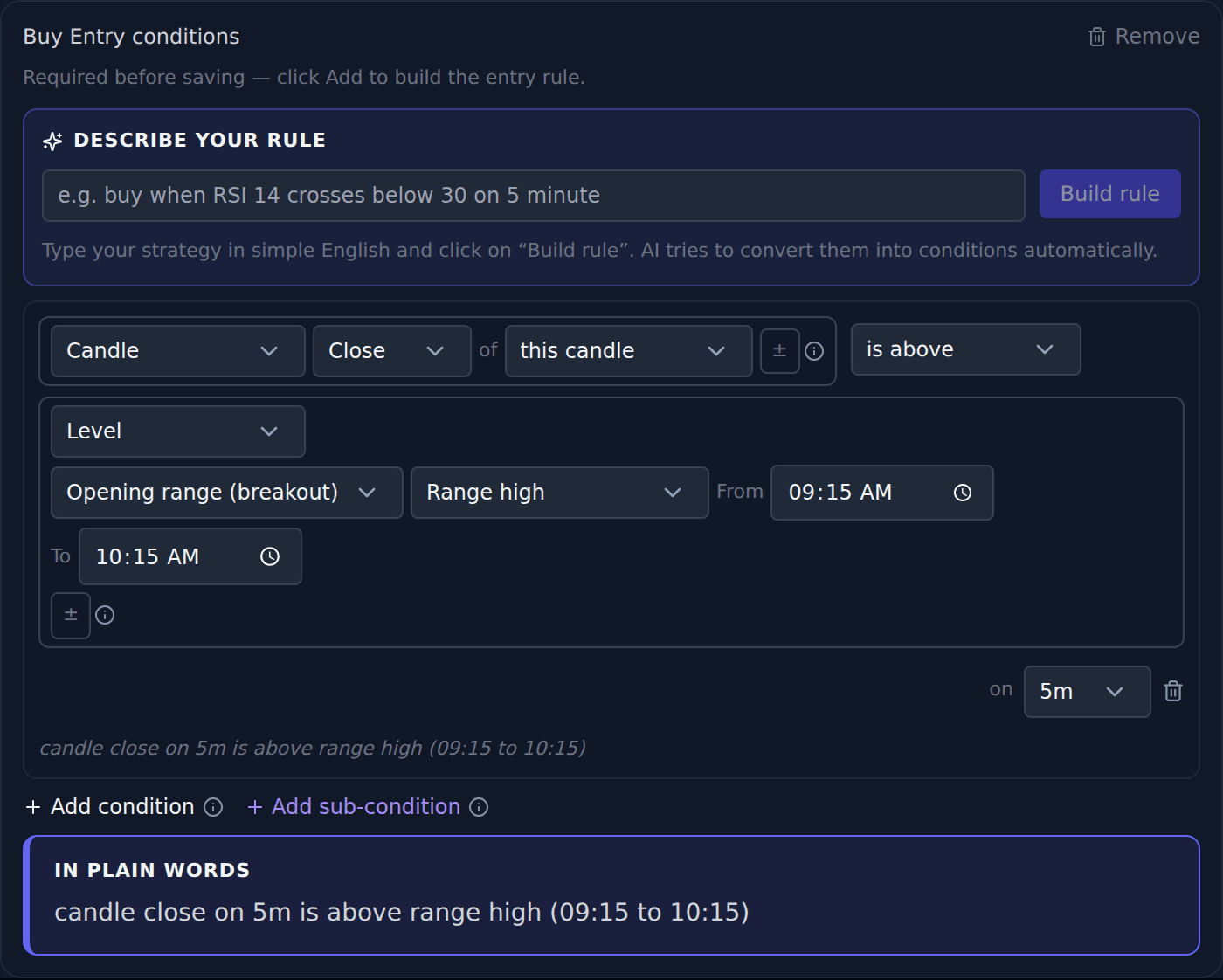
#Open Trade Builder, click New strategy, and choose NIFTY. Then add a Buy Entry condition and set the four dropdowns to match the picture below.
Read the grey sentence under the row. It says exactly what your rule does, in plain words. If that sentence does not say what you meant, the rule is wrong — fix it before you save.
- Left side: choose Candle, then Close. This is the price at the end of each candle.
- Middle: choose is above. Not "crosses above" — see the warning below.
- Right side: choose Level, then Opening range (breakout), then Range high.
- Times: leave From 09:15 and To 10:15 for the first hour, or change them to 09:30 and 10:30 if that is your style.
- Timeframe: choose 5m on the right. This decides which candle has to close above the band.
Nothing can happen before 10:15 — and that is correct
#This surprises people, so it is worth saying plainly. Between 09:15 and 10:15 the band is still being formed. It has no final top yet.
During that hour the platform treats the rule as not ready and will not enter a trade, even if the price looks like it is breaking out. Your first possible entry is the first 5-minute candle that closes after 10:15.
This is on purpose. A candle inside the first hour is part of the band — its own high may be the top of the band. Letting it "break out" of a band it is building would be meaningless, and would enter you into trades at random.
Use "is above", not "crosses above"
#crosses above is true only on the one single candle where the price moves from below the line to above it. If your platform is busy at that exact moment, or the price gaps over the line, you miss the trade completely.
is above is true on every candle while the price stays above the line. If the first chance is missed, the next candle still works.
For a breakout, is above is almost always what you want.
Stopping small fake breakouts
#Sometimes the price pokes one rupee above the band and falls straight back. That is a fake breakout, and it costs money.
Click the small ± button on the right-hand side and add a margin. Set Percent and 0.05, and the rule now needs the price to close 0.05% above the band, not merely touch it.
On a band top of 24,180, a 0.05% margin means the candle must close above 24,192 — about 12 points of real movement. Small fake pokes are ignored; genuine breakouts still pass.
Taking only the first breakout
#A band can be broken, fall back, and be broken again, three or four times in a day. Most traders only want the first one.
Set Max entries per day to 1 in the strategy settings. After the first entry, the rest of the day is ignored.
The other direction
#To trade a fall instead of a rise, build the mirror image: Candle Close is below, Opening range (breakout), Range low.
Using the same day above, that means a 5-minute candle closing below 24,060.
You can put both in one strategy — the buy rule in the Buy Entry block and the sell rule in the Sell Entry block. Whichever happens first is the trade you get.
Where people usually go wrong?
#These four cover nearly every support question about breakout rules.
- "My strategy never triggers." Read the grey sentence under the condition row. Nine times out of ten it says something different from what you meant.
- "It did nothing all morning." That is correct behaviour before 10:15. The band is not finished.
- Using "crosses above". One missed candle and the whole day is gone. Use is above.
- Too many trades. Set Max entries per day to 1, or add a ± margin so tiny pokes are ignored.