Discretionary Trading Tools
Trade Disc Automation
Write down what you would press and when — a level, a move, a P&L, a premium gap — and the platform exits or shifts the legs for you.
A rule that adjusts your legs for you
#Everything else in Trade Disc happens when you press a button. Automation is the one page where you write down what you WOULD press, and when, and the platform presses it for you while you watch something else.
A rule is one sentence, filled in from left to right: When something happens in the market → take these legs → do this → once or again. All four steps are on the page from the moment it opens, so you can see what a whole rule asks for before you touch anything; the ones you have not reached yet are greyed out, with a line saying what opens them. The finished sentence reads back in plain words above the Save button, so you can check it says what you meant.
Rules live in the book you made them in. A Forward Testing rule only ever touches Forward Testing legs, and a Live rule only Live legs. They are kept on the server, so closing the browser does not lose them, and they stay until you delete them or they finish.
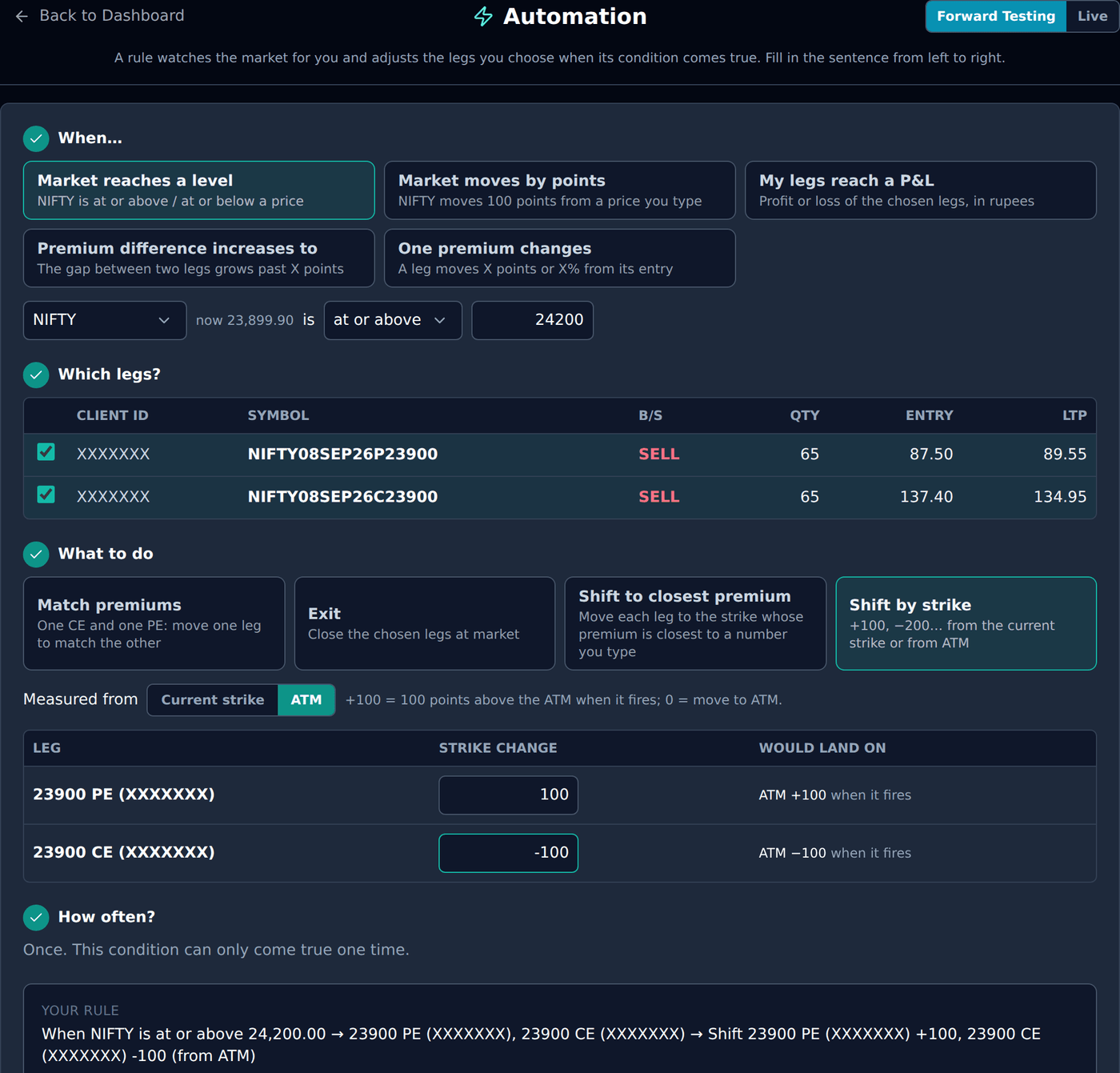
When… the five conditions
#Pick one. Each one watches a different thing.
- Market reaches a level — NIFTY (or another index or commodity) is at or above or at or below a price you type. On CROSS this is a touch: the moment a live price is on the far side of your number, it counts. On CLOSE it waits for a candle to finish there — see CROSS or CLOSE.
- Market moves by points — the index moves X points up, down or either way from a reference price you type. Press use current to put the live price in the box. This one takes CROSS or CLOSE too.
- My legs reach a P&L — the profit or the loss of the legs you choose, in rupees, booked plus open. Fill in one box or both.
- Premium difference increases to — the gap between two legs’ premiums grows past X points. This needs exactly two legs.
- One premium changes — one leg’s premium moves X points or X% from its entry price, up, down or either way. This watches exactly one leg.
CROSS or CLOSE
#The two conditions that watch the index — Market reaches a level and Market moves by points — ask one more thing: should the rule act the moment the price touches your number, or only when a candle finishes there?
CROSS is the original behaviour and stays the default. The instant a live price is on the far side of your number, the rule acts. A spike that comes straight back still counts, because for that one tick your number really was reached.
CLOSE waits. The rule looks only at finished candles and reads the closing price of each one. A wick through your level does nothing at all; the price has to still be there when the candle ends. Pick the candle you want beside it — 1m, 3m, 5m, 15m or 1h.
These are the same candles TradeBuilder uses, straight from the broker, so CLOSE is offered for NIFTY, BANKNIFTY and SENSEX. We do not keep candles for CRUDEOIL, CRUDEOILMINI or NATURALGAS, so on those the choice does not appear and the condition works on CROSS as it always has.
Two things worth knowing. A CLOSE rule can sit and do nothing while the price is visibly past your level — that is the point of it, and the rule’s own line shows the last close it read. And after the market shuts, or if the candle feed stops, a CLOSE rule reports that it is waiting rather than acting on a stale candle from earlier.
- Use CROSS when you want out the moment the level is touched, however briefly — a stop-loss-like rule.
- Use CLOSE when a level only means something if it holds — you do not want to be shifted out by one fast wick and back.
Which legs?
#Every condition can be picked whatever your book looks like — four legs open, ten, it makes no difference to which conditions are offered. The count is checked here instead, at the moment you pick the legs. Premium difference increases to takes exactly two legs and One premium changes exactly one; click a leg beyond that number and the page tells you so and keeps what you already picked, rather than quietly swapping one out.
The table lists the legs that are open right now in this book, on the accounts chosen in Configuration. Tick the ones the rule should act on. A rule cannot be saved with no legs; if nothing is open, this step says Open a position first and points you to the dashboard, and the rest of the page stays so you can still read your saved rules. Logged out, the page shows a sample straddle so you can try the sentence — Save asks you to login and connect a broker.
Your saved rules are listed underneath the form, under Your rules, with the book they belong to. That list only appears once you have at least one rule; until then there is nothing to show, so the page ends with the form.
If a chosen leg is shifted to another strike — by another rule, or by the shift buttons on the dashboard — the rule follows it onto the new strike and says so in its message. If a chosen leg is genuinely closed when the rule fires — you exited it by hand, a stop loss took it, a global exit or the Kill Switch closed the book — the WHOLE rule is cancelled, and the message names the leg. Nothing half-fires on a position that changed underneath it.
What to do… the four actions?
#Every shift is the same exit-then-re-enter the Adjustments buttons do: the exit is placed, the platform waits for it to FILL, then re-enters the same side and quantity at the new strike. BUY legs go before SELL legs. Beside each leg the page shows Would land on — the strike it would move to if the rule fired right now. A shift from ATM reads ATM +100 when it fires instead, because the ATM it uses is the one at that moment, not today’s.
A leg that would land on the strike it is already at is left where it is, and the rule says so.
- Match premiums — for one CE and one PE. It is offered first when your two legs are one CE and one PE, and greyed out at the end otherwise.
- Exit Positions — closes the chosen legs at market, the same way Exit All does.
- Shift to closest premium — a premium for each leg. The leg moves to the strike on its own side whose live premium is closest to your number.
- Shift by strike — a number for each leg in strike points: +100, −200, or 0. You choose ONE base for the whole rule. Current strike means +100 is 100 points higher than the leg is now, and 0 leaves that leg alone. ATM means +100 is 100 points above the at-the-money strike at the moment the rule fires, and 0 moves the leg to the ATM. Either way the number is snapped to a strike that is really listed.
- How Match premiums works — for one CE and one PE. When it fires, the platform looks at the two live premiums and moves one leg to the strike whose premium matches the other’s: either the lower-premium leg moves up to match the higher one, or the higher-premium leg moves out to match the lower one.
Once, or again and again
#Most rules fire once and are done. Three conditions can sensibly come true more than once, and only when the action is a shift: Market moves by points, Premium difference increases to and One premium changes. For those the page offers Again and again, with a box for how many times at most.
- Market moves by points — after it fires, the next X points are counted from the price where it fired. A rule set to 100 points from 24,250 fires at 24,350, then again at 24,450, then again at 24,550.
- Premium difference increases to — after it fires, the gap has to come back under your number and then open past it again before it counts as a new event.
- One premium changes — after it fires, the next change is counted from the premium where it fired.
- After a shift, a recurring rule follows the legs onto their new strikes, so it keeps watching the position you actually hold.
One example of each, in plain words
#Every condition and every action below has a small example you can picture. They all use the same position so the differences are easy to see: you have sold a NIFTY straddle at 24,250 — one 24250 CE at ₹100 and one 24250 PE at ₹100 — with NIFTY sitting at 24,250.
A rule is always one condition plus one action, so any example from the first list joins any example from the second. Pick the one that watches the thing you care about, then the one that does what you would have done by hand.
Example — Market reaches a level
#You are comfortable while NIFTY stays where it is, but if it runs to 24,500 your sold CE starts to hurt and you want out of the whole thing.
The rule: When NIFTY is at or above 24,500 → 24250 CE, 24250 PE → Exit Positions.
On CROSS, the first tick that prints 24,500 closes both legs. On CLOSE with a 5m candle, NIFTY can touch 24,505 at 11:02 and fall back to 24,480 by 11:05 and nothing happens — the rule only acts if a 5-minute candle actually closes at or above 24,500.
This one fires once and is done. There is no repeat: a level, once reached, does not un-reach itself.
Example — Market moves by points
#You do not care which way NIFTY goes, only that it has travelled far enough that your straddle is no longer centred on the market.
The rule: When NIFTY moves up or down 100 points from 24,250 → 24250 CE, 24250 PE → Shift by strike, 0 from ATM · up to 3 times.
NIFTY reaches 24,350. Both legs are closed and re-sold at 24350, the new at-the-money. The rule now counts its next 100 points from 24,350, and it is watching the two new legs. If NIFTY comes back to 24,250 it fires again and the legs move back. A third fire finishes it.
Press use current to drop the live price into the reference box rather than typing it.
Example — My legs reach a P&L
#You want the straddle taken off the table at a profit you would be happy with, or before a bad day gets worse.
The rule: When the P&L of these legs reaches profit ₹5,000 or loss ₹8,000 → 24250 CE, 24250 PE → Exit Positions.
The figure is booked plus open, in rupees, across the legs you picked — not per leg. So if the CE is ₹3,000 down and the PE is ₹8,000 up, the rule sees ₹5,000 and fires.
Fill in one box or both. Leaving the loss box empty is a perfectly good rule that only takes profit.
Example — Exit Positions
#The simplest action: close the legs you picked, at market, exactly as the Exit All button does.
The rule: When the P&L of these legs reaches profit ₹5,000 → 24250 CE, 24250 PE → Exit Positions.
Both legs are closed. BUY legs are sent before SELL legs, so a hedge is never lifted before the position it protects.
Exit never repeats — there is nothing left to act on afterwards — so the repeat choice is not offered with it.
Example — Shift by strike
#You want the legs moved by a number of strike points. You choose ONE base for the whole rule.
From current strike: +100 means 100 points higher than the leg is now, and 0 leaves that leg where it is. A rule of +200 on the CE and 0 on the PE moves only the CE.
From ATM: 0 means move to whatever the at-the-money strike is at the moment the rule fires, and +100 means 100 points above that. This is how a straddle is rebuilt around the market: 0 from ATM on both legs.
The rule: When NIFTY moves up or down 100 points from 24,250 → 24250 CE, 24250 PE → Shift by strike, 0 from ATM.
Every number is snapped to a strike that is really listed, and a leg that would land on the strike it is already at is left alone, with the rule saying so.
A worked example
#You sold a straddle at 24,250: one 24250 CE and one 24250 PE, NIFTY at 24,250. You want the straddle rebuilt around the market every 100 points, up to three times, without sitting on the button.
The rule: When NIFTY moves up or down 100 points from 24,250 → 24250 CE, 24250 PE → Shift 24250 CE ±0, 24250 PE ±0 (from ATM) · up to 3 times.
NIFTY reaches 24,350. Both legs are exited and re-entered at 24350, the new ATM, one after the other. The rule now measures from 24,350 and watches the two new legs. NIFTY falls back to 24,250: it fires again, and the legs move to 24250. A third fire finishes it. Each fire shows as a toast, and the rule’s row on this page carries the message with the strikes it moved.
A rule that is already true is refused
#If you type NIFTY at or above 24,000 while NIFTY is at 24,250, the rule is not saved. The message tells you the current price and asks for a level the market has not reached. The same check runs for every condition: a premium gap already wider than your number, a P&L already past your figure, a move already bigger than X. You are looking at the price when you save, so a number the market has already passed is a slip, not an instruction.
Where the messages appear?
#Every time a rule fires, finishes, is cancelled or fails, a message appears in three places: as a toast on whichever Trade Disc page you are on, on the rule’s row on this page, and — for the Live book — through the same notification channel as a stop loss hit. The toast closes on its own after a few seconds; the row keeps the message.
The status chip on each row reads Waiting, Firing…, Done, Cancelled or Failed. A recurring rule also shows how many times it has fired out of its limit.
What it cannot do?
#Plainly, so there are no surprises later.
- A rule cannot be edited. Delete it and add a new one. An edited rule would have to answer “measured from which level?” and gets it wrong.
- A rule cannot open a position from nothing. It only acts on legs that are already open.
- A rule is not retried. If a shift’s exit fills and the re-entry is rejected, that leg is FLAT with a visible rejected row, the rule stops with a Failed message, and it does not try again — exactly as the Adjustments buttons behave.
- Candle closes are judged only on the two index conditions, only on NIFTY, BANKNIFTY and SENSEX, and only when you choose CLOSE. Everything else — a P&L, a premium gap, a premium change — is judged on live prices.
- Two rules on the same leg do not coordinate. When one shifts the leg, the other follows it onto the new strike; when one exits the leg, the other cancels itself with a message.
Troubleshooting
#The things people actually run into, in the order worth checking.
- Which legs says Open a position first. There is nothing open in this book on the chosen accounts. Check the Forward Testing / Live toggle at the top, and the accounts ticked in Configuration.
- Save is greyed out. The sentence is not finished. Every step shows a tick when it is complete; the first one without a tick is the one still waiting.
- Match premiums is greyed out and sits last. It needs exactly two legs, one CE and one PE.
- Again and again is not offered. Only the three conditions above can fire more than once, and never with Exit.
- The rule was cancelled and I did not touch it. Read the message: it names the leg that was closed. A stop loss, a global exit, the Kill Switch, an expiry or another rule exited it. A leg that was only shifted does not cancel the rule — it follows.
- The rule fired but a leg says “left as it is”. Its target was the strike it was already on, or its number was 0 from the current strike.