Strategy Automation Tools
Trade Bots Strategies
Detailed guide for Trade Bots strategy setup, schedule fields, straddle/strangle setup, and risk controls.
Overview
#Trade Bots Strategies is where you create scheduled straddle and strangle strategies.
Unlike Trade Bridge, entries are not triggered by an external webhook. Trade Bots enters based on the configured time, day, symbol, and strategy setup.
Strategy list icons
#The Strategies page shows Today’s Strategies first, based on the current IST weekday, followed by All Strategies.
Action icons beside each saved bot include edit, pause/resume, duplicate, and delete.
- Pencil icon: edit bot fields.
- Pause icon: stop fresh scheduled entries without deleting the bot.
- Play icon: allow the bot to run again on selected days.
- Copy icon: duplicate the saved bot as a new strategy with copied settings.
- Trash icon: delete the bot after confirmation.
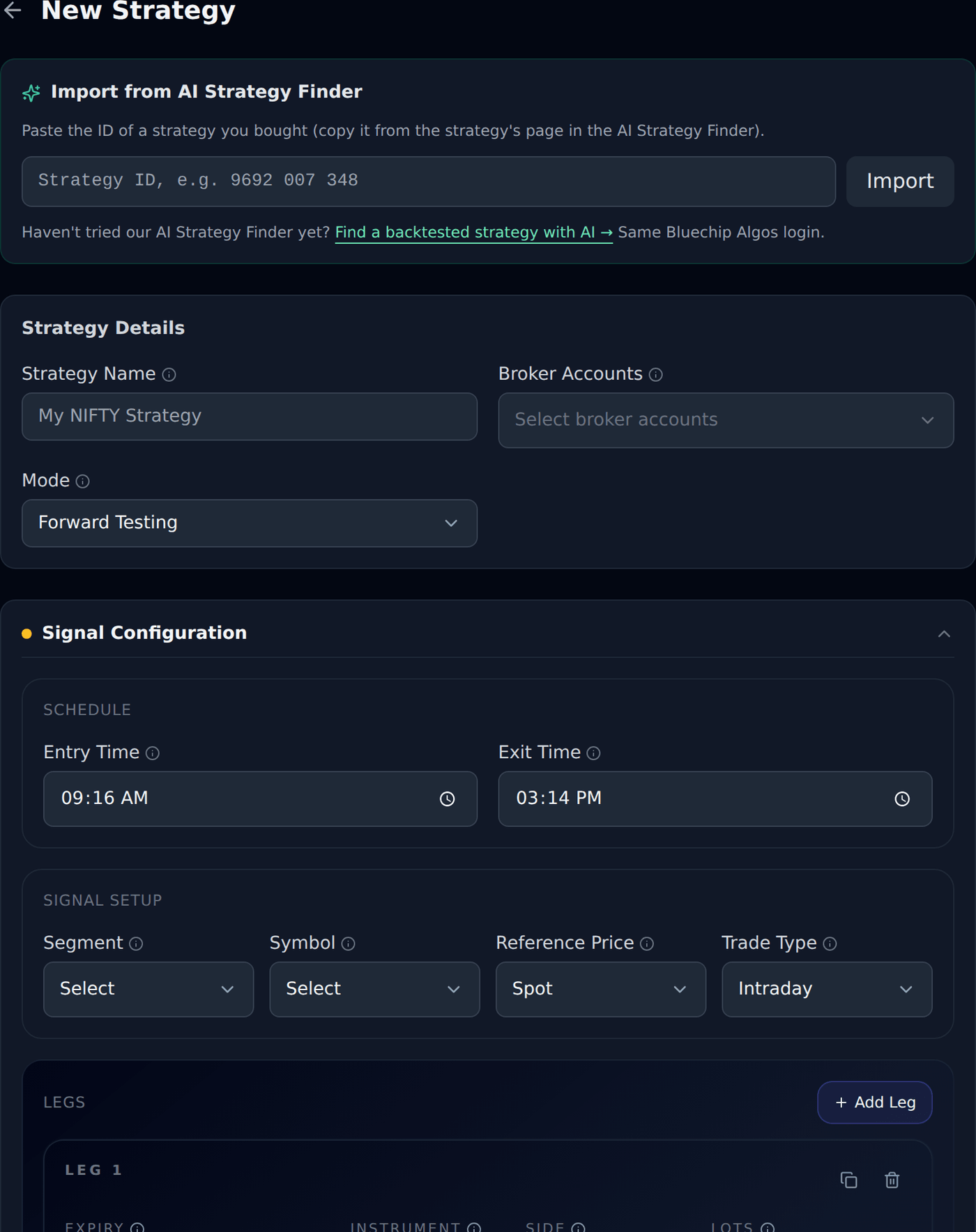
Strategy Name
#Strategy Name is the label you use to recognize this bot later.
Use a clear name such as NIFTY 9:20 Straddle or BankNifty Friday Strangle.
Broker Accounts
#Broker Accounts decides which connected broker accounts this bot can use.
Select at least one broker account. If the broker is missing, finish API Integration for your broker or contact support because broker accounts are assigned and checked from the platform side.
Account multipliers
#Set a separate multiplier for each selected broker account. It applies once to that account’s new entry size; the old shared control has been replaced.
Example: base 2 lots with account multipliers 1 and 2 produces 2 and 4 lots. Existing positions exit using actual fills. See Account multipliers.
Mode
#Forward Testing lets you test scheduled entries without live broker orders.
Live Trading can send real orders to the selected broker when subscription, broker, time, and strategy checks pass.
Entry Time
#Entry Time is when Trade Bots should enter the configured legs.
Example: If Entry Time is 09:20 and Tuesday is active, the bot tries to enter around 9:20 AM IST on Tuesday, after subscription and broker checks pass.
Exit Time
#Exit Time is when Trade Bots should exit open legs if they are still running.
Example: If Exit Time is 15:15, any still-open legs for that bot can be exited around 3:15 PM IST. Exit Time should be after Entry Time.
Weekdays
#Weekdays decide which trading days the bot is allowed to run.
If Monday is not selected, the bot will not create a new scheduled entry on Monday even if Entry Time arrives.
Active Weekdays
#Active Weekdays decide which days the bot is allowed to run.
If Tuesday is selected and Wednesday is not selected, the bot can run on Tuesday but will not create a new scheduled entry on Wednesday.
Straddle
#A straddle usually uses CE and PE legs around the same ATM strike.
Example: If NIFTY ATM is 24000, a simple straddle may use 24000 CE and 24000 PE. Exact buy/sell side depends on your strategy setup.
Strangle
#A strangle usually uses CE and PE legs away from ATM strikes.
Example: If NIFTY ATM is 24000, a strangle might use 24100 CE and 23900 PE. Farther strikes may be cheaper but behave differently from ATM strikes.
Segment
#Segment decides the market type for the bot, such as index options where supported.
Select the segment before choosing symbol, expiry, and strikes.
Symbol
#Symbol is the underlying used by the bot, such as NIFTY or BANKNIFTY where available.
Choose the symbol that matches your intended straddle or strangle.
Reference Price
#Reference Price decides which price source is used for strike selection.
Spot is the simplest choice for most beginners. Futures reference should be used only when your bot logic is based on futures price.
Trade Type
#Intraday is for same-day scheduled bots. Positional is for carry-forward style trades where supported by broker/product rules.
Beginners should usually use Intraday unless they clearly understand carry-forward risk and product type.
Legs
#Legs define the scheduled orders inside the bot signal.
Duplicate Leg copies the last configured leg into a new leg so straddles, strangles, and repeated leg setups can be adjusted faster.
Instrument Type
#Instrument Type identifies the contract type used by a leg, such as CE, PE, FUT, or EQ depending on segment.
For a basic options straddle, one leg is usually CE and another leg is usually PE.
Expiry
#Expiry decides which option contract expiry the bot should use.
Use the expiry that matches your trading plan. Wrong expiry can create a very different trade.
Strike Selection
#Strike Selection decides which strikes the bot uses for CE and PE legs.
ATM is the simplest starting point. ITM/OTM offsets should be used only when you understand how option strikes move.
Product MIS / NRML
#MIS is normally used for intraday scheduled bots where broker supports it.
NRML is used for positional style trades where supported. Beginners should confirm product type before live use.
Entry and Exit Delay
#Entry Delay waits before sending this leg entry order after the scheduled bot trigger.
Exit Delay waits before sending this leg exit order after an exit trigger. Beginners should keep delay values small or zero unless their strategy specifically needs staggered entries/exits.
Risk Fields
#Risk fields control how each bot leg exits when profit or loss conditions are reached.
The common examples below use the same BUY at Rs 100 setup so beginners can compare fields easily.
Stop Loss
#Common example: You BUY one option at entry price Rs 100. Quantity is 1. Initial Stop Loss is Rs 90 unless the section says otherwise.
If Stop Loss type is Points and value is 10, the stop loss is Rs 90. That means if the option falls from Rs 100 to Rs 90, the system tries to exit to limit the loss.
If Stop Loss type is Percent and value is 10, the stop loss is also Rs 90 because 10% of Rs 100 is Rs 10.
If Stop Loss type is MTM and value is 10 with quantity 1, the system watches for Rs 10 total loss. With entry Rs 100, that is the same as price falling to Rs 90 in this simple quantity-1 example.
When Stop Loss is placed as a broker-terminal SL-L order, the default trigger-to-limit buffer is 19%.
Target
#Common example: You BUY one option at entry price Rs 100. Quantity is 1. Initial Stop Loss is Rs 90 unless the section says otherwise.
If Target type is Points and value is 30, the target is Rs 130. That means if the option rises from Rs 100 to Rs 130, the system tries to book profit.
If Target type is Percent and value is 30, the target is also Rs 130 because 30% of Rs 100 is Rs 30.
If Target type is MTM and value is 30 with quantity 1, the system watches for Rs 30 total profit. With entry Rs 100, that is the same as price reaching Rs 130 in this simple quantity-1 example.
Trailing Stop Loss
#Trailing Stop Loss moves the stop loss upward as a BUY trade moves in profit. It does not move the stop loss down when price falls.
Example: You BUY one option at Rs 100 with initial SL at Rs 90. Trail Every X is 10 points and Trail By Y is 5 points.
When price reaches Rs 110, the trade has moved 10 points in profit, so SL trails by 5 points: SL moves from Rs 90 to Rs 95.
When price reaches Rs 120, the trade has moved another 10 points in profit, so SL trails by another 5 points: SL moves from Rs 95 to Rs 100.
When price reaches Rs 130, SL can move to Rs 105, and so on. This protects more profit step by step while the trade continues.
Trail To Cost
#Trail To Cost, or T2C, moves stop loss to your entry price after the trade gives enough profit.
Example: You BUY one option at Rs 100 with initial SL at Rs 90. T2C trigger is 20 points.
If price moves only to Rs 110, T2C does not activate because profit is only 10 points.
When price reaches Rs 120, profit is 20 points, so T2C activates and SL can move from Rs 90 to Rs 100.
After this, if price falls back to Rs 100, the trade is protected at cost instead of taking the original Rs 10 loss.
Wait and Trade
#Wait and Trade tells a leg not to enter the moment the signal comes. It waits until the price moves by the amount you set, and enters then.
The number is a price direction, not a profit direction. A plus number waits for a higher price and a minus number waits for a lower price, and it reads the same whether your leg buys or sells.
Example: the signal comes when the option is at Rs 100 and you set Wait and Trade 2 Points. The leg does not enter at Rs 100. It waits until the price is Rs 102 or more, and enters there.
Example with a minus: the same signal with Wait and Trade -2 Points enters when the price falls to Rs 98 or lower.
You can also use % instead of Points. On a Rs 100 option, 5% waits for Rs 105 and -5% waits for Rs 95.
If the price never reaches your level, no order is placed at all. The wait ends at that leg Auto Exit Time, and the order shows as cancelled with the reason.
While a leg is waiting, the dashboard shows Waiting to enter, and nothing is sent to your broker until the price arrives.

After Stop Loss: Re-Entry and Re-Execute
#After Stop Loss decides what a leg does once its stop loss is hit. There are three choices: Do nothing, Re-Entry, and Re-Execute.
Re-Entry waits for the price to come back to your original entry price and enters the SAME strike again. Example: you BUY at Rs 100 and your stop loss takes you out at Rs 90. The leg then waits, and only when the price climbs back to Rs 100 or higher does it buy that same strike again. If the leg SOLD at Rs 100 and was stopped out at Rs 110, it waits for the price to come back down to Rs 100 or lower.
Re-Execute does not wait. It enters again straight away, and it picks the strike using your leg settings at that moment. So an ATM leg takes whatever is ATM now, which is usually a DIFFERENT strike from the one that was stopped out. That is the point of it.
How many times is the number of EXTRA entries after the first one. If you set 3, the leg can enter up to 3 more times in the day, so up to 4 entries in total. You can set up to 100.
Think about the number before you set a big one, especially with Re-Execute. Every attempt is a real order at your broker, with the brokerage and charges that go with it, and Re-Execute goes back in the moment the stop loss is hit rather than waiting for anything. On a choppy day a high number can mean a great many orders.
Both of them run your whole leg setup again, including Wait and Trade, stop loss, target, trailing stop and Auto Exit Time. It is not just buying again; it is running that leg again.
Only a plain stop loss starts this. If the leg was closed by a trailing stop, by Trail To Cost, by its target, by Auto Exit Time, or by you exiting manually, nothing re-enters.
The count resets every day, and anything still waiting is dropped at that leg Auto Exit Time. While a leg is waiting to go back in, the dashboard shows Waiting to re-enter with the attempt number.
Your position stays in the same trade. A re-entry is not a new signal, so it does not need a new alert and does not use a new position slot.
Auto Exit Time
#Auto Exit Time can close a leg after the planned time if it is still open.
For most scheduled bots, Exit Time is the main time exit. Use leg-level Auto Exit Time only when the bot design needs different exit timing per leg.
Orders in Terminal
#Orders in Terminal decides whether your Stop Loss and Target are also placed as real orders sitting in your broker terminal.
A new strategy starts at Stop Loss. If this platform or your internet connection stops for any reason while a position is open, a stop loss already resting at your broker can still close it for you. That is why it is the starting choice.
None means nothing is placed at your broker. The platform still watches your levels and sends the exit when one is reached, but only for as long as it is running.
Both places a Stop Loss and a Target at your broker. Your broker counts these as two separate sell orders against one position, so the second one needs full margin, as though you were opening a fresh position rather than closing this one. If that margin is not free in your account the broker refuses it, and you are told when that happens. Choose Both only if you keep spare margin for it.
Whatever you choose here, the platform keeps watching your levels itself as well, so a refused or cancelled broker order does not leave the position unwatched.
Overall SL and Target
#Overall Stop Loss and Overall Target watch combined MTM of all active legs in the bot signal.
Example: Leg 1 is Rs 700 profit and Leg 2 is Rs 300 profit. Combined MTM profit is Rs 1000. If Overall Target is Rs 1000, the bot can try to exit the full signal.
Signal Trail To Cost
#Signal Trail To Cost works at bot signal level, not only one leg.
It applies once when the first eligible bot leg hits stop loss. Remaining open legs that already had an initial stop loss can move stop loss to entry price, unless their stop is already better.
This setting needs at least two legs with an initial stop loss. If only one eligible leg exists, saving is blocked.
Lock & Trail Profits
#Lock & Trail Profits is bot signal-level profit protection based on combined MTM.
Exact field names in the tool are If Profit Reach, Lock Min Profit At, Increase in Profits, and Trail Min Profit By.
If Profit Reach is the first open-profit level where protection starts. Lock Min Profit At is the minimum profit you want to protect after that first level is reached.
Increase in Profits is the next profit step. Trail Min Profit By is how much the protected minimum profit increases after each step.
Example: If Profit Reach is Rs 1000 and Lock Min Profit At is Rs 500, then when open profit reaches Rs 1000, the system starts protecting Rs 500. If profit later falls to Rs 500, exit can trigger.
Continuing the same example: if Increase in Profits is Rs 500 and Trail Min Profit By is Rs 250, protected profit becomes Rs 750 when open profit reaches Rs 1500. It becomes Rs 1000 when open profit reaches Rs 2000.
In Trade Bots, this exits the full bot signal if combined MTM falls back to the protected profit floor. It does not place a separate broker-terminal order.
Max Concurrent Positions
#This limits how many active scheduled executions can run at the same time.
Example: If Max Concurrent Positions is 1, a second scheduled entry is blocked while the first one is still open.
Common BUY example used in docs
#Use this same simple example while reading risk fields: BUY one option at Rs 100, quantity 1, initial SL Rs 90.
Stop Loss 10 points means exit at Rs 90 if the price falls.
Target 30 points means book profit at Rs 130 if the price rises.
Trailing Stop Loss with X 10 and Y 5 means SL moves from Rs 90 to Rs 95 at price Rs 110, then to Rs 100 at price Rs 120, then to Rs 105 at price Rs 130.
Trail To Cost 20 points means SL moves to the entry price Rs 100 only after price reaches Rs 120.