Strategy Automation Tools
Trade Builder: Getting Started
The indicator-based algo tool — 20 indicators, 7 levels and 15 candle patterns, analysed on the index and executed in options.
An indicator-based trading tool
#Trade Builder trades on indicators. You pick the indicators, levels or candle patterns that mean something to you, say what they must do, and the platform watches for exactly that — then places your trade.
There are 20 indicators to choose from: moving averages, RSI, MACD, Supertrend, ADX, Bollinger, VWAP and more. Alongside them are 7 levels (opening range, pivots, CPR, Camarilla) and 15 candle patterns.
All of it is worked out inside the platform on official candles. You do not need TradingView, you do not need a webhook, and you do not need to write any code.
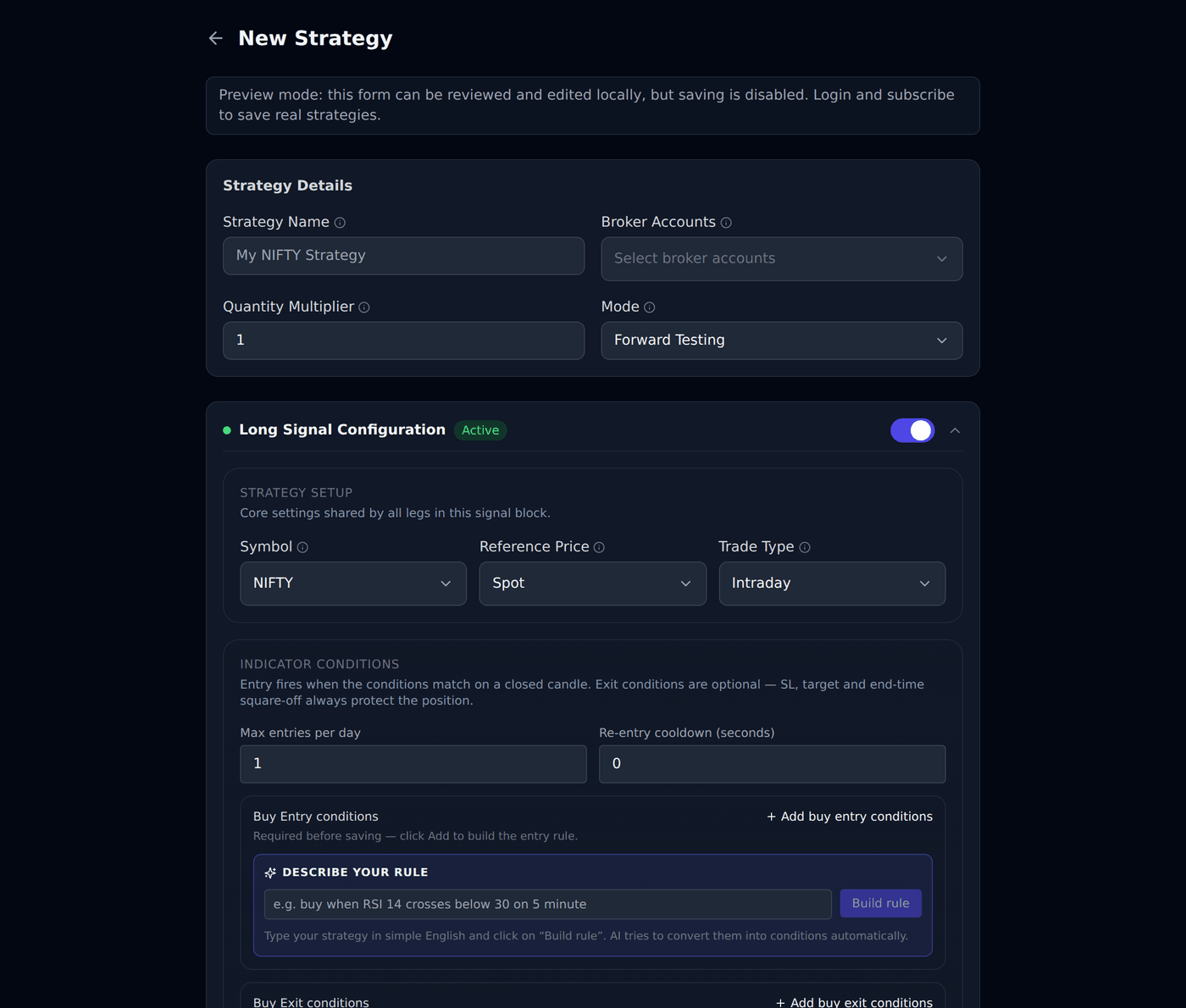
A simple example in words: buy when RSI falls below 30 on the 5-minute chart. You set that up from dropdowns, and from then on the platform checks it at the close of every 5-minute candle.
Which tool is this, and how is it different?
#Bluechip Algos has seven trading tools. Three place trades from a signal, three are for trading by hand, and one manages a stock portfolio. The quickest way to tell them apart is to ask what decides the entry.
- Trade Scalper — you decide, trade by trade. A discretionary tool for intraday traders and scalpers, with advanced controls built for option traders.
- Trade Disc — you decide, and then you adjust. A discretionary terminal for option traders who change a position after it is open — moving a leg to another strike, or changing its size, in one click.
- Trade Charts — you decide, on the chart. Options traded straight from the candles — entry, stop loss and target are lines you drag, with patterns and indicators drawn on the same chart.
- Trade Builder (this one) — indicators decide. RSI, moving averages, Supertrend, levels and candle patterns, worked out inside the platform on official candles. It analyses the index and places the order in options.
- Trade Bots — the clock decides. You give it times — enter at 09:20, exit at 15:10, on these weekdays. Straddles and strangles built around a schedule rather than an indicator.
- Trade Bridge — somebody else decides. Your signal comes from a third party such as TradingView. You configure what to trade here in Trade Apps, and the order is executed in your broker terminal.
- Equity Rebalancer — your stock list decides, on your schedule. You hold a fixed number of stocks in equal amounts and change the list every week or month. It works out what to sell and buy so every stock is even again, and buys shares for delivery rather than trading intraday.
It studies the index and trades the option
#This is the part worth understanding properly, because it is what makes an indicator strategy behave sensibly.
Your conditions are measured on the underlying — NIFTY, BANKNIFTY or SENSEX itself. The order that gets placed is in the option contract you choose in the leg.
So RSI(14) crosses below 30 is read on the NIFTY index, and what gets bought is the NIFTY call option you set up. Two different things, on purpose.
It matters because an option premium moves for reasons that have nothing to do with direction. Time decay eats it every day; a change in volatility can move it while the index sits still. An RSI measured on the premium is reading all that noise mixed together — it can look oversold simply because the day is passing.
The index has no expiry and no time decay. It only moves when the market moves, which is what your indicator is meant to be measuring.
You control this with the Reference Price field: Spot reads the index, Futures reads the futures contract. Spot is the usual choice.
Who this suits, and who it does not?
#Trade Builder suits you if you already know which indicator conditions would make you enter a trade, and you want that watched and acted on without sitting at the screen.
It does not suit you if you are looking for the platform to tell you what to trade, or which indicator to use. It has no tips, no recommendations, and no view on the market. It only does what you tell it.
What you need before you start?
#Three things, and all three must be in place before a live trade can happen.
- An active subscription. Without it, strategies can be built but not run live.
- A connected broker account. Check this on the Settings page — a broker that is added but not connected cannot place orders.
- An underlying you want to trade: NIFTY, BANKNIFTY or SENSEX.
How the platform decides — candle close, not every tick?
#The price moves constantly through the day. Trade Builder does not react to every movement. It waits for a candle to close, then checks your conditions once against that finished candle.
So on a 5-minute timeframe your rule is checked twelve times an hour: at 09:20, 09:25, 09:30 and so on.
This matters and people are often caught out by it. If the price dips to your level in the middle of a candle and recovers before the candle closes, nothing happens. The finished candle is what counts.
It is done this way on purpose. Reacting to every tick would fire trades on noise that disappears a second later.
Practise first with Forward Testing
#Every strategy has a Mode setting at the top: Forward Testing or Live Trading.
Forward Testing does everything a live strategy does — watches the market, decides, records the trade — but sends nothing to your broker. No real money moves.
Run a new strategy in Forward Testing for a few days first. You will see when it enters, when it exits, and whether it behaves the way you pictured. Switch it to Live Trading only when it does.
What it cannot do?
#Said plainly, so there are no surprises later.
- It cannot promise a profit. It follows your conditions exactly; whether those conditions make money is your decision, not the platform’s.
- It cannot suggest values or indicators. If you ask what RSI number to use, the answer will be that you have to choose. That is deliberate — suggesting a number would be trading advice.
- It cannot act between candle closes, for the reason above.
- It cannot trade what your broker will not accept. Rejections from the broker appear on the Orders page with the broker’s own message.