Common Platform
Account multipliers and multiple accounts
Give every broker account its own entry size.
What an account multiplier changes?
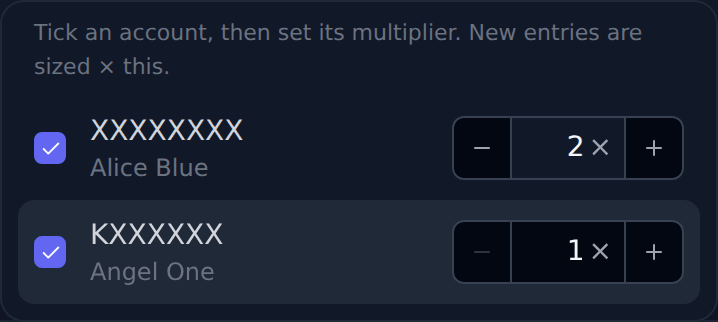
#When you choose several broker accounts, each account has its own multiplier. The default is 1×. The multiplier changes the size of a new entry in that account only. It does not change the signal, the stop or target levels, or any exit.
You set it right where you choose the account. In TradeBridge, TradeBots and TradeBuilder, open Broker Accounts on the strategy form, tick an account and use − and + beside it. In TradeScalper, Trade Disc and Trade Charts, it sits beside each account under Configuration → Trading Accounts. In Equity Rebalancer it sits beside each account’s amount. In Investing Terminal it sits in the account list of Buy stock and Deploy strategy.
Each account still needs its own funds and its own broker login. An order that goes through in one account can still be refused in another.
A worked example
#Your leg is 2 lots of NIFTY. Account A is 1× and Account B is 2×. Account A trades 2 lots and Account B trades 4 lots. With a lot size of 75 that is 75 × 2 = 150 and 75 × 4 = 300.
A result that is not a whole lot is rounded DOWN. 1 lot at 1.5× becomes 1 lot. 2 lots at 1.5× becomes 3 lots. 1 lot at 0.5× is less than one lot, so that entry is refused for that account. Shares round down the same way: 7 shares at 1.5× becomes 10 shares.
You can type any multiplier from 0.01 to 1000, such as 1.5. The − and + buttons move it by 1.
Where the sizes are saved and shown?
#In TradeBridge, TradeBots and TradeBuilder the multipliers are saved with the strategy. The strategy card shows each account with its multiplier, for example “ (627052) 2×”. Strategies made before this change keep the size they had.
In TradeScalper, Trade Disc and Trade Charts the multipliers are saved in Configuration with your trading accounts. When any account is not at 1×, a small “Sizes” badge at the top of the terminal lists each account’s multiplier. Click it to change them.
An exit, a partial exit or a cancel always uses the quantity you really hold. Changing a multiplier never resizes a position that is already open.
Investing: capital and shares are scaled once
#In Equity Rebalancer, the amount you type for an account is multiplied once. Rs 1000 at 2× puts Rs 2000 into that account, and the row shows “= Rs 2,000” so you see it before you confirm. Rebalance orders then use that account’s money; the multiplier is not applied again to each stock.
In Investing Terminal, Buy stock multiplies the shares, or the rupee amount, once per account and shows each account’s share count before you buy. 10 shares at 2× buys 20 shares. Rs 10,000 at 1.5× spends up to Rs 15,000, rounded down to whole shares. A deployed strategy multiplies its capital once per account in the same way.
If only some accounts succeed
#Read the result for each account. Low funds, a logged-out broker or a broker restriction can stop one account while the others go through.
If the broker’s answer is unclear, do not place the order again. Check the order first on the Orders page. Pressing Buy again with the same settings does not buy twice in an account that already succeeded.